
AI anime video generator
Free preview with a watermark. Sign in to download it or make another.
Start with a free 5-second clip from your own anime-style picture. The sample above it is an 8-second anime clip we made, and below it you can see how and what we measured.
One 8-second anime clip is three shots, not one
An anime clip holds its look when each shot starts from its own picture in the same style and the shots are joined with hard cuts. Our sample is three shots of about 2.71 seconds each.
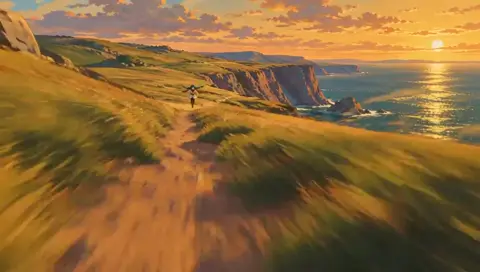
Shot 1 of 3 (AI-generated frame from the sample)
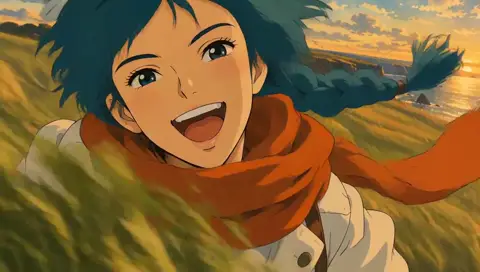
Shot 2 of 3 (AI-generated frame from the sample)
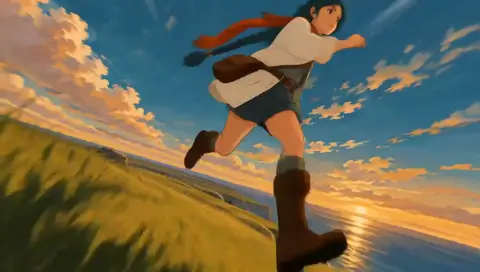
Shot 3 of 3 (AI-generated frame from the sample)
What is an AI anime video generator, and what can you make free?
It is a tool that turns a picture or a sentence into a short moving clip in an anime style. Here you can make one free 5-second clip from your own picture today. Longer anime videos are built from several shots joined together, and that builder is still being tested, so the sample below is shown for what it does, not as something you can press yet.
How to make an anime clip online, step by step
Pick or draw one anime-style picture
A picture of one original adult character in a flat, painted look works best. Characters from other studios and real people who did not agree are not accepted.
Write one movement and one camera move
For example: "she runs toward the camera, scarf whipping, the camera pushes in". Short beats long.
Press once and wait
The free start makes a 5-second clip. If it fails on our side the free try usually comes back; change the picture before a third try.
Want more than 5 seconds?
Chain clips. Our sample is three separate shots joined with hard cuts, which is why it holds its style from start to finish. (Measured in our trials; see How we made this page.)
Sizes, formats and lengths of the sample and the free clip
| Item | Value | Source |
|---|---|---|
| Sample length | 8.1 seconds, 3 shots | frame count at 24 fps |
| Sample size | 1344 x 768 as made, 960 x 544 on this page | file as rendered; page copy resized |
| Frame rate | 24 fps | sample file |
| Format | MP4, landscape 16:9, original sound kept | sample file |
| Free clip length | 5 seconds | free-start rule in our tool |
| Free clip size | 720p, vertical 9:16, watermark | free-start rule in our tool |
Where the numbers come from: 5 seconds is the length limit of our free start, read from the rule in our tool. 8.1 seconds is the length of the sample file, counted from its frames at 24 per second, and the shot lengths and cuts come from our own frame-by-frame check.
What we measured on this clip: cuts, movement and cost
Our own check on the sample file, read on 23 November 2026 (n = 1 clip, so a worked example, not an average).
| Measure | Value | Basis |
|---|---|---|
| Length | 8.1 seconds | the sample file |
| Hard cuts | 2, at 2.7 and 5.4 s | cut detection on every frame |
| Length of each shot | 2.71 seconds | between the cuts |
| Movement, middle second | 12.7 | frame-to-frame change score, higher = more movement |
| Movement, quietest second | 8.7 | the 4th second, a close shot |
| Movement, last second | 14.2 | the leap |
| One cut in the first try | 1 of 2 | one long request with timed shot notes; it also drifted to an oil-painting look |
| Compute for the full clip | about US$0.21 | three pictures plus three shots, from our spend log |
Movement second by second
- 1 s11.3
- 2 s13.4
- 3 s12.8
- 4 s8.7
- 5 s9.2
- 6 s10.0
- 7 s12.7
- 8 s14.0
- 9 s14.2
How we measured this
We sample the clip frame by frame, score how much each frame differs from the one before, and average it per second. Cuts are frames where that score jumps. The compute figure is the sum of what each picture and shot cost us, as logged when we made it.
Which anime ideas work as a short clip?
One character running or leaping
Our sample is exactly this: a woman with a teal braid sprints, laughs and leaps. One clear body, one action, plain background.
A close face with something moving
A scarf, hair or lantern light gives the clip motion without needing a second character.
A wide landscape with one small figure
A tiny figure on a cliff, street or rooftop reads well at phone size and moves in a believable way.
A fight between two characters
Not a good first try. Two bodies in contact give the movement too much to get wrong; start with one character.
Troubleshooting: common problems with anime clips and what to change
The clip looks floaty or slides
Usually the idea line asked for too much. Name one movement and one camera move; "runs toward the camera, the camera pushes in" holds better than a list of actions.
The style changes halfway
A long single request drifts. In our trial one long request with timed notes turned into an oil-painting look; separate short shots from same-style pictures kept the flat painted style.
How to write the idea line
Subject first, then the action, then the camera: "the girl with the teal braid leaps off a rock, low camera, the sea behind her". Skip names of other studios' characters.
What is not supported
Characters from other studios, real people who did not agree, crowds of fighting characters, and anything sexual or involving a child. These are refused, and a refusal asks you to change the text.
How we made this page
The CastTake team wrote this page on 2026-11-23. We made the sample ourselves in three steps: three pictures in one painted style, one short shot from each picture, then the three joined with hard cuts and the original sound kept. The figures come from our own check of that file. Where a number is not in our records it is not on this page.
AI anime video: what people ask
Is there a free AI anime video generator?
Yes, to start: one free 5-second clip from your own picture, with a watermark, on a shared daily pool. Longer clips and clips without a watermark are paid in credits, and the price is shown before you press.
Can I make an anime video online without signing up?
In some countries the first clip needs no sign-up and no card. Elsewhere the page tells you before you press whether a sign-in is needed. Downloading the clip or making a second one needs a sign-in.
What is the best way to keep the anime style from one second to the next?
Build the video from separate shots that start from pictures in the same style, then join them with hard cuts. In our own test, a single long request with timed shot notes cut only 1 time and drifted into an oil-painting look; three shots joined by hand gave 2 cuts and kept the flat painted style.
How long is the anime clip on this page?
8.1 seconds: three shots of about 2.71 seconds each, with the original sound kept. It is one clip (n = 1), so read it as an example, not an average.
Who owns the characters?
The sample character is one we made ourselves, an original adult. We do not accept characters from other studios or pictures of real people who did not agree to appear.
What is refused?
Well-known public figures, sexual content, and anything involving a child or a character who looks like one. A refusal asks you to change the text; nothing is charged.
Is the sample real?
Yes. It is the output of our own process, marked as AI-generated, and the figures beside it were measured on that exact file on 23 November 2026.