


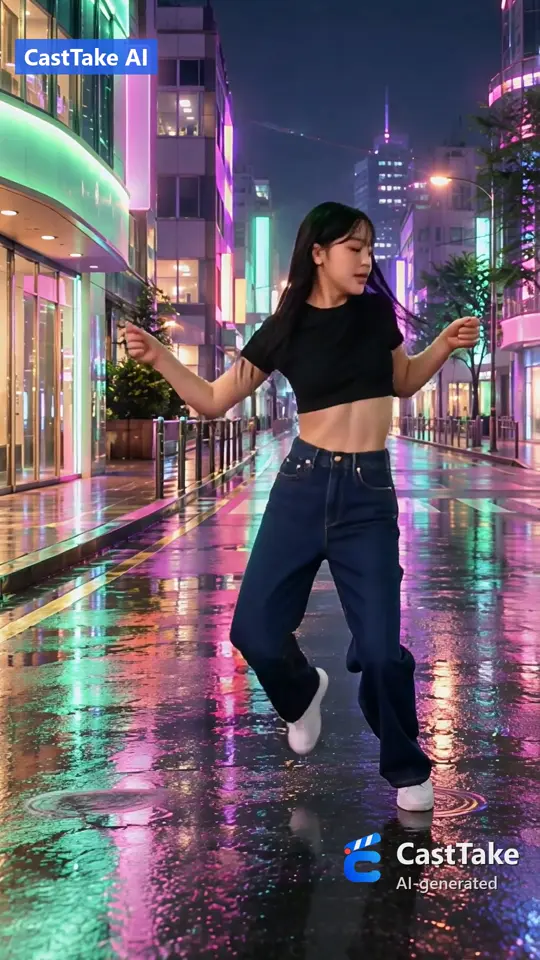
Demo: our own clip, watermarked

Higgsfield AI Genjutsu: cost, prompts and fixes

Higgsfield AI Genjutsu recasts a clip you already have; quote any length in credits and dollars below, beside our own price.

Quote a clip before you spend a credit

Resolution

Genjutsu bills 8 s at 7 credits a second: 56 credits.

Higgsfield Genjutsu, by plan
PlanClip cost, monthly planClip cost, annual plan
Starter270 plan credits$3.94not listed
Plus1,200 plan credits$2.75$2.19
Ultra3,000 plan credits$2.41$1.85

Credit rates and plan credits read 28 September 2026, plan prices 7 October 2026. Dollars are credits times the plan price over the plan credits, and you need the plan first.

CastTake Motion Transfer

One-time price
$3.99
Or from a credit balance
176 credits, worth $4.88 to $8.71 depending on the plan
  • Genjutsu keeps the motion, camera and timing of your source clip and rebuilds who and what is in it. Its modes are Motion Transfer, Object Swap and Batch.
  • It bills the input length rounded up to a whole second: 3, 7 or 11 credits a second at 480p, 720p and 1080p (1080p promo).
  • The calculator below quotes any clip in credits and dollars on each plan, beside our own price.
  • The prompts are our wording, and the test log holds only runs we did, with dates.

Example

A real run on our own clip

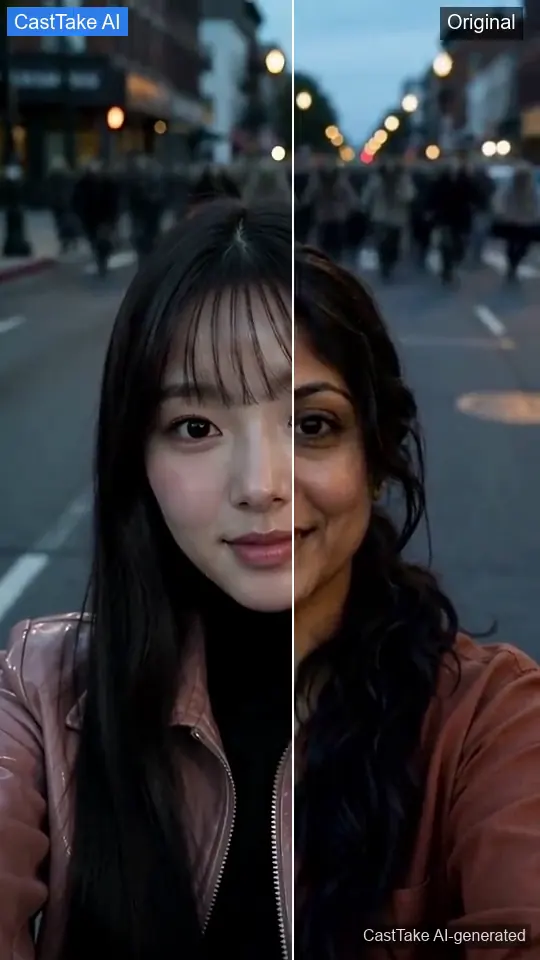
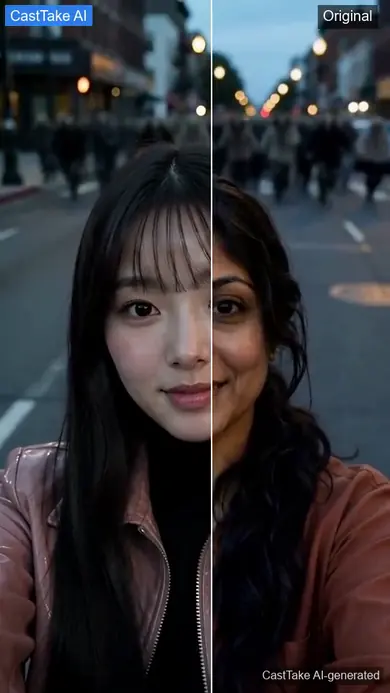
A selfie clip recast with an AI-generated hero, original then recast
Our own 8 second clip of a woman taking a selfie while a crowd of AI zombies walks up behind her. A looping wipe goes from the original to the version recast by CastTake Motion Transfer with an AI-generated hero.
Source
Our own clip: the first 8 seconds of the AI zombie selfie sample on our effects page.
New hero
An AI-generated portrait made by us, not a real person.
Run
CastTake Motion Transfer, Standard tier (delivered at 1080p), 7 October 2026, $4.99 one time for 8 seconds (176 credits for the same clip). The current price for the same clip is $3.99 (176 credits).
Time and output
This run took about 16 minutes from paying to the finished file, a little over the usual 10 to 15 minutes. 1080x1918 with the clip's own sound, 7.7 s, about 0.3 s shorter than the source.
What stayed
The selfie framing, the expression changes, the head turn toward the crowd, the crowd of AI zombies and the street.
What changed
The woman's face, hair and outfit. In every frame we checked, including the back and profile views, it is the same replacement person.
Limits
One hero per clip. This run kept the original place. Since 9 October 2026 you can also describe a new place or add a photo of one, which Genjutsu offers too.Genjutsu or CastTake: which to pick

To do the same, open CastTake Motion Transfer or quote the clip first.

See the AI zombie selfie sample the clip came from
Motion transfer
Living room → rainy Tokyo street
Motion transfer
Bedroom → sunset beach
Object swap
Drink can → green mug, same shots
Motion transfer
Couple dance → sunset rooftop
Motion transfer
Selfie clip, new AI hero
Motion transfer
Street walk → neon city

Original clips: @jerseyyjoe, @avaalfaro, @desandnaz via @MekaWrights. The recast people are AI-generated.

02

What Higgsfield AI Genjutsu does, in plain words

Higgsfield Genjutsu modes: what each does, best for, not for
ModeWhat it doesBest forNot for
Motion TransferKeeps the source motion, camera and timing, and rebuilds the characters and places from reference images.Putting a different person into a dance, a walk or a product-hold clip.Changing what happens in the clip. The action stays the source action.
Object SwapReplaces a product or object in the source with one from a reference image. This is our reading of the mode name.We have our own version for one product at a time: CastTake Object Swap.A product ad where only the item should change.Changing the person holding it.
BatchRuns one source against several sets of references. Also our reading of the name.Trying several heroes or products on one format that already works.A single clip. The point of Batch is volume.

Read on higgsfield.ai/genjutsu on 7 October 2026. We found little beyond the mode names there, so the Best for and Not for columns are our reading, not its claims. It announced Genjutsu on 1 September 2026 and added an API and a Restyle option on 30 September.

Input is 3 to 30 seconds with up to 40 reference images, and output goes up to 1080p. It starts from a video you supply, so we read it as a video-to-video tool.

03

Prompts to copy for each job

These are our own wording of patterns creators describe, with a keep-list in every one. They are not Higgsfield text, and we did not run each against Genjutsu, so treat them as starting points. Swap the words that name the person, place or product.

Template 1 of 7

Swap one person

When to use it
One person does something you like, and you want a different person doing exactly that.
The prompt

Replace the person in the source video with the person in Image 1, wearing the outfit shown in Image 1. Copy the choreography, timing, camera movement, framing, background and lighting from the source exactly. Only the face, hair, body shape and outfit change. Keep every cut where it is.

Keep-list
  • Choreography
  • Timing
  • Camera
  • Framing
  • Background
  • Light
Likely failure
The new person arrives in the original outfit colours.
Try this
Name the outfit in words as well as in the image, and say the hands keep the same gestures.

Template 2 of 7

Swap two people

When to use it
Two people share the frame and each needs a different replacement.
The prompt

Two people appear in the source. The person on the left side of the first frame becomes the person in Image 1. The person on the right side of the first frame becomes the person in Image 2. Keep who stands where, who speaks or moves first, and the distance between them. Do not let them trade outfits.

Keep-list
  • Left and right order
  • Who moves first
  • Spacing
  • Camera
Likely failure
The two references swap sides halfway through.
Try this
Upload the references in the same order you name them, and add one visible difference per person, such as a green jacket and a grey one.

Template 3 of 7

First-frame trick

When to use it
A direct swap keeps going wrong, so you fix the first frame yourself and let the video follow it.
The prompt

Use Image 1 as the exact first frame. It is the first frame of the source video with the person already replaced. Continue from it with the source motion, camera path and timing, and keep the person in Image 1 looking the same in every later frame.

Keep-list
  • First frame
  • Motion path
  • Timing
  • Identity of Image 1
Likely failure
Later frames slide back toward the original person.
Try this
Trim the source to the shortest window that shows the action, and repeat the identity line in the last sentence of the prompt.

Template 4 of 7

Swap a product

When to use it
The person stays, and only the item in their hand or on the table changes.
The prompt

Replace the item the person holds with the product in Image 1. Keep the label text and logo shape exactly as shown in Image 1. Keep the grip, hand position, the way the item turns toward the camera, and everything else in the shot unchanged.

Keep-list
  • Person
  • Grip
  • Camera
  • Label text
  • Scene
Likely failure
The logo or label text comes out garbled.
Try this
Use a flat, front-on product photo on a plain background, and avoid sources where fingers cover the label for long stretches. Name the old object and give the new one a similar size and position; in our one try a big-to-small swap failed. Name the new product in words as well as showing it in a photo, and use a photo on a plain background.

Template 5 of 7

Keep only the motion

When to use it
You want the performance and the camera, and nothing else from the source scene.
The prompt

Copy the performance, not the scene. Use the source only for body movement, timing and camera path. Set it in a new place: a narrow tiled kitchen at midday, white counters, a window on the left. The person is the one in Image 1.

Keep-list
  • Body movement
  • Timing
  • Camera path
Likely failure
Pieces of the original room stay in the background.
Try this
Describe the new place with three concrete objects and one light direction, and leave the source place out of the prompt entirely.

Template 6 of 7

Restyle only

When to use it
People, places and action are right, and only the look should change.
The prompt

Keep the people, locations and action exactly as in the source. Change only the visual style to hand-painted gouache with flat shapes and a warm palette of ochre, teal and cream. Do not change faces, outfits or camera movement.

Keep-list
  • People
  • Places
  • Action
  • Camera
Likely failure
The style change also moves the colours of key items.
Try this
Name the palette you want and list the one item whose colour must not change.

Template 7 of 7

Use a character sheet

When to use it
One face photo is not enough because the person turns, looks away or is seen from behind.
The prompt

Image 1 is the front view and Image 2 is the side view of the same character, with Image 3 showing the back. Use all three for face, hair and outfit. Recast the person in the source as this character, and match the source camera angle at each moment.

Keep-list
  • Face
  • Hair
  • Outfit from every angle
  • Source camera angle
Likely failure
The layout of the sheet shows up inside the frame.
Try this
Crop each view into its own image instead of uploading one combined sheet.

04

When a run goes wrong

Find the symptom, then read the cause and the fix. The last column gives the source and date of each row, and marks a row that is our own reading.

Symptoms, likely cause, what to try and where each comes from
What you seeLikely causeWhat to trySource and date
Stuck on processing for hours or daysCreators report runs stuck for hours or days. The cause is not known to us.Check your credit balance before you resubmit, so a second run is a choice and not a surprise. If a paid run is unfinished after a day, send support the job details.Creator reports on X, YouTube and Reddit, 7 October 2026. One Reddit post in r/generativeAI: "it takes 3 days and still it's processing". Our free run waited 22 minutes on 28 September.
The free generations are gone, or you never had anyStarter includes none. Plus and Ultra include 3 free 720p generations.Press the quote button first, since it shows the credit price without generating. Check framing at 480p, 3 credits a second, before a long 1080p run.Higgsfield pricing page, 7 October 2026. Quote button, 28 September 2026.
Refused by moderationA reference or prompt that looks like protected IP, per creator reports.Describe an original character in words, and use references you own the right to use.Creator reports, 7 October 2026. We did not find a published list of triggers (checked 7 October 2026).
The face drifts between cutsOur guess: one front-facing photo says little about the side or back of a head.Use the character sheet prompt with one image per view, and keep each run to one scene if you can.Our reading; creators report drift in DIY chained workflows (7 October 2026). In our 28 September row, Genjutsu kept one face across every cut.
A product logo bends or changesFingers covering the label, per creator reports.Give a flat front-on product photo, state that the label text stays unchanged, and pick a source where the label stays visible.Creator reports of logo instability and occlusion failures, 7 October 2026.
Shots missing, merged, or cut times offWe did not find this documented (checked 7 October 2026). A multi-cut source gives the model more to track, which is our guess.Name the cuts in the keep-list, or split the source at each cut and run the shots one by one. Trimming also lowers the bill, because input seconds are what you pay for.Our reading, not a tested result. In our 28 September run Genjutsu kept every cut.

05

Our test log and samples

Every row is a run we did, with its date. The footage came from a third-party reel, so we show numbers here and not frames.

Dated test log, first-hand runs only
DateWhat we ranWhat happenedNumber
28 Sep 2026Genjutsu, free generation at 720p. Source: an 8 second multi-cut Korean fashion reel. References: a generated model and our can.Kept every cut and scene, recast the model with a consistent face and outfit, put the can in shot 1, and restyled the rooms. 22 minutes in the free queue.63 credits quoted for 8.01 s, billed as 9 s
1 Oct 2026Our current Motion Transfer at 720p on the same reel.All 9 shots in order and recast, product in shot 1, source colour grade kept. Genjutsu restyled the grade to beige and made the scarf black. Faults: shot 2 framed tighter, and cut times drifted by 0.12 to 0.83 s (mean 0.47 s).One 8 s run
28 Sep 2026The first version of our Motion Transfer on the same reel.Rendered only when no reference image had a face. It refused photos with faces.No render for face photos
28 Sep 2026Kling 3.0 motion control on the same reel.Returned 3.1 seconds of the 8 second input.Billed on all 8 s
7 Oct 2026A raw reference video containing a real face, run in an internal test of the first version, outside the member flow.The task was cancelled.Cancelled, not billed
7 Oct 2026Object swap in CastTake, not Genjutsu. An 8 second clip with 9 shots, one reference image of a drink can, at the lowest resolution, asked to replace a large orange fridge with the can.All 9 shots, the person and the rooms stayed the same, and cut times moved by 0.04 to 0.26 s. The fridge was not replaced; the can was added next to a sofa in two shots instead. We read it as a size mismatch, from a single test and not a verdict.9 shots kept, fridge not replaced
7 Oct 2026The same test on the first 4 seconds of that clip (4 shots), the same can image and the same lowest resolution, asked to replace a black handbag with the can at a similar size.The handbag was replaced in the three shots where it appears (by her feet twice, in her hand once), nothing else changed, and every cut moved by exactly one frame (0.04 s). One object, one clip.3 of 3 shots swapped, cuts moved 0.04 s
7 Oct 2026Object swap, same setup, on the same 4-shot clip: the black handbag swapped for a photo of a beige canvas tote bag on a plain wall, run twice, once with the new object named in text and once with the photo alone.Both runs replaced the handbag in all three shots where it appears, nothing else changed, and every cut moved by 0.04 s at most.3 of 3 shots swapped, both wordings
7 Oct 2026Object swap, same setup, on a 4 second, five-shot product ad of our own with fast cuts and lime splashes: blue drink cans swapped for a photo of a green ceramic mug (the photo shows a kitchen table around the mug), run twice, once with the photo alone and once with the object also named in text.The cans became the mug in the shots where they appear. With the photo alone, the kitchen background spread into other shots; with the object named in text it stayed out. In both runs the clip came out 0.3 s shorter than the source, the last shot changed to a fruit splash, and cut times moved by up to about a second.Cans swapped; last shot changed, 0.3 s shorter

Takeaway from the object swap tests above: swaps to an object of similar size worked on a calm clip in our tries, while a fast-cut, splashy clip came back changed in timing and in its last shot. Naming the new object in text kept the photo background out in our one comparison. We have run four swaps on two source videos, three of them on the fashion reel and one on our product ad, so treat this as a few data points and not a rule. We have not tested other objects.

The clips below are CastTake Motion Transfer samples made before this page. None is Genjutsu output, and none uses the reel from the log.

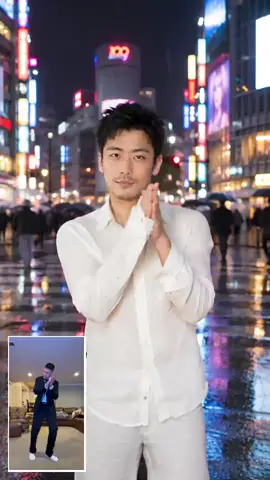
Street dance, recast (vertical)In: A short dance clip of a real person on a city street, used as the motion reference.Out: The same moves and camera with a different, AI-generated person in a rain-lit neon street. The clip wipes from the original to the recast; the recast carries the CastTake AI watermark.No product in this one: it shows the motion carrying over.
Street dance, recast (widescreen)In: The same reference clip, framed 16:9.Out: The same recast in a widescreen frame, to show the aspect ratio follows the source rather than being forced to vertical.Same demo as above, wide crop.
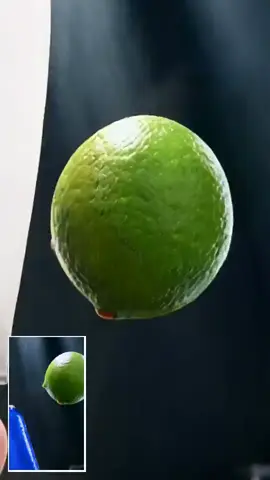
Drink ad, recast with the CastTake canIn: A short drink-ad reel (a lime and a can in close-up) used as the motion reference.Out: The same shot recast with the CastTake energy can standing in for the original product, 8 seconds with sound.This is the product-placement case: same camera moves, your product in the frame.

06

What a clip costs, worked out

Cost of a clip on Higgsfield Genjutsu plans and on CastTake
Source clipGenjutsu creditsStarterPlusUltraCastTake one-timeCastTake creditsValue of those credits
8 s: Genjutsu 720p, CastTake Standard (delivered at 1080p)56$3.94$2.75$2.41$3.99176$4.88 to $8.71
12 s: Genjutsu 720p, CastTake Standard (delivered at 1080p)84$5.91$4.13$3.61$5.49264$7.32 to $13.07
15 s: Genjutsu 720p, CastTake Standard (delivered at 1080p)105$7.39$5.16$4.51$6.99330$9.15 to $16.34
8 s: Genjutsu 1080p, CastTake HD (delivered at 1080p)88$6.19$4.33$3.78$8.99344$9.54 to $17.03
12 s: Genjutsu 1080p, CastTake HD (delivered at 1080p)132$9.29$6.49$5.68$12.99516$14.30 to $25.54
15 s: Genjutsu 1080p, CastTake HD (delivered at 1080p)165$11.61$8.11$7.09$15.99645$17.88 to $31.93

Rates read 28 September 2026, plan prices 7 October 2026. 1080p is the promo rate (list 16 credits a second). Dollars assume you spend every credit.

Cost of a 720p Genjutsu clip by length against CastTake Standard (delivered at 1080p) one-time pricesLine chart, 3 to 30 seconds on the horizontal axis and dollars on the vertical axis. The three Genjutsu lines rise steadily, Starter highest and Ultra lowest. The CastTake line is a short step line that ends at 15 seconds because we sell nothing longer. The same numbers are in the table below the chart.$0$4$8$12$163s8s12s15s20s25s30sLength of the source clipGenjutsu StarterGenjutsu PlusGenjutsu UltraCastTake one-time
Genjutsu at 720p, CastTake Standard (delivered at 1080p). Genjutsu is priced at each plan monthly price and credit rate read 28 September 2026. Ours is the one-time price from our tier table and stops at 15 seconds.
Chart data as a table
Source lengthGenjutsu StarterGenjutsu PlusGenjutsu UltraCastTake one-time
4 s$1.97$1.38$1.20$3.99
8 s$3.94$2.75$2.41$3.99
12 s$5.91$4.13$3.61$5.49
15 s$7.39$5.16$4.51$6.99
20 s$9.85$6.88$6.02n/a
30 s$14.78$10.32$9.03n/a
  • Genjutsu: 8.01 s rounds up to 9 s, and 9 x 7 credits = 63 credits. That matches the quote we saw on 28 September 2026.
  • Dollars: 63 x $19 / 270 = $4.43 on Starter; 63 x $59 / 1,200 = $3.10 on Plus; 63 x $129 / 3,000 = $2.71 on Ultra. Each plan dollar figure assumes you spend every credit the plan gives you. Credits you leave unspent make a clip dearer.
  • CastTake: 8 s on the Standard tier is 8 x 22 = 176 credits. One credit costs $0.0495 on Starter ($9.90 for 200), $0.0374 on Creator ($29.90 for 800), $0.0277 on Studio ($49.90 for 1800), so those credits are worth $8.71, $6.58, $4.88. The one-time price for the same clip is $3.99.
  • Neither side includes tax or card fees.

Our rates, the full side-by-side and how the tool works are one tap away.

07

Genjutsu or CastTake: which to pick

Choose Genjutsu when the clip is long, busy or has several people. Choose CastTake Motion Transfer when you want one clip with your own hero photo and product, paid once. These rows restate the dated tests and limits above.

When to choose Higgsfield Genjutsu or CastTake Motion Transfer
You needPickWhy, from the tests and limits above
Changing the scene or the placeEitherGenjutsu rebuilds characters, places or products from reference images (read 7 October 2026), and it restyled the rooms in our 28 September run. Since 9 October 2026 CastTake can also move a clip to a new place you describe or show in a photo. In our one test, on a single continuous take, a garden became a rainy airport tarmac and the moves and timing stayed the same.
More than one person to replaceGenjutsuCastTake replaces one hero per clip. We have not tested Genjutsu with two people, so check what it supports for your clip; it accepts up to 40 reference images.
A clip over 15 secondsGenjutsuGenjutsu takes 3 to 30 seconds of input. CastTake sells up to 15 seconds.
A fast multi-cut reelGenjutsuOn 28 September 2026 Genjutsu kept every cut of an 8 second multi-cut reel and recast the model with a consistent face. In our 1 October run CastTake kept all 9 shots, but cut times drifted by 0.12 to 0.83 s.
One clip without a planCastTakeOne-time price from $3.99 for up to 8 seconds, no subscription. Genjutsu needs a plan first, from $19 a month (read 7 October 2026).
A hero from a photo of your own faceEitherCastTake takes one hero photo of your own face or of someone who agreed. We have not tested Genjutsu with a photo of a real person, so we cannot say which does it better.
Price of an 8 second clip at 720pEitherGenjutsu is $3.94 on Starter credits, plus the plan; CastTake is $3.99, once. Which is lower depends on how many clips you make in a month.

08

Questions people ask about Higgsfield AI Genjutsu

Last checked 8 October 2026.

What it is

What is Higgsfield AI Genjutsu?

Higgsfield AI Genjutsu is a video tool that keeps a clip's motion, camera and timing and rebuilds its characters, places or products from reference images. Higgsfield announced it on 1 September 2026 and added an API and a Restyle option on 30 September. Its modes are Motion Transfer, Object Swap and Batch. We read all of this on higgsfield.ai on 7 October 2026. CastTake is not affiliated with Higgsfield, and this guide describes its public pages as we read them.

Is Higgsfield AI Genjutsu just Seedance 2.5?

Creators report that Higgsfield AI Genjutsu is a Seedance 2.5 edit behind a new front end, but we cannot confirm that and we do not claim it. We did not find a model list for Genjutsu from Higgsfield (checked 7 October 2026). Our own Seedance 2.5 edit-mode runs behave in a similar way: shots stay in order, though our cut times drifted by up to 0.83 s. Judge the tool by its output and its price per second. The cost table above puts Genjutsu and a pay-per-clip route on the same clip lengths, so you can compare them without settling the model question.

What modes does Higgsfield Genjutsu have?

Higgsfield Genjutsu has three modes: Motion Transfer, Object Swap and Batch. Motion Transfer keeps the source motion, camera and timing and rebuilds characters and places from reference images. Higgsfield names Object Swap and Batch on higgsfield.ai/genjutsu, but we found little detail there (checked 7 October 2026). Our reading is that Object Swap replaces one item in the source and Batch runs one source against several sets of references. Higgsfield also added a Restyle option on 30 September 2026. The modes table above marks every best-for and not-for note as our reading.

What clip length and reference images does Genjutsu accept?

Higgsfield Genjutsu accepts a source video of 3 to 30 seconds and up to 40 reference images, and it outputs up to 1080p. Those limits come from higgsfield.ai/genjutsu on 7 October 2026. Billing follows the input length, so a trimmed clip costs fewer credits than a long one. A source with several cuts is accepted: in our 28 September run an 8 second multi-cut reel kept every cut. We read Genjutsu as a video-to-video tool, so you start from a clip you already have and not from text.

Cost and free use

How much does a Higgsfield Genjutsu clip cost?

A Higgsfield Genjutsu clip at 720p costs 7 credits a second, so an 8 second clip is 56 credits. That is about $3.94 on Starter and $2.41 on Ultra at each plan's own credit price (rates read 28 September 2026, plans 7 October 2026). You need the plan first, and the dollar figures assume you spend every credit it gives you. One creator reported a 15 second clip costing just under $5, plan and resolution not stated. The calculator above quotes any length from 3 to 30 seconds.

Is Higgsfield Genjutsu free?

Higgsfield Genjutsu is partly free: Plus and Ultra include 3 free 720p generations, and Starter at $19 a month includes none (read 7 October 2026). After the free runs each generation spends credits. Creators report that the free tier feels like bait, and our own free run on 28 September 2026 waited 22 minutes in the queue. We did not find a free download; we saw Genjutsu as a page on higgsfield.ai. To try Higgsfield AI for free, press the quote button, which shows the credit price without generating, and check framing at 480p first.

How are Higgsfield Genjutsu credits counted?

Higgsfield Genjutsu counts credits from the length of your input video, rounded up to a whole second. The rates are 3 credits a second for 480p, 7 for 720p and 11 for 1080p (read 28 September 2026). Our quote on that date showed 63 credits for an 8.01 second clip at 720p, billed as 9 seconds, which is 9 times 7. The 1080p figure is the promotional rate and the list rate is 16. Trimming the source to the action window lowers the bill, because input seconds are what you pay for.

Using it

How do I write a Higgsfield Genjutsu prompt?

A good Higgsfield Genjutsu prompt names who or what changes and lists what must stay the same. Our templates start with a keep-list: choreography, timing, camera, framing, background and light. For two people, say left and right and number the reference images in upload order. If a direct swap fails, fix the first frame yourself and use it as the first-frame reference. These are our wording of patterns creators describe, and we did not run each one against Genjutsu. The prompt library above has 7 copyable templates.

Can I keep only the motion and change everything else?

A Higgsfield Genjutsu prompt can keep the motion and change the rest if you say so in plain words. A line such as copy the performance, not the scene tells the model to use the source for body movement, timing and camera path. You then describe a new place with three concrete objects and one light direction. Leave the source place out of the prompt, which is the fix our template gives for pieces of the original room staying in the background. Motion Transfer is the Genjutsu mode built around this idea.

Can I swap just one object in a Genjutsu clip?

Swapping one object worked in our tries when the new object was a similar size on a calm clip. On 7 October 2026 a black handbag was replaced by a drink can and by a canvas tote bag in all three shots where it appears, while a large orange fridge was not replaced by the same small can. Naming the new object in text kept the photo background out of other shots in our one comparison. A fast-cut product ad came back 0.3 s shorter with a changed last shot. Those tests ran in CastTake, not on Genjutsu, and cover four swaps on two source videos, so read them as tips and not rules. CastTake Object Swap costs 18 credits per second at 480p or 39 at 720p. Wrong swap? Tell us on the result page; after a check we can return the credits.

When it goes wrong

Why is my Higgsfield Genjutsu run stuck on processing?

Creators report that Higgsfield Genjutsu runs can stay stuck on processing for hours or days (checked 7 October 2026). One Reddit post in r/generativeAI says "it takes 3 days and still it's processing". Our own free run waited 22 minutes on 28 September 2026. Check your credit balance before you resubmit, so you know whether the run has already taken credits. If a paid run is unfinished after a day, send Higgsfield support the job details. The cause is not known to us, and changing the prompt is not a known fix.

Why did the face or the cuts change in my Genjutsu result?

Faces and cuts can change in a Higgsfield Genjutsu result, and our guess is that one front-facing photo says little about the back of a head. Creators report identity drift in do-it-yourself workflows that chain several cuts, while in our 28 September run Genjutsu kept one consistent face across every cut. For a drifting face, try a character sheet with one image per view. For merged or missing cuts, name the cuts in the keep-list or split the source at each cut and run the shots one by one.

Why was my Higgsfield Genjutsu prompt refused?

A Higgsfield Genjutsu prompt can be refused when a reference or the prompt looks like protected IP, according to creator reports checked on 7 October 2026. We did not find a published list of triggers. Describe an original character in words, and use references you have the right to use. Remove brand names and character names from the prompt as well as from the images. Our prompt templates use generic people and products for this reason, and none names a real person.

Alternatives

Is there a Higgsfield Genjutsu alternative, and is it cheaper?

CastTake Motion Transfer is an alternative for one job, recasting a reference clip with your product in the frame. It saves money mainly for people without a Higgsfield plan: one clip from $3.99 for up to 8 seconds on the Standard tier, delivered at 1080p, no subscription, where Genjutsu is $3.94 on Starter plus the $19 plan. CastTake takes one hero photo of your own face or someone who agreed. Genjutsu takes 3 to 30 seconds of input, so it covers clips over 15 seconds, and in our 28 September test it kept every cut of a fast multi-cut reel and restyled the rooms (read 7 October 2026). CastTake replaces one hero per clip and a second character is not supported; we have not tested genjutsu with two people, so check what it supports. Creators report do-it-yourself routes such as Kling Motion Control, Wan 2.2 Animate, Luma Modify and fal Recast (7 October 2026).