
AI zombie trend: one photo, then the horde arrives behind you
Upload one ordinary photo. You smile at the lens, the street behind you fills with running zombies, and you turn back to the camera as they close in.
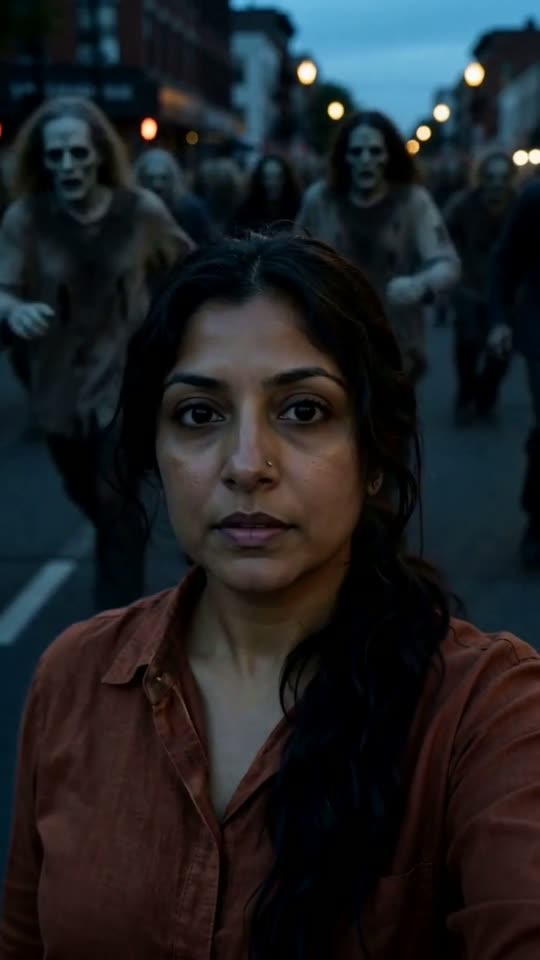
The AI zombie trend takes one calm, everyday photo and turns it into a short apocalypse scene: you are smiling at the camera, and the city behind you slowly fills with zombies running your way. Here you add one photo and get a 10-second vertical clip with your face kept from the photo.
A clear, front-facing photo. The template keeps your face, hair and skin tone; outfits and the set come from the template.
No nudity, minors or other people's photos without consent — every upload is screened.
About 5 seconds of you in this format.
This video: 80 credits · about 10 videos a month for $29.90 on Creator, or $288 a year
No subscription needed · Usually ready in 10-15 minutes · Failed renders are refunded
40 free credits when you sign in, enough for a 5-second preview
Zombie Ambush
Choreography locked · Facial reference enabled
The zombies are pale, ragged and unsettling, but there is no blood, no bites and no wounds anywhere in the clip, so it stays postable on TikTok, Reels and Shorts.
- Input: one clear photo of one adult, face to the camera.
- Output: a 10-second vertical 9:16 video with street sound, a distant crowd, running footsteps and a tense score.
- Price: first video $2.99 once per account, then 80 credits (about $2.99).
How to make an AI zombie trend video in four steps
There is nothing to write or edit before the render. The street, the horde, the timing and the camera are fixed by the template; you only choose the photo.
- 01
Upload one photo of yourself
Use the upload box at the top of this page. One adult, face to the camera, eyes visible. A relaxed, smiling photo matches the calm opening best.
- 02
Confirm it is you or an adult who agreed
You tick a box saying the person in the photo is you or an adult who said yes. Generating asks you to sign in with Google, and your photo is kept while you do.
- 03
See the price, then render
Generate shows the price before anything renders: your first video is $2.99, once, with no subscription, and a render that fails is never charged. It waits in a shared queue, usually 3 to 6 minutes, and you can close the tab while it runs.
- 04
Render the full clip and post it
The full 10-second MP4 lands in your dashboard with the turn and the final look at the camera. Post it as it is, or put your original photo in front of it for a one-second before-and-after.
What the AI zombie trend is, and where it came from
The format is simple: an ordinary photo of someone becomes a short, cinematic clip where the world around them turns into a zombie apocalypse. Usually the person is calm or smiling at first, then a horde floods into the background and the mood flips from selfie to disaster movie. The best posts play it straight, with slow motion and a sad, lingering look, which is why people call it emotional rather than scary.
It took off on TikTok around 1 October 2026, and Google searches for it jumped on 3 and 4 October. Several variants spread at the same time: couple versions captioned "Couple Zombie" or "My Beloved Zombie", where one partner protects the other; a one-tap effect in PixVerse called Zombie Rush; and free CapCut templates that drop your photo into a ready-made edit. Many posts promise the exact prompt in the comments. On this page the prompt is printed in full further down, because it is the one we actually send.
Three zombie ambush clips we rendered ourselves
Each clip is the full 10-second render from the Zombie Ambush template, made from one AI-generated presenter portrait, never a real person. Read what went in and what came out under each one.
Second by second: what happens in your clip
The template is three shots. The first one is long on purpose, so even its first five seconds tell a complete little story.
| Time | On screen | Sound |
|---|---|---|
| 0:00 to 0:05 | You stand in the middle of a city street at dusk, waist up, smiling at the camera like a selfie. Far behind you, pale figures in torn clothes appear, more and more of them, and start running your way. You hear something and the smile freezes. | Ordinary street noise, slowly replaced by a low, distant crowd |
| 0:05 to 0:07.5 | You turn slowly to look behind you, in slow motion, hair and clothes lifted by the wind. The horde is closer and the picture starts to darken. | Running footsteps getting louder, the score swells |
| 0:07.5 to 0:10 | You turn back and look straight into the lens, steady but a little sad, while the blurred crowd closes in behind you. The frame holds. | The score peaks and stops on the final frame |
Where the free preview is offered it is the first 5 seconds only, cut from shot one. The camera is handheld with a slight shake throughout, and nothing on screen is text or subtitles.
Copy these AI zombie prompts
These are English versions of the prompt our template sends to the video model (the original is written in Chinese). Paste them into any reference-to-video model that takes one face photo, or just use the tool above.
Prompt 1: the full 10-second ambush
10 seconds, 9:16 vertical, no subtitles or text. The person from image 1 is the only normal human in the scene and keeps their exact face, skin tone and hair. They wear a complete, opaque top and trousers, even if the photo shows swimwear or no top. Scene: a city street at dusk, street lights just on, cold grey-blue sky; they stand in the middle of the street, waist up, facing the camera. Handheld, cinematic, the camera stays on them. Shot 1 (0 to 5 s): they smile at the camera as if taking a selfie; at the far end of the street a large crowd of pale, ragged, stiff-moving people in Halloween zombie makeup appears, growing, and starts running toward them; they have not noticed, then hear it and the smile freezes. Shot 2 (5 to 7.5 s): they turn slowly to look back, slow motion, wind in their hair and clothes, the costumed crowd closing in, the image darkening. Shot 3 (7.5 to 10 s): they turn back and look straight into the lens, determined but a little sad, the crowd blurred behind them, freeze frame.
Prompt 2: the 5-second version (shot one alone)
5 seconds, 9:16 vertical, no text. Same person and clothing rules as above, same street at dusk. A single continuous shot: they smile at the camera like a selfie while, far down the street behind them, a growing crowd of pale, ragged people in Halloween zombie makeup appears and starts running their way; they hear it and the smile freezes. No cuts, no outfit change. This is the prompt of the short 5-second version.
Prompt 3: the negative list we send
Avoid: a changed or swapped face, drifting features, a second normal main character, extra fingers, plastic skin, anime look, on-screen text, subtitles, watermarks, logos, the likeness of real celebrities, bare chest, swimwear, underwear, revealing clothes, horror close-ups, violence. Notice what is not in it: words like blood or bites. Video models screen prompts for those and can refuse the whole render, so the no-gore rule is written into the scene instead, with a costumed crowd and nobody touched.
Which photo works for a zombie ambush
Only your face is taken from the photo. The street, the light and usually the clothes are rebuilt for a cold evening scene, so the face is what to get right.
✓ Works
A calm, smiling, everyday photo
The clip opens on a relaxed selfie moment, so a happy photo makes the frozen smile hit harder. Holiday shots and desk selfies both work.
Face to the camera, evenly lit
The scene is dim and blue. A bright, front-facing photo gives the model enough detail to keep your face recognisable in that low light.
Just you, head and shoulders
Crop out anyone else. The prompt allows only one normal human, and everyone else on screen is part of the horde.
✕ Breaks it
Dark or blurry photos
A dim photo plus a dim scene leaves the model guessing, and the guessed face can drift during the slow-motion turn.
Two people in the frame
The model keeps one face and may turn the other person into a zombie, which is rarely what you wanted.
A child, a celebrity or someone else's screenshot
This template is for adults who agreed. Our photo check turns away apparent minors here, and the confirmation you tick rules out public figures.
CastTake next to PixVerse Zombie Rush and CapCut templates
All three get you a zombie clip from a photo. They differ in what you control and what you pay. Check each app for its current price before you upload.
| Detail | CastTake Zombie Ambush | PixVerse Zombie Rush | CapCut zombie templates |
|---|---|---|---|
| How it works | A new 10-second clip generated around your face from our own prompt | A one-tap effect inside the PixVerse app or site, applied to your photo | An edit someone else built; your photo goes into a slot in their timeline |
| Prompt | Printed in full on this page | Set by PixVerse, not shown | Set by the template author |
| Gore | Written out of the scene: no blood, bites or wounds | Follows PixVerse rules | Depends on the template |
| Cost | First video $2.99 once, then credits; no subscription | Uses PixVerse credits; the app has its own free allowance | Many templates are free; some need CapCut Pro |
PixVerse and CapCut are separate products and are not connected to CastTake. If you only want a quick free version, a CapCut template is a fair choice; if you want your own clip with the prompt you can see and reuse, that is what this page is for.
What this tool will not make
The trend works because it is dramatic, not because it is gruesome. These limits are built into the template and the upload checks.
Gore of any kind
No blood, bites, wounds, severed limbs or close-ups of injuries. The zombies are pale and ragged, and nobody on screen gets hurt.
Real celebrities or public figures
Putting a famous person in a zombie attack they never filmed is misleading, and platforms remove it. The tool is for you and people who agreed.
People who did not agree
An ex, a classmate, a coworker or a stranger from a screenshot is off limits. Ask first, and take the clip down if they ask.
Children in danger
A child being chased by a horde is not something we render. The template is adults only, and photos that look like a minor are turned away.
What one zombie clip costs
| Detail | Length | Credits | Price |
|---|---|---|---|
| Free preview, where offered | 5 s | 0 | Free, watermarked |
| First full video on an account | 10 s | 80 | $2.99, once |
| Each one after that, on the Creator plan | 10 s | 80 | $2.99 |
Priced on the Creator plan ($29.90 a month for 800 credits). A credit pack is a single payment that never renews and costs more per credit. The button shows the credit cost before anything is charged, and a failed render gives its credits back.
Zombie trend questions
What is the AI zombie trend?
It is a short-video trend where an ordinary photo of someone becomes a cinematic zombie apocalypse clip. The person starts calm or smiling, a horde of zombies floods into the background and rushes toward them, and the clip ends on a dramatic, often emotional look. It took off on TikTok around 1 October 2026 and spread to Instagram and Facebook within days. Couple versions, the PixVerse Zombie Rush effect and free CapCut templates are all part of the same wave. An AI video model builds the whole scene around the face from the photo, which is why one picture is enough.
Is the AI zombie effect free?
The full 10-second clip with the turn and the final look is paid, and you see the price before it renders. Some accounts are offered a watermarked 5-second cut of the opening shot first. The first full clip on an account costs $2.99, once, and later ones use 80 credits, about $2.99 on the Creator plan. Credit packs are single payments that never renew, and a render that fails returns its credits automatically. Free CapCut templates for the trend also exist, so compare before you pay anywhere.
How long does an AI zombie video take to make?
A render usually takes 3 to 6 minutes, because it waits in a shared queue with everyone else's renders. You do not need to keep the page open: close the tab, and the finished clip waits in your dashboard as a vertical MP4. If the queue is busy at peak hours it can run a little longer. A render that fails is not charged, and you can start another one straight away with the same photo or a better-lit one.
Can I make the couple zombie version?
Not yet. This template takes one photo and keeps one person as the only normal human on screen, because a solo shot keeps the face closest to the photo. The couple versions, often captioned My Beloved Zombie, need two faces kept apart for the whole clip, and we have not built that template yet. For now you can render one clip for each person and cut between them in CapCut or the TikTok editor. If you want a two-person clip today, our Hotel Lobby AI duo takes two photos, in a different scene with no zombies.
Can I just use a CapCut zombie template instead?
Yes, and for a quick post it is a reasonable choice. A CapCut template is an edit someone else built: you replace the placeholder with your photo, and the template's transitions and music do the rest. Many are free, some need CapCut Pro, and what you get depends on how the template author made it. The difference here is that the whole scene is generated around your face from a prompt printed on this page, so the clip is yours rather than a shared edit. You can also take the finished clip into CapCut afterwards to add music or your original photo at the start.
Will the clip have blood or gore in it?
No. The prompt writes the horde as a crowd of pale, ragged, stiff-moving people in zombie makeup, nobody on screen is touched or attacked, and the model is told to avoid horror close-ups and violence. We also review every sample we publish frame by frame. The tension comes from the horde getting closer, the slow-motion turn and the sound, which is also what the most shared posts in the trend do. Keeping it clean matters for posting too: platforms limit or remove graphic violence, and a clip that stays dramatic without gore can be shared with family as well as followers.
Can I use a photo of a friend or a celebrity?
A friend, yes, if they are an adult and they agreed; a celebrity, no. Before generating you confirm that the person in the photo is you or an adult who said yes. Putting a public figure into a zombie attack they never filmed is the kind of video platforms label as misleading and remove, and it can break likeness laws in several countries. A screenshot of someone else's post counts as their photo, not yours. If someone in your clip asks you to take it down, take it down. Photos that look like a child are refused on this template.
Why do my clothes look different in the zombie clip?
The photo sets who is in the clip, not exactly what they wear. The model keeps your face as a likeness, then dresses you in complete, everyday clothes that suit a cold evening street, so a summer top can come back as a jacket. The prompt always asks for a full, opaque top and trousers, even if the photo was a swimsuit or shirtless shot. If a particular outfit matters, check the free preview where it is offered and render again if it does not match, or use a photo where you already wear something close to street clothes.
Ready to try it?
Add a photo in the tool at the top of this page. Nothing is charged until you press a paid button, and the price is on the button.
Back to the tool