
AI Bigfoot Video Generator for a 10-second forest selfie vlog
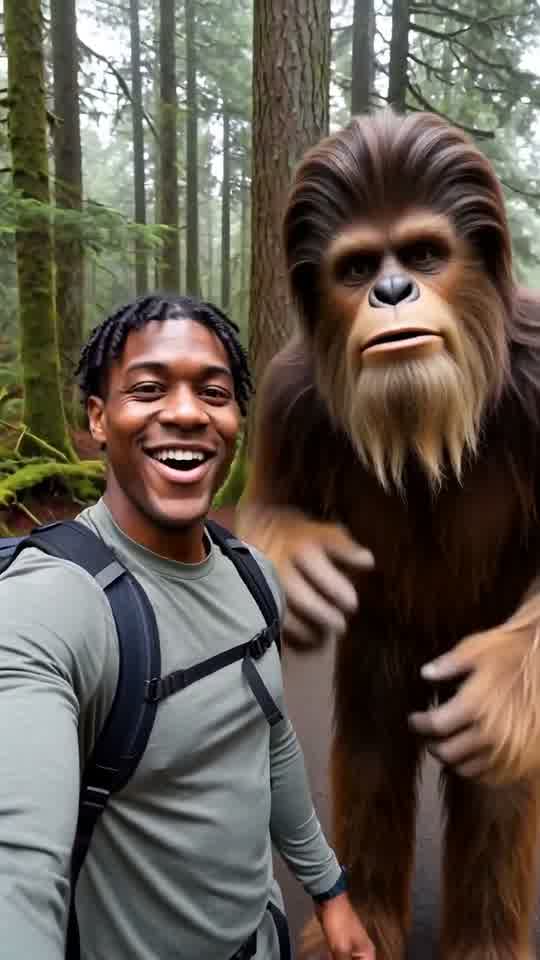
You walk a misty pine trail, whisper to the phone, then a friendly Bigfoot leans into frame and waves beside you.
Add one clear photo of one adult or one pet. The tool makes a 10-second selfie vlog on a daylight pine trail, keeps the uploaded subject as the lead, and places one friendly Bigfoot behind them for the last two beats.
A clear, front-facing photo. The template keeps your face, hair and skin tone; outfits and the set come from the template.
No nudity, minors or other people's photos without consent — uploads may be checked by automated tools.
About 5 seconds of you in this format.
This video: 80 credits · about 10 videos a month for $29.90 on Creator, or $288 a year
No subscription needed · Credits never expire · Usually ready in 10-15 minutes · Failed renders are refunded
Bigfoot Forest Selfie Vlog
Choreography locked · Facial reference enabled
This is not documentary footage, evidence of a sighting or a recreation of a movie character. It is a short fictional comedy scene with fixed dialogue and one generic folk creature. The clip is built for a quick TikTok or Reels post, not a long narrated episode.
- Input: one clear photo of one adult or one pet. For a person, the face should be front-facing and fully visible.
- Output: one 10-second vertical 9:16 MP4 with handheld motion, three spoken lines and one friendly Bigfoot.
- Price: first full video $2.99 once per account, then 80 credits, about $2.99. No subscription is required.
Bigfoot vlogs made with this generator
Each clip below came out of the tool at the top of this page from one portrait, in one run, on 23 October 2026, and is shown at full length. The photos that went in are AI portraits we use for tests, not real people.
What the Bigfoot selfie vlog format is
The joke works because an ordinary phone update turns into an impossible encounter without changing the casual vlog style.
A phone selfie, not a distant sighting
The lead holds the camera at arm length and talks directly to it while walking. The view feels like a personal trail update.
The background changes the meaning
Bigfoot appears behind the lead while the lead is still saying that nothing has been found. The viewer notices the joke as it enters frame.
Friendly behavior is the payoff
The creature leans into the selfie, waves and gives a thumbs-up. The scene ends as a meeting, not a chase.
The clip stays short
Three beats fit into ten seconds: setup, discovery and a shared look at the lens. There is no extra backstory or second location.
AI Bigfoot video generator beat sheet
| Time | Picture | Spoken line |
|---|---|---|
| 0 to 4 seconds | The lead walks a misty pine trail in a handheld selfie and glances over one shoulder. | Day three looking for Bigfoot. Nothing yet. |
| 4 to 7 seconds | A tall, shaggy brown Bigfoot steps from between the trees and leans into the background of the selfie. The lead turns, looks startled, then laughs. | Wait... is that? |
| 7 to 10 seconds | Bigfoot stands beside the lead, waves a large hand at the lens and gives a thumbs-up while both face the phone. | Okay, he's friendly! |
The words, timing, forest and actions are fixed. Your photo changes who records the vlog.
Choose a photo that fits a close phone selfie
✓ Good fit
One clear adult face
Use even light, a visible hairline and an unobstructed front view. A head-and-shoulders portrait matches the opening framing.
One pet looking toward the camera
Cats and dogs can lead the scene. Visible eyes, ears and muzzle markings give the clip better identity cues.
A simple, sharp source
Use the original photo rather than a screenshot with interface text. The new forest replaces the old background.
✕ Poor fit
Two people or a group
The vlog has one lead plus Bigfoot. A group photo makes it unclear which person should hold the phone.
A child or a public figure
The human lead must be an adult who agreed to the use. Do not upload a celebrity, politician or other public figure.
A hidden or tiny face
Heavy shadows, sunglasses across the eyes, face-covering hands or a distant full-body shot can weaken identity through the moving selfie.
You in the vlog, not a Bigfoot-only text video
A Bigfoot-only video can invent any creature and any forest from a written request, but it has no reason to look like you. This page starts with a photo because the joke is personal: your face, hair or pet markings belong to the person holding the phone, while the forest encounter is built around that identity. You do not write the scene or supply a second character image.
The fixed format also sets clear limits. There is one trail, one lead, one friendly Bigfoot and three short English lines. It does not make a custom episode, accept a script, create a group expedition or produce a Bigfoot documentary. The creature is a generic folk figure rather than a named screen character. If you need an original story with different actions and locations, this one-click effect is too narrow.
Make the forest vlog and post it
- 01
Pick one adult or pet photo
Use a clear face in good light. Confirm that you own the photo or have the adult subject's permission.
- 02
Upload it at the top of the page
You can choose the file before login. Pressing Generate asks you to sign in and then shows the available offer and price.
- 03
Let the three fixed beats render
A full clip is 10 seconds and usually takes about 10 to 15 minutes in the shared queue. You can close the tab and return to the dashboard.
- 04
Watch the face, mouth and hands
Review the entire result before posting. Pay special attention when the lead turns and when the large hand waves near the lens.
- 05
Upload to TikTok or Reels
Post the vertical MP4 directly. Keep captions away from both faces, since Bigfoot leans in right next to the lead in the last beat.
Price for one complete forest vlog
| Option | Price | Details |
|---|---|---|
| First full video | $2.99 | A once-per-account 10-second full render. |
| Later full videos | 80 credits | About $2.99 at the $29.90 monthly Creator plan rate. Credits do not expire. |
| Free preview where offered | No charge | A separate watermarked 5-second preview. It is not the full three-beat video and is not available to everyone. |
How we made these clips: render log, 23 October 2026
Every render made for this page, kept or not. The first three came back landscape because of a setting on our side, which we fixed the same afternoon; the three clips above were made after the fix with the same portraits.
| Run | Photo | Lines heard | Bigfoot | Used |
|---|---|---|---|---|
| 1 to 3 | All three portraits | All three lines in each | Joined every time | No, landscape frame |
| 4 | Grey hair, denim shirt | All three, run together | Steps in at 5 s, waves, thumbs-up | Yes, clip 3 |
| 5 | Short twists, grey hoodie | All three, clear | Visible early on the path, waves, thumbs-up | Yes, clip 1 |
| 6 | Dark curls, striped shirt | All three | Far off at 6 s, then close, waves, thumbs-up | Yes, clip 2 |
No render was refused and none failed; each took about one to two minutes. All six are people; no pet photo has been run through this generator yet.
Questions about making a Bigfoot forest vlog
What does the AI Bigfoot video generator make?
It makes a 10-second comedy clip from one photo. The uploaded adult or pet becomes the person holding a phone on a misty pine trail. They say they have found nothing, then one tall, shaggy brown Bigfoot steps into the selfie behind them. The lead notices, laughs, and frames both characters together while Bigfoot waves and gives a thumbs-up. The file is a fictional social video with fixed actions and three short English lines. It is not documentary footage, a claimed sighting, a long story or a recreation of a named movie character.
Can I use a pet photo instead of a person?
Yes. The template accepts one clear photo of one pet as well as one adult. Choose a picture where the animal faces the camera and the eyes, ears and muzzle are easy to see. A cat or dog with distinct markings gives the moving clip more detail to hold. The pet becomes the selfie-vlog lead while one friendly Bigfoot remains the only other figure. Do not use a photo with several pets or people, since the scene has one lead role. The age rule applies to people; human photos must show adults who agreed to be included.
How much does the 10-second Bigfoot clip cost?
Your first full video is $2.99 once per account. Later videos from this effect use 80 credits each, about $2.99 at the monthly Creator plan rate of $29.90. No subscription is required, and purchased credits do not expire. The tool shows the price before it starts a paid render. A render that fails for a technical reason gives its credits back. That price covers the complete 10-second MP4 with the forest scene, dialogue and friendly creature. It does not include extra editing, custom dialogue, a longer episode, social advertising or music licensed outside CastTake.
How does the free preview work?
Where the current offer allows it, the free preview is a separate watermarked 5-second render. It is meant to show the visual direction before you buy a full clip, but it is not the finished 10-second video and may not contain all three beats. Availability can vary by location, account history and session, so the upload tool is the source of truth for your visit. You can choose and upload a photo before login. Pressing Generate asks you to sign in and displays the price before any paid render begins. A preview does not unlock a clean full-length download.
What can go wrong in a Bigfoot selfie render?
A generated selfie can drift when the lead turns away and back. Hair, glasses, pet markings or facial proportions may change slightly. Spoken mouth movement can miss a word, and the phone-holding arm can bend awkwardly near the edge of the frame. Bigfoot has a large waving hand, so fingers or the thumbs-up can also come out unclear. Sometimes the creature enters too early, stays too far behind the lead or draws attention away from the uploaded face. Use a sharp front-facing source, then watch the complete result before posting. A clear source helps but does not guarantee a perfect take.
Can I change the lines, creature or forest?
No. This effect is a fixed one-click scene. It always uses a daylight pine trail, one lead from your photo, one friendly Bigfoot and the same three short English lines. You cannot replace the creature with a named character, turn the clip into a chase, add a group of hikers or provide a custom script. The narrow format is what lets the tool show a clear price and make the same recognizable joke from one upload. If your idea depends on different dialogue, another location, a longer plot or several characters, this template is not the right tool for that project.
How should I post the vlog to TikTok or Reels?
Download the vertical MP4 and upload it directly to TikTok or Instagram Reels; it is already 9:16, so nothing needs cropping. The opening line already provides the setup, so a short caption such as a trail-day update is enough. Keep added text away from the lead and the creature entering behind them. If you add music, choose it from the platform library and keep it low enough that the three lines remain understandable. Watch the final second before posting to make sure the wave and thumbs-up are readable on a phone screen.
Ready to try it?
Add a photo in the tool at the top of this page. Nothing is charged until you press a paid button, and the price is on the button.
Back to the tool