
AI DJ duo: two photos, one keyboard, the Kong Kong King King clip
Add a photo of each person. They take over the two people at the laptop and the little keyboard, play, point, throw an arm up on the beat and walk out to the camera side by side.
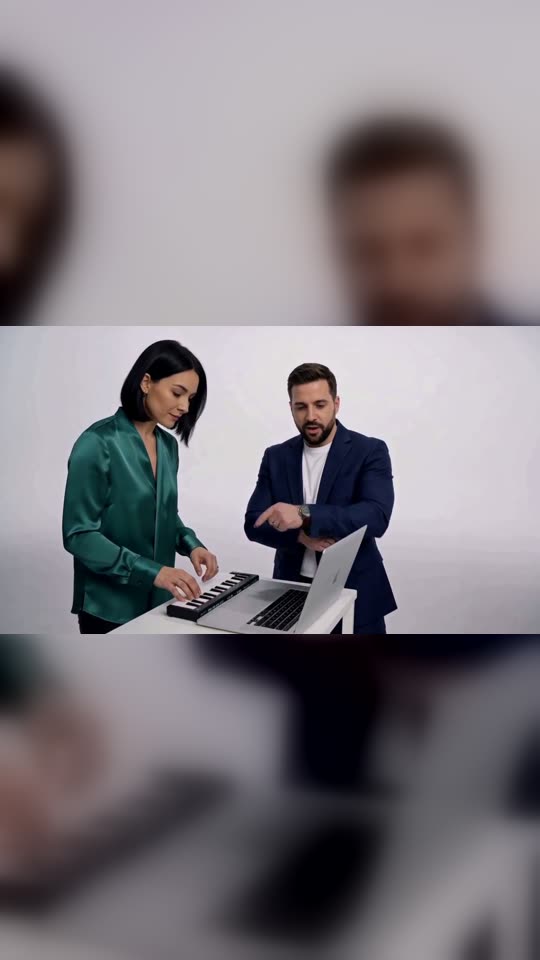
AI DJ duo is the name for the short clip where two people crowd one laptop and a mini keyboard in a white studio while a crowd chants "kong kong king king". Here you add one photo for the person on the left and one for the person on the right, and get the same 15 seconds with the two of you in it.
One clear, front-facing photo for each person. Each keeps their own face, hair and skin tone; the booth, outfits and mic come from the template.
No nudity, minors or other people's photos without consent — uploads may be checked by automated tools.
This video: 120 credits · about 6 videos a month for $29.90 on Creator, or $288 a year
No subscription needed · Credits never expire · Usually ready in 15-23 minutes · Failed renders are refunded
DJ Duo Keyboard Recast
Choreography locked · Facial reference enabled
Nothing is rewritten: the moves, the cuts and the walk at the end come from the clip itself, and the chant comes back on the same beat. What changes is who is standing at the keyboard.
- Input: two clear photos, one person in each: left first, then right.
- Output: the 15-second landscape clip with both of you in it, chant and French line on the original beat.
- Price: first video $2.99 once per account, then 120 credits (about $4.48). No subscription, credits never expire.
AI DJ duo clips made on this page
Each clip below came out of the tool at the top of this page from two portraits, in one run, and is shown at full length. Under each one is what went in, what came out and what went wrong, so you can judge an ordinary attempt before you upload.
What the AI DJ duo clip is
The AI DJ duo is a fifteen-second clip of two people sharing one tiny setup: a laptop and a mini keyboard on a small white table, in front of a plain white wall. A voice chants "kong kong king king" over the opening, the two of them play, point and hype each other up, and the clip cuts to a wide shot of both walking out side by side. People search for it as the Kong Kong King King clip, and also as the Alors on Danse AI meme, which is the same clip under another name.
The joke is the pairing. The same fifteen seconds read differently with two best friends, a couple who argue over the playlist, or a manager and the intern, because the one who plays the keys and the one who points at the sky are different people every time.
This page does not make a new scene in the spirit of the clip. It takes the clip itself and swaps who is in it: your left photo becomes the person at the keyboard, your right photo the person at the laptop, and everything else stays as it was.
The Kong Kong King King clip, beat by beat
The clip is 15 seconds, and you get all of it. This is what happens and who does it, read off the clip half a second at a time.
| When | Left (your first photo) | Right (your second photo) | Sound |
|---|---|---|---|
| 0:00 to 0:03 | Looks down and taps the mini keyboard. | Stands beside the laptop, taps it once, then flicks a finger up and out to the side. | The "kong kong king king" chant |
| 0:03 to 0:06 | Leans in and plays with both hands. | Leans in too and types on the laptop. | The beat carries on |
| 0:06 to 0:08 | Keeps playing, head down. | Turns to the left player and points, nodding along. | The beat carries on |
| 0:08 to 0:11 | Steps back from the table and dances toward the camera. | Throws an arm straight up at the ceiling, then points out and pumps a fist. | A short line in French |
| 0:11 to 0:15 | Cut to a wide shot: points at the camera, then walks out beside the other. | Walks out beside them, full length, as the camera pulls back. | The track plays out |
Because the clip is reused rather than rewritten, these beats are not a wish that a render may or may not follow: the timing and the cuts come from the clip. What can still slip is a face or a hand, and the clips at the top of the page show where it did.
Who to put at the keyboard
The left spot plays the keys and does the dancing; the right spot runs the laptop and does the pointing. Casting is the whole creative decision, so here are four pairings that use those two roles.
The one with the aux, and the one who wants it
Put whoever always controls the music in the car on the left, at the keys. Put the friend who keeps asking for the aux on the right, pointing at them. The clip tells the story without a caption.
A couple before the wedding DJ is booked
Two people at one keyboard is an easy save-the-date joke or an anniversary post. Pick photos from the same season so you look like you belong in the same room.
Two coworkers on a Friday
The quiet one at the keys and the loud one at the laptop is a team-channel post that needs no explanation. Ask both of them first: the clip ends with the two of them walking out at the camera, which is very public.
Grown-up siblings
Use current photos of both. The wide shot at the end shows you head to toe, so outfits matter more here than in a close-up effect, and the photo you pick decides what you are wearing.
Two photos that hold up in the wide shot
The clip goes from waist-up at the table to full length at the end, and the two people overlap and turn away from the camera along the way. Each photo has to carry one person through all of that.
✓ Works
One person per photo, face to the camera
The first photo becomes the left player and the second the right. Two separate photos are what this effect takes; they do not have to be taken together or on the same day.
Upper body in frame
Your clothes in the photo become your clothes in the clip, including in the walk at the end. A photo cropped at the chin leaves the outfit to chance.
Two people who look different
Different hair, different colours. When both photos look alike, the left and right people are easier to mix up in the shot where they overlap.
✕ Fails or drifts
One photo of both of you
This effect needs one photo per person. A group photo is refused here, unlike our other duo effects, because the clip assigns each photo to one fixed role.
Sunglasses, hats, masks or a hand on the face
Anything covering the face has to be guessed again in each shot, and the two halves of the clip may not agree.
Someone who has not agreed, or a famous face
You confirm that each person is you or an adult who said yes. Photos that look like a child, and photos of public figures, are refused before anything renders.
AI DJ duo or one of our other two-person effects
All three take a photo of each person. They are not the same product, so here is how they differ before you pay for one.
| Effect | What you get | Sound | Length | Best for | Not for |
|---|---|---|---|---|---|
| AI DJ duo (this page) | The Kong Kong King King clip itself, with the two of you swapped in. Landscape. | The chant and French line of the clip, on its beat | 15 s | Joining the trend exactly as people know it | Changing the words, the room or the moves |
| Hotel Lobby AI | A new scene we wrote: two of you at one mic in an orange booth, trading lines. Vertical. | Rapped lines, which you can personalise with names | 10 s | A birthday or a shout-out with your own words | Anyone who wants this exact clip |
| AI APT | A new scene we wrote: a drummer and a singer in a pink studio. Vertical. | A count-in, a sung line and a shared chorus | 10 s | Two friends who want a music video moment | A clip with no singing in it |
Our other two duo effects are written scenes, so a render follows the script closely but not frame for frame. This one reuses a clip, so the frames are set and only the people change.
How to make an AI DJ duo video
- 01
Add the left photo, then the right
Left is the person at the keyboard who dances; right is the person at the laptop who points. The price shows on the button before you press it.
- 02
Wait for the render
Expect 15 to 23 minutes for a 15-second clip. You can close the tab: the video is kept in your dashboard and we email you when it is ready.
- 03
Check the first shot and the walk
Make sure the left and right people are the ones you meant, then watch the wide shot for faces. If a face came out wrong on the first video of your account, one free redo runs the same two photos again. A render that fails gives its credits back.
- 04
Post it
The clip already has its sound. Most people post it as it is, with the names of the two people in the caption.
About the sound
The sound is made again with the picture, following the clip it is built on: the "kong kong king king" chant over the opening and the short French line near the end, on the same beat. It is close to the clip people know but not a copy of the recording, so a word or a beat can come out slightly different from one video to the next. We did not write the chant. When you post, you can keep this sound or pick the trend sound from the TikTok, Reels or Shorts library instead.
What one AI DJ duo video costs
| Detail | Length | Credits | Price |
|---|---|---|---|
| First full video on an account | 15 s | 120 | $2.99, once |
| Each one after that, on the Creator plan | 15 s | 120 | $4.48 |
| Free redo if a face is off, first video only | 15 s | 0 | Free, once |
There is no free preview on this effect: it always renders the whole clip. Priced on the Creator plan ($29.90 a month for 800 credits). A credit pack is one payment that does not renew, and its credits do not expire.
How the clips on this page were made
The record behind the AI DJ duo clips at the top of this page.
| Item | Detail |
|---|---|
| Rendered | 15 October 2026 |
| Method | The template on this page, two portraits per clip, the same source clip and instructions for all three |
| Inputs | Six different AI-generated portraits, never a real person |
| Runs | One run per pair. A first attempt was turned away as busy before it started and cost nothing; nothing that rendered was left out |
| Time | About 17 minutes from submit to finished for the first clip, most of it waiting in the queue |
| Sound | Checked by transcribing the first clip next to the source: the chant runs over the opening and the French line lands near the end, at about the same loudness |
| Editing | Resized and compressed for the web. The first clip is also set in a vertical frame so it fits the cards on this site |
Each pair was rendered once, so the faults are in the clips: invented trousers and shoes in the walk, a wristwatch that was not in the photo, and a clap where the clip has a dance. Their notes say so.
AI DJ duo questions
What is an AI DJ duo video?
An AI DJ duo video is the Kong Kong King King clip with two people of your choosing in it. The clip is 15 seconds long: two people at a laptop and a mini keyboard in a white studio, a chant over the opening, some pointing and an arm thrown up on the beat, and a wide shot of both walking out side by side. On this page you add a photo of each person and they replace the two people in the clip. The moves and the cuts stay as they are and the chant comes back on the same beat, so the result looks like the clip people already know, with your faces.
What is the kong kong king king song?
It is what people call the chant at the start of the clip, a voice going "kong kong king king" over the beat, and the trend is named after it. The same clip also turns up in searches as the Alors on Danse AI meme. We have not been able to confirm who first made the track or the chant, so we do not name an artist on this page. What we can say is what your video contains: the chant over the opening and a short line in French near the end, made again on the same beat as the clip. It is not a new song, and it is not the original recording either.
Which photo goes on the left in the AI DJ duo?
Your first photo becomes the person on the left, at the mini keyboard. That person plays the keys, steps back to dance and points at the camera in the wide shot. Your second photo becomes the person on the right, at the laptop, who types, points at the other one and throws an arm up at the ceiling. The roles stay fixed through every cut and through the walk at the end. If you want to swap who does what, swap the order of the two photos before you press Generate. Check the first two seconds of the result to confirm the order is the one you meant.
Can I use one photo of both of us?
Not on this effect. It needs two photos, one person in each, because every photo is tied to one of the two fixed roles in the clip and a photo with two faces in it leaves the role to a guess. The photos do not need to be taken together, on the same day or in the same place, and it is fine to crop each person out of a larger photo as long as the crop shows one face clearly. Our Hotel Lobby rap duo does accept a single photo of both people, if that is the photo you have. That one is a different scene, not this clip.
Does the AI DJ duo video keep the sound?
It keeps the same sound, made again with the picture. In the clips on this page the "kong kong king king" chant runs over the opening and the short French line lands near the end, both on the beat of the clip and at about the same loudness. Because it is generated with the video and not copied from the recording, a word or a beat can come out slightly different from one video to the next. We do not add a new voice or a new song. If you would rather use the trend sound itself, mute the clip in the app and pick that sound from the TikTok, Reels or Shorts library when you post.
Is the AI DJ duo video free?
No. The full 15-second clip is paid, and you see the price on the button before anything renders. The first video on an account costs $2.99, once. After that each one uses 120 credits, about $4.48 on the Creator plan. Credit packs are single payments that do not renew, and their credits do not expire. There is no free short preview on this effect, because it always renders the whole clip. A render that fails gives its credits back, and if a face is wrong on the first video of your account, you get one redo for free.
Can I put a celebrity or a friend in the clip?
A friend, yes, if they are an adult and they agreed to it. A celebrity, no. Before generating you confirm that each person in the two photos is you or an adult who said yes, and photos of public figures or of anyone who looks under 18 are refused before anything renders. A famous person dancing in a clip they never filmed is the kind of video platforms label as misleading and remove, and in several countries it breaks likeness law. A screenshot of a post by someone else counts as their photo, not yours. If someone in your clip asks you to take it down, take it down.
How long does an AI DJ duo video take?
Expect 15 to 23 minutes from the moment you press Generate. The clip is the full 15 seconds and both people are rendered into every frame, which takes longer than our shorter one-photo effects. You do not need to keep the page open. The finished video is saved to your dashboard and we email you when it is ready. If it fails, the credits go back to your balance automatically. If it is still running after the longest time quoted on the page, it is usually just queued behind other videos, and it carries on without you doing anything.
Ready to try it?
Add a photo in the tool at the top of this page. Nothing is charged until you press a paid button, and the price is on the button.
Back to the tool