
AI dress up game video: your portrait, a 3D stage and a cursor that changes the outfit
Your portrait becomes the character in a 3D dress-up game: the cursor clicks, the outfit changes. A vertical clip ready for TikTok and Reels.
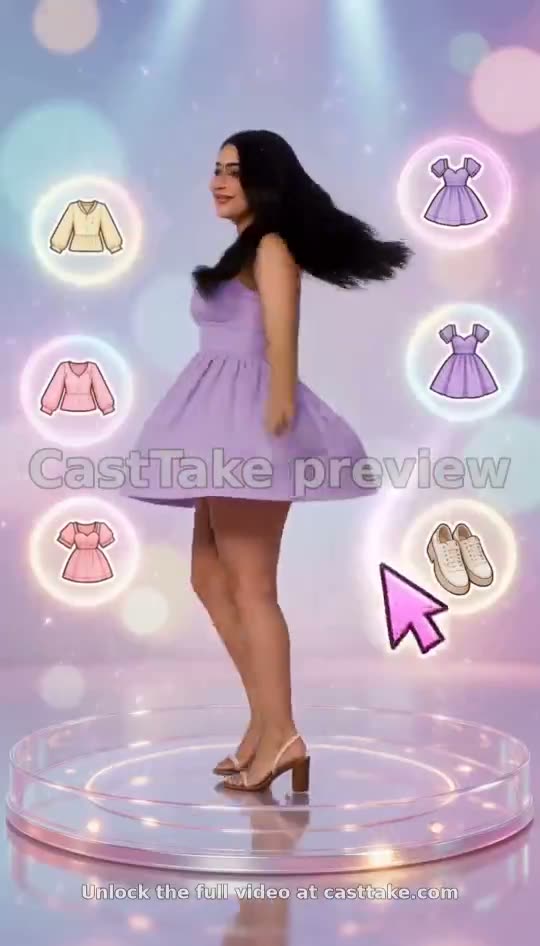
This format looks like a dress-up game and is a video. A glowing stage, outfit cards floating on both sides, a pink cursor that taps one, and a 3D version of you swapping clothes with a sparkle. You upload one portrait and press a button.
A clear, front-facing photo. The template keeps your face, hair and skin tone; outfits and the set come from the template.
No nudity, minors or other people's photos without consent — uploads may be checked by automated tools.
About 5 seconds of you in this format.
This video: 120 credits
No subscription needed · Credits never expire · Usually ready in 15-23 minutes · Failed renders are refunded
3D Dress-Up Game
Choreography locked · Facial reference enabled
It is the AI dress up game video that went round on X, rebuilt around your face. Nothing in it can be played, which is the point: it is made to be posted.
- Input: one clear, front-facing portrait as PNG, JPG or WebP.
- Output: a 15-second vertical 9:16 video in a stylized 3D look.
- Price: 120 credits a video; your first small or medium credit pack is 15% off.
An AI dress up game video is a video, not a game
If you searched for an AI dress up game to play, this is not one: you cannot tap the cards, save outfits or share a link to a playable stage. What you get is a finished vertical video in which a cursor appears to play the game for you, ready to post on TikTok, Reels or Shorts.
Two previews, straight from the tool
These are 5-second free previews with the watermark left on, not the full 15 seconds. Play them before reading anything else; the format is easier to see than to describe.
What happens on screen
Four pieces make the format work. Each one is visible in the two previews above.
The stage
A round, glowing platform under soft spotlights, with bokeh circles and a pastel backdrop. The character stands on it the whole time.
The cards
Icons of clothes hover on both sides of the character: tops, dresses, shoes, bags. They are decoration in the game look, and the cursor uses them as targets.
The cursor tap
A pink arrow cursor glides to a card and taps it. The tap is the beat; the eye follows it before the outfit changes.
The sparkle swap
The clothes change in one move with a burst of sparkle, and the character does a small turn or pose to show them off.
Why the character looks 3D instead of like a photo
The format is a game render, so the model draws you as a game character. Your face, hair and skin tone are kept as a likeness, but the shading, the proportions and the fabric are stylized. If you want a photoreal video of yourself changing clothes, the AI outfit change video format does that better; this one is meant to look like a game.
That is also why there is only one way to use it. Some of our formats can take a product photo and show it with an AI presenter, but a stylized 3D scene turns any presenter into a doll, so this format takes a portrait of a person and nothing else.
Expect a real result, not a copy of the original post. The creator who started it chose the stage and the cards for their own character; the model here builds them again around yours. Two runs on the same portrait will not match, and the free preview is a good way to find out what your photo does before you pay.
Dress up game, or dress up game video maker?
The words overlap in search, so here is the difference in plain terms.
| Detail | A playable dress up game | This dress up game video maker |
|---|---|---|
| What you do | Tap and drag clothes yourself | Upload one portrait and press a button |
| What you get | A game session | An MP4 you download and post |
| Who is the character | A stock doll | A 3D character built from your portrait |
| Can you change the outfits | Yes, as often as you like | No, the format picks them |
| Length | As long as you play | 15 seconds, vertical |
| Cost | Usually free or ad-supported | 120 credits a video; your first small or medium credit pack is 15% off |
A quick photo checklist
✓ Do
Use one person, facing the camera
A clear face with even light gives the 3D model the most to keep.
Show shoulders and hair
A head-and-shoulders crop lets the stylized body and hair match yours.
Pick a plain background
The stage is replaced anyway, so a clean backdrop leaves less to misread.
✕ Skip
Group shots
The model has to pick one person, and it will not always pick yours.
Sunglasses or a hand over the face
Hidden features are invented, and the invention drifts between outfits.
Someone who has not agreed
You tick a box that the photo is you or an adult who agreed. Keep to it.
Make yours in four moves
- 01
Add the portrait
Drop it into the upload box at the top of the page, then tick the box that it is you or someone who agreed.
- 02
Try the free preview
Where it is offered, a 5-second watermarked cut arrives in a few minutes and needs no sign-up first.
- 03
Unlock the video
One full 15-second render uses 120 credits, and your first small or medium credit pack is 15% off.
- 04
Post it
Download the MP4 from your dashboard. It is vertical, so it fits Shorts, Reels and TikTok without cropping.
Who makes an AI dress up game video
Creators riding the trend
The original format did well on X, and a version with your own face is a new post rather than a repost of somebody else’s.
Small fashion shops
A stylized clip is a fun way to tease a new season without a photoshoot. It shows the fun, not the garment, so pair it with real product photos.
Friends and group chats
A dress-up clip of you or a friend is an easy thing to send when a plain photo feels flat.
Where the format came from
The idea was posted on X by @sophiaparkerr_. The post below loads through X’s own embed, so it plays from X and is not hosted here. It is their video of their character, not ours.
Ours: a CastTake preview
The original trend, by @sophiaparkerr_
Not made by CastTake. Credit for the format goes to @sophiaparkerr_; the post plays from X when you press the button.
Open @sophiaparkerr_’s original post on XWhat one clip costs
| Detail | Length | Credits |
|---|---|---|
| Later clips | 15 s | 120 |
| Free preview, where offered | 5 s | 0 |
Priced on the Creator plan ($29.90 a month for 800 credits). A credit pack is one payment, not a subscription, and costs more per credit.
Preview details
Where the two previews above came from.
| Item | Detail |
|---|---|
| Rendered | 29 September 2026 |
| Model and mode | MiniMax H3, Dress-Up Game 3D template, star-in-it mode |
| Inputs | One AI-generated portrait per clip, two different portraits, no real people |
| Length shown | 4 seconds, the watermarked free-preview cut; the full template runs 15 seconds |
| Editing | None |
Only the previews are shown here. A full 15-second render may differ in the second half.
Questions about the AI dress up game video
Is this an AI dress up game I can play?
No. It makes a video that looks like someone playing a dress-up game: a glowing stage, outfit cards on both sides and a cursor that taps them while a 3D version of you changes clothes. Nothing in it is interactive. You cannot tap the cards yourself, pick your own outfits, save a look or send a link to a playable stage. If you want something to play with, this is the wrong tool. If you want a finished vertical video to post that carries the look of the game, and starring your own face, that is exactly what it produces.
How do I make an AI dress up game video of myself?
Upload one clear, front-facing portrait in the tool at the top of this page and tick the box that it is you or an adult who agreed to it. Where the free preview is offered, run it first: you get a watermarked 5-second cut in a few minutes without creating an account. When you like what you see, the full 15-second video uses 120 credits (your first small or medium credit pack is 15% off), and it lands in your dashboard as an MP4 you can download. There is nothing to install and nothing to prompt, because the format is fixed.
Can I pick which outfits appear in the dress up game video?
No. The stage, the floating cards and the clothes are all part of the format, so you cannot choose a tank top, a dress or a pair of shoes and expect to see it. In our previews the character moves from a yellow tank and jeans to a lilac dress, then heels, then white sneakers and a small bag, but a different run can pick a different stage or different cards. What you supply is the face, and the model keeps your hair, skin tone and features as a likeness. Treat the outfits as a surprise, and use the free preview to see what your portrait draws.
Why does my character look like a cartoon and not a photo?
The format is a stylized 3D game render, so the model draws you as a game character. Your face, hair and skin tone are carried over as a likeness, but the shading, proportions and fabric are stylized on purpose, because a photoreal person on a glowing pastel stage would break the game look that makes the format work. If you would rather see yourself in believable, photographic outfit changes, the AI outfit change video format is closer to that. For this one, expect a polished 3D figure, not a filter over your photo.
Is it the same as the viral dress up game video on X?
It is the same idea, built again around your portrait. The original was made by @sophiaparkerr_ with their own character, and it is embedded on this page through X’s own player rather than copied or hosted by us. Ours is a different video: the stage, the cards, the outfits and the timing of the cursor taps differ from run to run, and the person in it is you. Credit for the format belongs to the original creator, and the link to their post is on this page so you can see the source and follow them.
Can I use the video commercially, for example for a small shop?
You may post a clip you paid to render, including for a small shop or a creator account. Two cautions apply. Do not upload a photo of a person who has not agreed, because the tool asks you to confirm the face is yours or an adult who agreed. And check the AI-content labelling rules of the platform you post on, since several require a disclosure. Keep in mind what the clip shows: a fun stylized character, not your real garments, so pair it with real product photos if you are selling clothes.
Ready to try it?
Add a photo in the tool at the top of this page. Nothing is charged until you press a paid button, and the price is on the button.
Back to the tool