
Yes yes I love you template made from your own photo
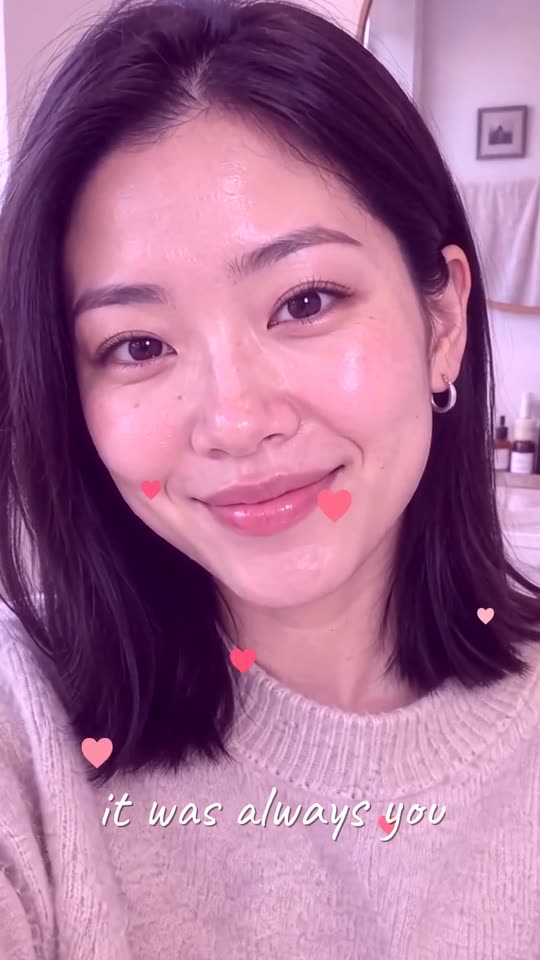
One photo becomes a quiet push-in with rising hearts and one handwritten line.
This yes yes i love you template turns one photo of one adult or pet into a 6-second vertical heart video. The camera pushes slowly in while the subject blinks and smiles, then hearts rise over a soft glow and one handwritten line fades in. It is inspired by the TikTok trend, not the official template, and no song is included.
A clear, front-facing photo. The template keeps your face, hair and skin tone; outfits and the set come from the template.
No nudity, minors or other people's photos without consent — uploads may be checked by automated tools.
About 5 seconds of you in this format.
This video: 15 credits
No subscription needed · Credits never expire · Usually ready in 5-8 minutes · Failed renders are refunded
Love Push-In Hearts
Choreography locked · Facial reference enabled
The upload is the first frame, so clothes, room and light stay as you shot them. The hearts, the glow and the line are added after the render, which keeps them identical in every video and keeps them off your face.
- Input: one clear photo of one adult, cat or dog, looking toward the camera.
- Output: a silent 6-second vertical MP4 with hearts, a soft glow and one fixed line.
- Price: 15 credits for the complete clip. No subscription is required.
Yes yes I love you template results from real photos
These are complete runs from two adult portraits. They are resized for the page, not shortened or assembled from hand-picked frames.
What kind of picture keeps the face stable?
A slow push-in is gentle, so the render stays close to the photo when the photo is easy to read. These choices matter most.
✓ Keeps the face stable
One subject facing the lens
One adult, cat or dog with both eyes and the whole face visible gives the render a clear identity to hold.
Even, soft light
Window light or shade without hard shadows across the face lets the blink and smile stay natural.
A calm, simple background
A plain wall or a soft outdoor blur leaves fewer edges to bend during the push-in.
✕ Makes it drift
Sunglasses, hands or masks on the face
Anything covering the eyes or mouth hides the details the render must keep.
Profiles and tilted extreme angles
A side view or a very tilted selfie has fewer landmarks, so the face is more likely to change.
Groups, stickers and text on the photo
The effect is written for exactly one subject. Stickers and text on the picture clash with the hearts and the line added after.
Is this the original Yes Yes I Love You template?
No. It is not the official template and it does not use that template’s footage. It is our own version, inspired by the TikTok trend: a slow push-in on your photo, hearts, a soft glow and one handwritten line. The look is similar; the clip is new and made from your photo. No song, lyrics or recording from the trend are included in the file.
Which parts are AI motion and which are added after?
Only the push-in and the face are generated. Everything that makes it look like the trend is drawn afterwards by a fixed overlay, so it cannot change your face.
| Part of the video | Made by | Can it drift from your photo? | In the free preview? |
|---|---|---|---|
| Motion: slow push-in, blink, small smile | AI render from your photo | Yes. This is the only part that can, so we check the face before delivery. | Yes, 5 seconds with a watermark. |
| Hearts | Added after the render, the same eight every time | No. They sit over the picture and never touch the face. | No. |
| Glow | Added after the render as a soft light blend | No. It only brightens the picture slightly. | No. |
| Handwritten line | Added after the render, one fixed line that you cannot edit | No. It is not generated, so it cannot misspell. | No. |
| Sound | None. The file is silent. | Not applicable. | No sound either. |
The free preview shows the motion only. Hearts, glow and the line appear in the complete video.
How do you add the trend sound without breaking copyright?
The video we deliver is silent. We ship no song and no lyrics, so there is no recording in the file that could be claimed.
To use the trend sound, download the clip, open it in your own editor or posting app and add a sound you are licensed to use, such as one from that app’s own library. The platform then applies its own rules for your account and country.
Line up the first soft beat with the moment the hearts start to rise, about half a second in. A silent file also works with your own voice note or a quiet ambient track.
How we tested the samples
Each sample on this page is one complete run of the paid effect, rendered with the same prompt and settings that Generate uses. Checked on 9 November 2026.
Before a render goes on the page we compare one frame near the end with the input photo. A sample is kept only when it still shows the same person or pet. A sample that fails is not published, and the effect refunds a failed paid render the same way.
We do not shorten, speed up or hand-pick frames. The samples are resized for the page and nothing else is changed.
Questions about the yes yes I love you template
Does the free preview show the hearts, glow and line?
No. When a free preview is offered, it shows only the first 5 seconds of the motion: the slow push-in, the blink and the small smile. It carries a watermark and has no hearts, no glow and no handwritten line. Those three are added only to the complete 15-credit video. A preview is therefore useful for checking whether your face, hair and background stay stable, but it is not the finished look. Some visitors are not offered a preview. In that case the price is shown before rendering and nothing is generated until you choose the paid video.
What happens if the face changes during the render?
We check it. After the motion is rendered, we compare a frame from near the end with your photo. If the result clearly shows a different person or animal, the video is not delivered and the credits for that render are returned to your account. If the check cannot give a clear answer, for example because it is briefly unavailable, the video is delivered as rendered, so a good result is never held back. Reading the clip once yourself is still a good habit, especially with photos taken at an angle or in dim light.
Can I use two photos in one video?
Not yet. This effect is written for exactly one subject: one adult, one cat or one dog. The slow push-in is planned around a single face in the frame, and a second person would compete for the same push-in and can swap or blend faces in the render. For a couple, make two separate videos and place them side by side or one after the other in your editor. If you want a clip with two people in the same scene, the image-to-video tool lets you describe a scene yourself, though results with two faces vary more.
Can I use a cat or dog photo?
Yes. This effect accepts one real cat or dog as well as one adult. Choose a portrait with both eyes visible, a clear muzzle and only one animal in the frame. Pets do not give a human performance: in our cat test the blink and the head movement were small and calm, which looked natural, and the hearts carried more of the mood. A costume covering the face, a person holding the pet, two pets together or a very dark coat against a dark background can make the identity harder to keep.
Why is the clip 6 seconds when the render is 5?
The motion itself is rendered for 5 seconds. After that, the last frame is held for one more second so the hearts and the handwritten line can finish fading in before the clip ends. The delivered file is therefore 6 seconds long. The extra second is not another scene, another paid segment or a hidden extension of the motion. The price is the same 15 credits for the whole clip, and the file is vertical and silent, ready for a short-video app.
How many credits does the yes yes I love you template cost?
The complete video costs 15 credits, with no subscription needed. The price is fixed and does not depend on the photo or the subject. A render that fails, or one that fails the face check described above, is returned to your balance. Credit packs and their prices are listed on the pricing page, and a first pack may carry a first-order discount. You can see the cost before you start, and nothing is charged until you press Generate on the tool at the top of this page.
Ready to try it?
Add a photo in the tool at the top of this page. Nothing is charged until you press a paid button, and the price is on the button.
Back to the tool