
Raindance AI: put your own face on the golden-hour pier
One photo in. A wooden pier, a low sun, a slow line sung to the camera and a few seconds of golden rain out.
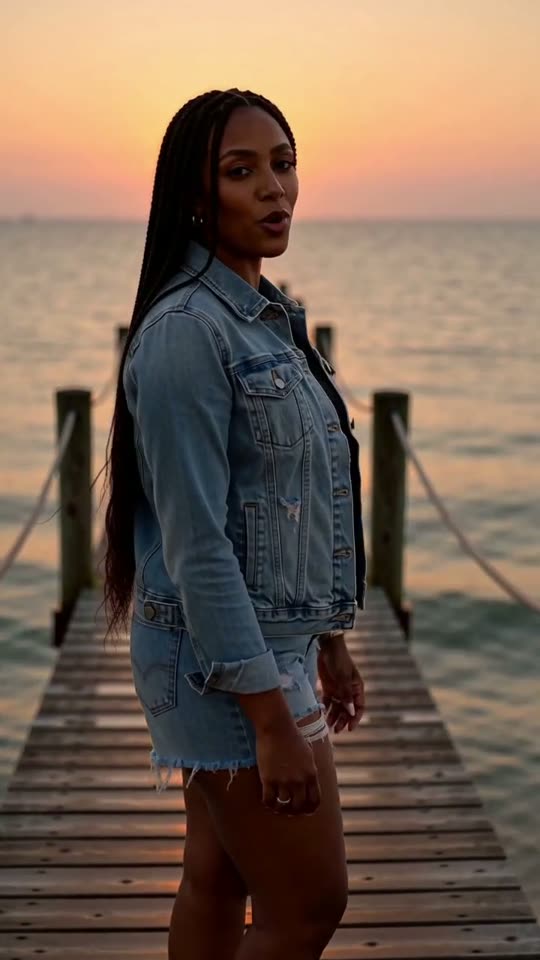
Raindance AI is the trend where an everyday photo cuts to the same person on a wooden pier at sunset, singing slowly into the camera like a music video. Here you add one photo and get a 10-second vertical clip of you on that pier, with your face kept from the photo.
A clear, front-facing photo. The template keeps your face, hair and skin tone; outfits and the set come from the template.
No nudity, minors or other people's photos without consent — uploads may be checked by automated tools.
About 5 seconds of you in this format.
This video: 80 credits
No subscription needed · Credits never expire · Usually ready in 10-15 minutes · Failed renders are refunded
Golden Pier Serenade
Choreography locked · Facial reference enabled
The clip sings its own short lines over a slow groove, and near the end a light shower starts and catches the sun. It is not the song from the trend, so you attach that from the TikTok or Reels sound library when you post.
- Input: one clear photo of one person, face to the camera.
- Output: a 10-second vertical 9:16 video with a sung line, sea sounds and a short sunlit shower.
- Price: 80 credits a video; your first small or medium credit pack is 15% off.
What the Raindance AI trend is
Raindance is a duet released in October 2025 by a British rapper and a Nigerian singer, and its video spends a lot of time in warm evening light by the sea. At the end of September 2026 TikTok picked up an AI edit built on that look: the post opens on a normal photo of someone, then cuts to that person on a wooden pier at golden hour, singing slowly and seriously into the lens while the song plays underneath. The joke works best when the photo is the least cinematic thing possible, a library selfie or a photo of your dad at a barbecue. Some versions add rain, some put two people in, but the pier, the low sun and the straight-faced singing are what make people recognise it. This page builds that pier scene from your photo. It does not use the original recording, the lyrics, the video footage or the faces of the two artists, and it is not connected to them.
Three pier clips we rendered ourselves
Each clip is the full 10-second render from the Golden Pier Serenade template, made from one AI-generated portrait with no editing afterwards. None of them shows a real person. Watch the clip first, then read what went in, what came out and what drifted.
The viral clip next to what our render gives you
A finished trend post has four parts. Our render covers the pier part; the rest you add in the app you post from, which takes a couple of minutes.
| Part of the post | In the viral clips | In our render | What you do |
|---|---|---|---|
| The opening photo | An ordinary snapshot, shown for about a second | Not included | Put your original photo first in the TikTok or CapCut timeline |
| The pier scene | Wooden pier, low sun, the person singing to the lens | Yes: the same person from your photo, waist up, slow push-in | Nothing, this is the render |
| Rain | In some versions only | A light shower in the last few seconds, lit by the sun | Nothing, or trim it off if you want the dry version |
| The song | The Raindance track from the sound library | Not included: an original slow groove and sung lines instead | Mute our audio and add the track from the sound library |
Where the free preview is offered it is the first 5 seconds only: the turn to the camera and the first sung line, before the rain starts.
How to make the photo-to-pier cut
The cut is what sells the Raindance AI trend, and it is an edit you make yourself, not something any generator does for you. Open TikTok or CapCut, start a new project, and add two things in this order: the plain photo you used, then the pier clip from your CastTake dashboard. Set the photo to last about one second. Shorter than that and viewers do not register who it is; longer and the joke goes flat.
Put the cut on a beat. In the sound library, pick the Raindance track and scrub to the part you want, then drag the join between the photo and the clip until it lands on a strong beat. Turn the original audio of the pier clip down to zero first, so our sung line does not clash with the song.
A few small touches help it read as the trend. A slow zoom on the still photo makes the cut feel intentional. Keep everything vertical rather than cropping to fit. Write a deadpan caption such as "me after one good night of sleep" rather than explaining the joke, and switch on the AI-generated content label the app offers for realistic AI video.
How to do the Raindance AI trend on CastTake
There is no prompt to write: the pier, the light and the performance are fixed by the template, so the only thing you choose is the photo.
- 01
Add one photo
Use the upload box at the top of this page. One person, face to the camera, nothing covering the eyes.
- 02
Confirm it is you or someone who agreed
You tick a box saying the person in the photo is you or an adult who said yes. Generating asks you to sign in with Google, and your photo is kept while you do.
- 03
Check the free preview where it is offered
A watermarked 5-second cut shows whether the face came through. It waits in a shared queue, usually 3 to 6 minutes, and you can leave the page while it runs.
- 04
Make the full clip, then edit the post
The full 10-second render lands in your dashboard as an MP4. Download it and build the photo-to-pier cut described above.
Which photo works best on the pier
The template keeps the face from your photo and dresses and lights everything else, so the face matters far more than the outfit or background.
✓ Works
A plain, everyday photo
The more ordinary the photo, the bigger the jump when it cuts to the pier. A desk selfie or a supermarket queue works better than a holiday shot.
Face to the camera, in daylight
A clear, front-facing face gives the model the most to keep. Window light is enough.
One person, head and shoulders
Crop out anyone else before uploading. The template is built for a solo singer.
✕ Breaks it
Sunglasses, caps pulled low, a hand on the face
Hidden features get invented, and the invented version can change between the first and last second.
A group photo
The model picks one face, and not always the one you meant.
A celebrity, a screenshot of someone else, or a cartoon
The tool is for you and people who agreed. Our photo check turns away images without a real person in them, and the confirmation you tick rules out public figures.
Who to put on the pier
The funniest Raindance AI clips put someone completely unromantic into a completely romantic shot.
Yourself, dead serious
Your least flattering everyday photo, then you singing at sunset as if it were a film. Most posts in the trend are this.
A parent who agreed to it
Dad at the barbecue becomes dad on the pier. Ask first, and send it to the family chat before you post it anywhere public.
The friend who never sings
With their permission, the quiet one in the group serenading the camera gets the biggest reaction.
A birthday message
Swap the voice note for ten seconds of you singing at sunset, with the real song added in the editor.
What one pier video costs
| Detail | Length | Credits |
|---|---|---|
| Free preview, where offered | 5 s | 0 |
| Each one after that | 10 s | 80 |
Priced on the Creator plan ($29.90 a month for 800 credits). A credit pack is one payment, not a subscription, and costs more per credit. The credit cost is shown on the button before anything is charged, and a render that fails returns its credits.
Why the Raindance song is not in the file
The pier clip comes with its own sound: a slow groove with drums, bass and a picked guitar, waves in the background, and the person in your photo singing two short lines written for this template. None of it is the Raindance recording, and none of it quotes its lyrics. We have no licence for the song, and a video with a well-known track baked into the file is exactly what platforms mute or take down.
Adding the track where you post avoids both problems. TikTok, Instagram Reels and YouTube Shorts carry licensed versions of popular songs in their sound libraries, and that is how nearly every post in the Raindance AI trend gets its music. If you would rather keep our audio, the clip stands on its own as a short sunset ballad.
How the pier clips were made
The test behind the three pier clips above.
| Item | Detail |
|---|---|
| Rendered | 3 October 2026 |
| Model and mode | MiniMax H3, likeness mode, Golden Pier Serenade template |
| Inputs | One AI-generated portrait per clip, no real people |
| Length and editing | 10 seconds each, full renders, no editing |
| A discarded first attempt | Our first prompt was a night-rain street dance. After reading what the trend looks like in search results we threw those renders away and rewrote the template as the golden-hour pier you see here |
Dates and settings are from our own runs. Outfits drift between clips; faces held in all three.
Questions before you upload
What is the Raindance AI trend?
It is a TikTok edit that opens on an ordinary photo of someone and then cuts to that person on a wooden pier at golden hour, singing slowly and seriously into the camera, with the song Raindance playing underneath. The look borrows from the warm, seaside feel of that song's music video. The humour comes from the gap between the plain photo and the cinematic shot, which is why people use their most boring selfies, or photos of their parents. Some versions add rain or put two people in the scene. An AI video model builds the pier shot from the photo, and the cut and the song are added in the editing app.
How do I do the Raindance AI trend with my own photo?
Upload one clear photo in the tool at the top of this page and confirm the person is you or an adult who agreed. Signing in with Google starts the render, and your photo is kept while you sign in. Where the free preview is offered, a watermarked 5-second cut shows the face first. The full 10-second clip lands in your dashboard as a vertical MP4. Then open TikTok or CapCut, place your original photo for about one second, put the pier clip after it, mute the clip's own audio and add Raindance from the sound library, with the cut on a beat. That last part is what makes it read as the trend.
Is the Raindance AI trend free?
You can try it without paying where the free preview is offered: a 5-second watermarked cut, enough to see whether your face came through. The full 10-second clip is paid. Each one uses 80 credits, and your first small or medium credit pack is 15% off. Credit packs are single payments that never renew, and a failed render returns its credits automatically. Free one-tap CapCut presets for the trend exist too, so compare the price on the button before you upload anywhere. No subscription is needed.
Does the video include the Raindance song?
No. The clip has an original slow groove, sea sounds and two short sung lines written for this template. It does not contain the Raindance recording or its lyrics, because we have no licence for the song and a file with a famous track inside it is likely to be muted or removed. To post with the real song, open the clip in the TikTok, Instagram or YouTube Shorts editor, turn the clip audio down to zero and choose Raindance from the sound library, which is licensed for use on that platform. That is how almost everyone in the trend adds it.
Is it a Raindance AI filter or a video generator?
It is a video generator, not a filter. A filter changes the video you film. This makes a new ten-second clip from a still photo, with the pier, the sunset, the movement and the singing all generated around your face. That is why it takes a few minutes instead of working live in the camera, and why the face is the only part that comes from your photo: the clothes and the background are made to fit the scene. You can keep the clip as it is or trim it in any editor before you post.
Can I make a Raindance AI video with two people?
Not with this template. It is built for one person singing alone on the pier, because a solo shot keeps the face closest to the photo and is the most common version of the trend. The two-person version of Raindance clips puts a couple into scenes from the music video, which is a different edit. For a two-person clip you can make one pier video for each person and cut between them in the editor, so each of you gets a line. Our duo templates, Hotel Lobby AI and AI APT MV, take two photos but use other scenes.
Can I put a celebrity or a friend who did not agree in it?
No. The tool is for you and adults who agreed to their face being used. Before generating you confirm exactly that. Making a real public figure sing in a clip they never made is the kind of video platforms label as misleading and remove, and it can break likeness laws in several countries. A friend who did not agree is no different: ask first, and if someone in your clip asks you to take it down, take it down. A screenshot of someone else's post counts as their photo, not yours.
Why do my clothes look different in the clip?
Because the photo sets who is in the clip, not what they wear. The model keeps the face as a likeness and then dresses and lights the person to suit a warm evening by the sea, so a winter coat can become a light summer shirt. In our own test renders the faces held up much better than the outfits did. If a particular outfit matters, check the free preview where it is offered and render again if it does not match. The rain near the end also wets the hair a little, which is part of the scene rather than a fault.
Ready to try it?
Add a photo in the tool at the top of this page. Nothing is charged until you press a paid button, and the price is on the button.
Back to the tool