
Bulin 47 AI rap video from your own photo
One front-facing photo raps to our own original beat, with lip-sync.
Bulin 47 AI here means a rap video made from your own photo. You upload one front-facing photo, and the person in it raps to our own original beat with matching lip movement. It is inspired by the TikTok trend and is not the official template. The clip is 10 seconds long, vertical and rendered with sound. No song, footage or lyrics from the trend are included.
A clear, front-facing photo. The template keeps your face, hair and skin tone; outfits and the set come from the template.
No nudity, minors or other people's photos without consent — uploads may be checked by automated tools.
This video: 50 credits
No subscription needed · Credits never expire · Usually ready in 2-4 minutes · Failed renders are refunded
Street Rap Beat
Choreography locked · Facial reference enabled
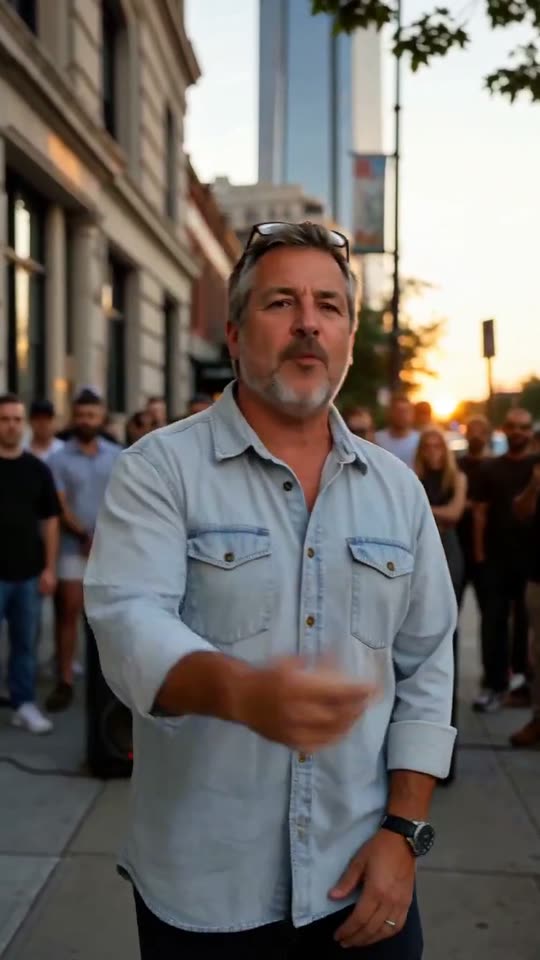
The scene is a city sidewalk at golden hour with a small crowd and a portable speaker behind you. The camera pushes slowly in, you nod on the beat and use confident hand gestures. Your face, hair and clothes are read from the photo you upload.
- Input: one clear, front-facing photo of one adult with the mouth visible.
- Output: a 10-second vertical MP4 with our original beat and an AI-generated rap vocal.
- Price: 50 credits for the complete clip. No subscription is required.
Bulin 47 AI rap videos from two sample portraits
These are complete runs from two AI-generated adult portraits (not real people), played with sound. They are resized for the page, not shortened or assembled from hand-picked frames.
Is this the official Bulin 47 template?
No. This is our own version, inspired by the TikTok trend. The beat is our own original beat, and the rap vocal is AI-generated for this effect. No Bulin 47 audio, footage or lyrics are used anywhere in the clip. The look is similar to the trend: a street freestyle, a head nod on the beat and a crowd behind. The video itself is new and made from your photo.
How do I make a bulin 47 ai rap video?
It takes one photo and 50 credits. A render usually finishes in 2 to 4 minutes.
- 01
Upload one front-facing photo
Choose a photo of one adult with the whole face and the mouth visible. A close portrait from the chest up works best.
- 02
Check the price and press Generate
The video costs 50 credits. The price is shown before you start, and nothing is charged until you press Generate.
- 03
Wait for the render
The tool shows progress while the 10-second clip is made. A failed render is returned to your credit balance.
- 04
Download and post
The MP4 is vertical, so it fits TikTok, Instagram Reels and YouTube Shorts without cropping. The beat is already in the file.
What do 50 credits get you?
One price covers the whole clip. Nothing is added for the beat or the vocal.
| Part of the video | What you get | Where it comes from |
|---|---|---|
| Picture | A 10-second vertical clip of the person in your photo | AI render from your photo |
| Beat | Our own original beat, matched to the length of the clip | Made by us for this effect |
| Rap vocal | A short AI-generated rap with the mouth following the words | Generated with the beat, not copied from any song |
| Scene | A city sidewalk at golden hour, a small crowd, a portable speaker | Fixed by the effect |
| Price | 50 credits, no subscription | Fixed, whatever the photo |
There is no free preview for this effect, because a preview without the beat would not show the effect.
Which photo lip-syncs best?
A clear front-facing photo lip-syncs best, because the mouth must be visible to follow the beat. These choices matter most.
✓ Lip-syncs well
One face looking at the lens
One adult with both eyes and the full mouth visible gives the render a clear face to animate.
Even, soft light
Window light or shade without hard shadows across the mouth keeps the lip movement clean.
A close portrait
A photo from the chest up shows enough of the face for the mouth to follow the words.
✕ Makes the mouth drift
Sunglasses, masks or a hand over the mouth
Anything covering the eyes or the mouth hides the details the lip-sync needs.
Side-on or tilted extreme angles
A profile has fewer landmarks, so the mouth is more likely to drift from the beat.
Group photos
The effect is written for exactly one person. A second face can swap or blend with the first.
Where does this rap clip fit?
The clip suits short, funny or confident posts about the person in the photo.
Rap-challenge posts on TikTok
Post the clip as your entry when a friend challenges you to freestyle. The beat is ours, so there is no trend sound to credit.
Birthday and group-chat jokes
Send a friend a rap verse starring themselves. Use their photo only with their permission.
Profile and channel intros
A 10-second vertical intro with sound opens a channel or a story highlight with some character.
A starting point for longer songs
For a full song with your own lyrics, the AI music video maker builds longer clips instead of a single freestyle.
How we tested the samples
Each sample on this page is one complete run of the paid effect, rendered with the same prompt and settings that Generate uses. Checked on 9 November 2026.
Before a render goes on the page we compare its audio track with our beat. In our test the beat in the output matched the beat we supplied at 0.93 normalized cross-correlation, so the sound in the file is our own beat and not a different track.
We do not shorten, speed up or hand-pick frames. The samples are resized for the page and nothing else is changed.
Questions about bulin 47 ai
Is there a free preview for this effect?
No. Most of our effects show a short watermarked preview first, but this one does not. A preview would be silent, because the beat is added only to the complete 50-credit video, and a silent preview would not show whether the mouth follows the music. The price is shown before rendering, and nothing is generated until you press Generate. If the render fails, the credits for that render are returned to your balance. Reading your photo against the checklist above is the best way to predict the result before you pay for it.
Whose voice is the rap?
The voice is an AI-generated original rap vocal made for this effect. It is not your voice, and it is not the voice of any artist, creator or person from the trend. We write the beat and the vocal ourselves, and every video uses the same beat. No song, lyric or recording from the trend is copied into the file. If you want to post it, you can mention that the audio is AI-generated, which most platforms ask for when a voice is not yours. The mouth in the video follows the words, but it is not a recording of you speaking.
Can I use my own song or my own voice?
Not yet. This version uses one fixed original beat, so the length, the lip-sync and the price are known in advance. Letting you upload a song would change the price, because the render would depend on the length and the content of your file, and uploaded music can carry rights we cannot check. If you want a longer clip with your own lyrics, the AI music video maker is the better tool for now. For this effect, the fixed beat is also what keeps every render the same length and the same price, which is why one original beat ships with the page.
Can I use two photos in one video?
Not yet. This effect is written for exactly one person: one adult, one mouth and one set of gestures. A second face competes for the same beat and can swap or blend with the first in the render. For two friends, make two separate videos and place them side by side or one after the other in your editor. If you want two people performing in one scene, the AI rap video generator has a duo style, though results with two faces vary more than with one.
What if the mouth does not match the beat?
A failed render is returned to your credit balance. A render that finishes but looks off is a different case: mouth sync depends on a clear face, so a side-on photo, sunglasses or a shadow across the lips can make the lips drift from the words. The best fix is a new photo that follows the checklist above, with one front-facing adult in even light. Each new attempt costs another 50 credits, so check the photo first. If the same good photo keeps failing, contact support.
Can I post the video on TikTok?
Yes. The file is a vertical MP4 that fits TikTok, Instagram Reels and YouTube Shorts. The beat and the rap vocal are our own original work and are included in the file, so you do not need to add a licensed sound. Use only photos of yourself or of people who agreed to appear, and label the video as AI-generated where the platform asks you to. The video is not the trend template, so do not describe it that way in your caption. Each platform applies its own rules to your account and country.
Ready to try it?
Add a photo in the tool at the top of this page. Nothing is charged until you press a paid button, and the price is on the button.
Back to the tool