
Champagne birthday AI bottle-pop video from one photo
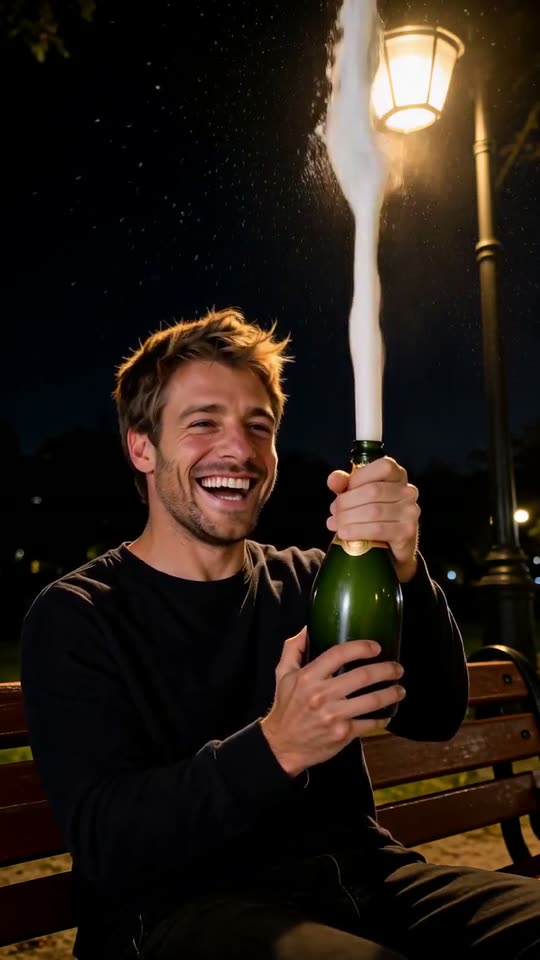
Champagne birthday AI turns one adult portrait into a 7.5-second celebration clip. First it builds a warm night scene on a wooden park bench with one dark green bottle. The cork leaves the frame, white foam rises above the subject, and the ending changes to black and white, slows down and holds on the laugh.
A clear, front-facing photo. The template keeps your face, hair and skin tone; outfits and the set come from the template.
No nudity, minors or other people's photos without consent — uploads may be checked by automated tools.
This video: 40 credits
No subscription needed · Credits never expire · Usually ready in 8-12 minutes · Failed renders are refunded
Bench Bottle Pop
Choreography locked · Facial reference enabled
The still scene and moving clip are made as one workflow. In our three tests the scene picture plus video took 60 seconds in each of the two early trials and 110 seconds in the latest full run, while every delivered file played for 7.5 seconds. Those times are measured, not guaranteed, and a busy queue can take longer.
- Input: one clear photo of one adult. This effect does not accept children, pets or group portraits.
- Your face and hair stay; the outfit changes to the party look shown in the scene, such as a dark green sequin dress.
- Output: one 7.5-second vertical MP4 with a colour opening and a monochrome slow-motion freeze ending.
- Price: 40 credits for the complete render, including the scene still and finish.
Three complete champagne birthday AI tests
All three examples began with one adult portrait. We show the full outputs, including the second sample’s imperfect bottle, so the range is visible before you generate.
How does the champagne birthday AI video work, step by step?
The effect separates scene construction from motion so the person, bench and bottle begin in a deliberate arrangement.
- 01
Upload one adult portrait
Choose a single person with the face unobstructed and enough detail around the shoulders. The photo is used to preserve identity, skin tone, hairstyle and hair colour, not as the literal first frame.
- 02
Build the birthday bench still
A vertical night photograph is drawn with the same adult seated under a warm street lamp, holding exactly one unopened dark green bottle with both hands. This gives the motion step a stable bottle neck, cork and empty sky for the foam.
- 03
Animate the cork and foam
The subject smiles, presses the cork upward, then laughs while a single stream of white foam rises above the head and falls. The action is planned so the bottle points away from the face.
- 04
Apply the final finish
For a paid unwatermarked result, the last movement becomes monochrome, plays at half speed and freezes. If the finishing step cannot run, the plain colour clip is delivered instead of a failed render.
Why is your photo turned into a night bench scene first?
A portrait usually has no bottle, bench, street lamp or open sky. Asking a moving-video step to invent all of those while also preserving a face creates too many simultaneous changes. The separate still establishes one adult, one opaque bottle, two visible hands and a safe upward bottle angle before motion begins. It also lets the original photo be close-up or indoors without pretending that its room is a park. The new setting is fictional, and small clothing or hand details can still be invented.
What is in the 7.5 seconds: colour, slow motion, freeze?
| Delivered time | Picture | Action |
|---|---|---|
| 0 to 4.5 seconds | Full colour under a warm street lamp. | The subject smiles, grips the bottle, pushes the cork free and the foam begins. |
| 4.5 to 6.5 seconds | Black and white, played at half speed. | One second of the original foam-and-laugh action expands to two seconds. |
| 6.5 to 7.5 seconds | Black-and-white final frame. | The last image is cloned for a one-second freeze so a caption can land. |
The motion request is eight seconds, but the deliberate edit selects the strongest early action and delivers a 7.5-second finished clip.
Which photos keep the bottle and face right?
The bottle is invented, while the face and hair come from the upload. Inputs that clearly separate those areas give the scene fewer ambiguous shapes.
✓ Choose
One adult facing forward
A clear, evenly lit face is easier to preserve after the scene changes. A small natural smile works because the clip grows into a laugh.
Shoulders and hands unobstructed
Hands do not need to be visible in the source, but avoid a hand covering the chin or cheek because it can carry into the bottle grip.
Simple hair outline
Keep the whole hairstyle inside the frame. Empty space above the head helps the new picture reserve room for the foam stream.
✕ Avoid
Children or uncertain age
The scene depicts an alcoholic drink, so this effect is restricted to adults even when the intended post is only a joke.
Two people
The scene prompt specifies one person and one bottle. A couple photo can merge faces, invent a second bottle or place an unwanted person on the bench.
Existing bottles or readable labels
A bottle already in the photograph can compete with the one built for the scene. Logos and label words may also turn into garbled marks.
What we measured on three clips
n = 3 full renders: two trials on 5 and 6 November 2026 and one paid render on 13 November 2026. We looked at every clip frame by frame around the cork, the foam and the freeze.
| Check | Clip 1 | Clip 2 | Clip 3 |
|---|---|---|---|
| Delivered length | 7.5 s | 7.5 s | 7.5 s |
| Time to render | 60 s | 60 s | 110 s |
| Face and hair kept | Yes | Yes | Yes |
| Outfit | Changed to the scene look | Changed to the scene look | Changed to the scene look |
| One bottle, solid | Yes | Slight transparency under the foam | Yes |
| Foam still rising when black and white starts (4.5 s) | Yes | Yes | Yes |
Three renders is a small sample. It shows what the effect can do, not how often the bottle or the hands slip.
How we wrote this, and what we have not tested
How we wrote this: the CastTake team wrote this page on 13 November 2026 from our own three test renders (n = 3), each checked frame by frame. We have not tested glasses, beards with heavy shadow, hats, very dark skin in low light or photos taken from far away, so those results may differ from the clips here. Check the cork moment and the area under the foam before you share.
Questions about champagne birthday AI
Why is there no free preview for champagne birthday AI?
This effect has to draw a complete night-bench still before it can animate anything, so even a short preview would pay for and create the most expensive setup step. It therefore begins with the 40-credit full render instead of offering a free starter. The price shown covers the scene picture, the eight-second motion request and the optional 7.5-second finish. Nothing should be submitted until you confirm that price. The two page samples exist to show the framing, bottle position, foam and likely flaws before you use your own photo.
Why must the person be 18 or older?
The scene centres on opening a bottle presented as champagne, so it is designed only for an adult subject. That restriction applies even if no one drinks, the bottle has no label, or the post is meant as a harmless birthday greeting. Use a photograph where the person is clearly an adult; a child, teenager or age-ambiguous face can be refused during screening. This is a condition of this specific scene rather than a claim that every birthday effect needs alcohol. For a younger subject, choose a celebration template without a bottle and avoid trying to disguise age in the prompt or image.
Can the bottle or hands look wrong?
Yes. Generative video can bend the bottle neck, change its apparent transparency, soften fingers or briefly create an extra edge when the foam covers the hands. The still-first workflow reduces those failures by starting with exactly one solid dark green bottle held in a defined position, but it cannot guarantee physical continuity in every frame. Our second sample has a slight bottle-shape flaw, which is why its note says so. Inspect the cork moment and the area under the foam before posting. If an error changes the meaning or looks unsafe, do not publish that result.
Can I upload a photo with two people?
No. The still and motion plans both specify one adult, one face, two hands and one bottle. With two people, the drawing step has to guess who sits on the bench and may blend identities, place an extra figure in the background or invent another bottle. Crop to the intended person before uploading, but do not crop so tightly that the hair or shoulders disappear. If the post is for a couple, generate separate solo clips or use an effect explicitly designed for two photos. Consent still matters: use your own image or one the pictured adult has allowed you to animate.
Does the downloaded video include a birthday song?
No. The planned sound is only the cork, fizz and a happy laugh; it does not include a commercial song or reproduce a particular recording. Add music after downloading by choosing a licensed track inside the social app or editor where you will publish. The black-and-white freeze gives you a clean place for the last beat or a short birthday caption. Platform music rights differ by country and account type, so using an in-app library is more reliable than baking a copied recording into the generated file. You can also keep the clip quiet and add your own spoken greeting.
How long does the scene still and video take?
Our measured tests took about 60 seconds for the still and motion together, followed by a short local finishing step. That is a practical observation, not a service guarantee. Image screening, queue traffic and temporary capacity can add time, while a warm and quiet queue may finish sooner. The delivered edited clip remains 7.5 seconds regardless of processing time. If the finishing step cannot run, you receive the plain eight-second colour clip rather than a failed render, and the credits are not lost.
What happens for an account that has never bought credits?
A never-bought account can be subject to the normal watermark policy. In that case the render remains the plain eight-second colour clip because post-processing is permitted only when the result can be persisted unwatermarked. The monochrome slow-motion freeze is applied to eligible paid, clean outputs, after the motion render succeeds. This ordering prevents a finished file from bypassing watermark rules. Buying access does not retroactively promise that every old render will be re-edited, so read the result shown for the task you created and keep the raw clip if that is what the account policy delivered.
Ready to try it?
Add a photo in the tool at the top of this page. Nothing is charged until you press a paid button, and the price is on the button.
Back to the tool