
Burning Bridges AI: one photo, then you walk out of the party
Upload one clear photo. In a crowded chandelier-lit party you shade your eyes and search the room, spot the camera, then walk out of the crowd and point straight at it.
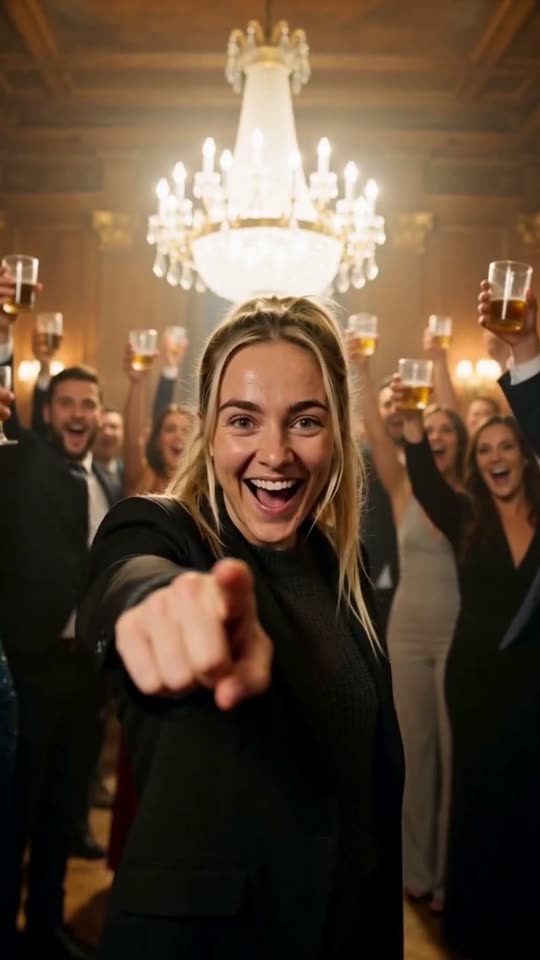
The Burning Bridges AI trend puts an ordinary person into a glossy party scene: you walk toward the camera out of a crowd under crystal chandeliers, stop, put a hand over your eyes, and then look straight into the lens. Here you add one photo and get an 8-second vertical clip with your face kept from the photo.
A clear, front-facing photo. The template keeps your face, hair and skin tone; outfits and the set come from the template.
No nudity, minors or other people's photos without consent — uploads may be checked by automated tools.
About 5 seconds of you in this format.
This video: 64 credits · about 12 videos a month for $29.90 on Creator, or $288 a year
No subscription needed · Credits never expire · Usually ready in 8-12 minutes · Failed renders are refunded
Chandelier Party Scan
Choreography locked · Facial reference enabled
This is our own version of that scene, not the original music video: a new room, a new crowd and no song, so you add the sound from TikTok, Reels or Shorts when you post.
- Input: one clear photo of one adult, face to the camera.
- Output: an 8-second vertical 9:16 video with a low party bassline and crowd chatter, no vocals.
- Price: first video $2.99 once per account, then 64 credits (about $2.39). No subscription, credits never expire.
The four beats of the Burning Bridges AI clip, and when they land
Posts in this trend differ in outfit and room, but nearly all of them hit the same four beats. This is what the trend asks for next to what our template renders, so you know what to expect before you upload. Ours opens on the hand over the eyes and puts the walk second.
| Beat | What the trend does | What our clip does | Where in the 8 seconds |
|---|---|---|---|
| The walk-out | The lead leaves a crowded room and walks toward the camera with a loose, confident stride. | After you spot the camera you laugh, push past the guests beside you and stride toward the lens. | 0:03 to 0:06 |
| The hand over the eyes | One hand goes up over the eyes, as if from the lights or as a refusal to look back. | The clip opens on it: one hand flat above your eyebrows like a visor, leaning forward and searching the crowd from left to right. | 0:00 to 0:03 |
| The straight look | The hand drops and the lead looks directly at the lens. | Your eyes stop on the camera, your face lights up and the hand comes down. | At 0:03 |
| The exit | Often a turn, or simply the freeze at the end of the shot. | No turn. You point straight at the lens, the guests behind you raise their glasses and cheer, the chandelier flares and the frame holds. | 0:06 to 0:08 |
Where the free preview is offered it is a separate, watermarked 5-second render of the same scene, not the full 8 seconds. A clip that fits the trend's usual length is 10 to 12 seconds, so ours is a little shorter.
Four Burning Bridges AI clips we rendered ourselves
Each clip is the full 8-second render from the Burning Bridges template, made from one AI-generated portrait each of four different people, never a real person. What went in and what came out are written under each one, including what did not come out well.
What the Burning Bridges AI trend is
The trend takes its name from a song, and the clip it copies is a party scene from the song's music video. People put their own face, or a friend's, in the lead role and post the result with the song's sound laid over it. The explainers and how-to posts that circulate describe the same shape: a walk out of a party, a swagger, and a hand over the eyes before the look at the camera.
Three ways of making it are going around. The most common is a CapCut template, where your photo drops into an edit somebody else built. The second is a one-photo generator site that renders a clip from a single picture. The third is a character swap, where you trim a few seconds of the original scene and run it through a swap tool with your photo. All three take a few minutes, and none of them guarantees a result on the first try.
We built the second kind and went one step further than most: the scene is our own, the prompt is printed below, and the render uses your face but not anyone else's. That is why the room here is a party of our own invention and why there is no song in the file.
How to make a Burning Bridges AI video in five steps
Nothing needs to be written or edited first. The room, the crowd, the camera move and the timing are fixed by the template. The only thing you choose is the photo.
- 01
Pick one clear photo of one adult
Use a photo where your whole face is visible and you are looking roughly at the camera. Shoulders in the frame help, because the clip opens close on your face and shoulders.
- 02
Drop it into the tool at the top of this page
Upload the photo and choose a look if the page offers presets. You tick a box to say the person in the photo is you, or an adult who agreed.
- 03
Sign in with Google and see the price
Generate asks you to sign in, then shows the price before anything renders. Your first video is $2.99, once, with no subscription, and a render that fails is never charged.
- 04
Wait a few minutes
The render waits in a shared queue, usually 8 to 12 minutes. You can close the tab. The clip appears in your dashboard as a vertical MP4.
- 05
Add the sound when you post
Our clip has a party bassline and crowd chatter, no vocals. Upload it to TikTok, Reels or Shorts and pick the trend sound from the platform's own library, so the music stays licensed by the platform.
Photos that make the walk-out look right
Only your face and general look come from the photo. The room, the light and the guests are built around you, so the face is what to get right.
✓ Works
A well-lit, front-facing portrait
The room is warm and dim. A bright, even photo gives the model enough detail to keep your face recognisable under that gold light.
Glasses, earrings or a beard are fine
Small features that sit on the face usually come through. In our four clips the two beards and the round glasses all survived the hand movement.
A photo that already shows your shoulders
The clip opens close on your face and shoulders, so a head-and-shoulders photo matches the framing it starts from.
✕ Breaks it
A hand already in front of your face
The hand-over-eyes beat opens the clip. If the photo already has a hand across the face, the model has less of your face to keep.
Two or more people in the frame
The prompt asks for one clear lead. The others tend to be pulled into the crowd or turn into a second lead.
A child, a celebrity or a screenshot of someone else
This template is for adults who agreed. A photo that looks like a minor is turned away, and the confirmation you tick rules out public figures.
Three ways to make a Burning Bridges AI clip
These are the three routes you will see in search results. They differ in what you control and in what ends up in the file. Check each tool for its current price and terms before you upload.
| Detail | CapCut template | One-photo generator (CastTake) | Character swap on the original clip |
|---|---|---|---|
| What you do | Open a shared template, replace the placeholder with your photo | Upload one photo and press generate | Trim a few seconds of the original scene, then upload that clip and your photo to a swap tool |
| Whose scene it is | The template author's edit, often with the original footage | A new scene we generate around your face | The original music video footage with your face swapped in |
| Prompt or settings | Fixed by the template author | Printed in full on this page | You choose the clip and the swap settings |
| Sound | Usually the original track | Bassline and chatter, no vocals; add a platform sound when you post | Whatever audio the source clip had |
| Rights risk | Depends on the template; original footage can be claimed | Our own scene, no artist and no song in the file | Highest, because it reuses the original video |
| Cost | Many are free; some need a CapCut Pro plan | First video $2.99 once, then 64 credits; no subscription | Depends on the swap tool |
CapCut and the swap tools mentioned are separate products and are not connected to CastTake. If you want a free version and do not mind a shared edit, a CapCut template is a fair choice. If you want your own clip with a prompt you can see and reuse, that is what this page is for.
Copy these Burning Bridges AI prompts
These are English versions of the prompt our template sends to the video model (the original is written in Chinese). Paste them into any reference-to-video model that takes one face photo, or just use the tool above.
Prompt 1: the full 8-second scan
8 seconds, 9:16 vertical, no dialogue, no subtitles or text. Audio: the low bass beat of an indoor party and the chatter of the crowd, no singing and no lyrics. The person from image 1 is the lead and keeps their exact face, face shape, skin tone and hair for the whole clip; only the lead is clearly visible, every other guest is a blurred figure in the background with no clear face. They wear a complete, smart dark shirt or knit with a jacket; the clothes do not have to copy the photo. Scene: a party in an old house at night, dark wood-panelled walls, a huge crystal chandelier overhead, warm gold light, a faint haze in the air, the room packed with guests holding glasses, all blurred; the lead stands in the middle of the crowd, waist up, close to the camera. Vertical, cinematic, shallow depth of field; the shot opens close on the lead, the camera first circles them a little and then slowly backs away. Shot 1 (0 to 3 s): from the first frame they already hold one hand above their eyebrows like shading their eyes from the sun, palm down, fingers together, eyes visible under the hand; leaning forward and squinting, they look left and right through the crowd, anxious and exaggerated, the head turning slowly from left to right. Shot 2 (3 to 6 s): their eyes suddenly stop on the camera and light up; they drop the hand, break into a surprised laugh, push past the guests beside them and stride toward the camera. Shot 3 (6 to 8 s): they point straight at the lens, the guests behind them turn round together and raise their glasses high with a cheer, the chandelier suddenly brightens, freeze frame.
Prompt 2: a 3-second version (shot one alone)
3 seconds, 9:16 vertical, no text, no lyrics. Same person and clothing rules as above, same party room. A single continuous shot, close on the lead: one hand held above the eyebrows like shading the eyes from the sun, palm down, eyes visible under it, leaning forward and searching the crowd from left to right. No cuts and no outfit change. This is the opening beat alone, for a model that only makes short clips; our own template always sends the full prompt above.
Prompt 3: the negative list we send
Avoid: a changed or swapped face, drifting features, a second clearly visible lead, guests with clear faces, extra fingers, fused fingers, plastic skin, anime look, over-smoothed skin, on-screen text, subtitles, lyrics, singing, brand marks, watermarks, logos, the likeness of real artists, the likeness of real celebrities. Lyrics, singing and real likenesses are on the list on purpose: this is our own scene, so nothing from the original video should appear in it. Despite the trend's name, nothing in the scene burns either.
This is not the original video, and it is not connected to the artist
The scene is our own invention and the clip contains no footage, music, lyrics or likeness from the music video that gave the trend its name. We name the song only to explain what the trend is. Add the sound inside TikTok, Instagram or YouTube when you post so it stays properly licensed by the platform. Use your own photo or an adult friend's who agreed, and take a clip down if the person in it asks.
What one Burning Bridges AI clip costs
| Detail | Length | Credits | Price |
|---|---|---|---|
| Free preview, where offered | 5 s | 0 | Free, watermarked |
| First full video on an account | 8 s | 64 | $2.99, once |
| Each one after that, on the Creator plan | 8 s | 64 | $2.39 |
Priced on the Creator plan ($29.90 a month for 800 credits). A credit pack is a single payment that never renews, and its credits never expire. The button shows the credit cost before anything is charged, and a failed render gives its credits back.
Burning Bridges AI clips: when and how they were made
The record behind the four clips above.
| Item | Detail |
|---|---|
| Rendered | 11 October 2026 |
| Method | The Burning Bridges template on this page, reference to video, one portrait per clip |
| Inputs | Four different AI-generated portraits, never a real person |
| Length and editing | 8 seconds each, full renders, only resized, trimmed at the sides to 9:16 and compressed for the web |
| Reviewed | Frame by frame for face drift, extra people and clothing |
Each portrait was rendered once with this prompt. We did not pick the best of several runs, so the guests come into focus in the first clip and the last one ends far from the lens, and we say so in their notes.
Burning Bridges AI questions
What is the Burning Bridges AI trend?
It is a short-video trend where your face is put into a party scene copied from the music video of the song Burning Bridges. The usual clip has the lead walking out of a crowded room with a swagger, putting a hand over their eyes, and then looking straight at the camera. People make it with a CapCut template, a one-photo generator or a character swap, then post it with the song as the platform sound. On this page you upload one photo and an AI video model builds a new party scene around your face, so the clip is yours rather than the original footage.
Is the Burning Bridges AI video free?
The full 8-second clip is paid, and you see the price before it renders. Some accounts are offered a watermarked 5-second version first. The first full clip on an account costs $2.99, once, and later ones use 64 credits, about $2.39 on the Creator plan. Credit packs are single payments that never renew and never expire, and a render that fails returns its credits. Free CapCut templates for the trend exist too, so compare before you pay anywhere, because they make a different thing: a shared edit rather than a new clip.
How long does a Burning Bridges AI video take to make?
A render usually takes 8 to 12 minutes, because it waits in a shared queue with everyone else's renders. You do not have to keep the page open: close the tab and the finished clip waits in your dashboard as a vertical MP4. At busy hours it can take a little longer. A render that fails is not charged, and you can start another straight away with the same photo or a better-lit one. The clip itself is 8 seconds, a little shorter than most posts in the trend.
Do I get the original song and video?
No. The clip is our own scene with its own party sound, a low bassline and crowd chatter, and it contains no footage, no lyrics and no vocals from the music video. That keeps it clear of the copyright claims that follow the original footage around. To use the song, add it from the TikTok, Instagram or YouTube sound library when you post, so the platform handles the licence. We are not connected to the artist or the label, and the page names the song only because the trend is named after it.
Why does my hand look like a salute?
In our scene the hand is held flat above the eyebrows, the way you shade your eyes from the sun to look for someone, so your eyes stay visible under it. That is on purpose: a hand laid right across the eyes hides most of the face, and a hand crossing a face is where a likeness is most likely to slip. Held a little too high or too stiff, the same gesture can read as a salute. If yours looks like that, render again with a photo where your face is clear and your arms are not in the frame, because a second run often lands differently. We published the result of a single run for each portrait, and said so in the render log, so you know what an average attempt looks like.
Can I make the Burning Bridges AI video with two people?
Not yet. This template takes one photo and keeps one person as the only clearly visible lead, because a solo shot keeps the face closest to the photo. A two-person version needs two faces kept apart for the whole clip, and we have not built that scene. For now you can render one clip for each person and cut between them in CapCut or the TikTok editor. If you want a two-person clip today, our Hotel Lobby AI duo takes two photos in a different scene, with a booth and a microphone instead of a party.
Can I use a photo of a friend or a celebrity?
A friend, yes, if they are an adult and they agreed; a celebrity, no. Before generating you confirm that the person in the photo is you or an adult who said yes. Putting a public figure into a party scene they never filmed is the kind of video platforms label as misleading and remove, and it can break likeness laws in several countries. A screenshot of someone else's post counts as their photo, not yours. If someone in your clip asks you to take it down, take it down. Photos that look like a child are refused on this template.
Why does my outfit change in the clip?
The photo sets who is in the clip, not exactly what they wear. The model keeps your face as a likeness and then dresses you for an evening party, so a hoodie comes back as a jacket. The prompt always asks for a complete dark shirt or knit with a jacket, whatever the photo shows. In our four clips a green hoodie, a grey T-shirt, a yellow sweater and a blue polo all became a dark top under a dark jacket. The outfit in your photo will not carry over, so pick the photo for your face and hair.
Ready to try it?
Add a photo in the tool at the top of this page. Nothing is charged until you press a paid button, and the price is on the button.
Back to the tool