
Dime dime baby AI concha bite dance from one photo
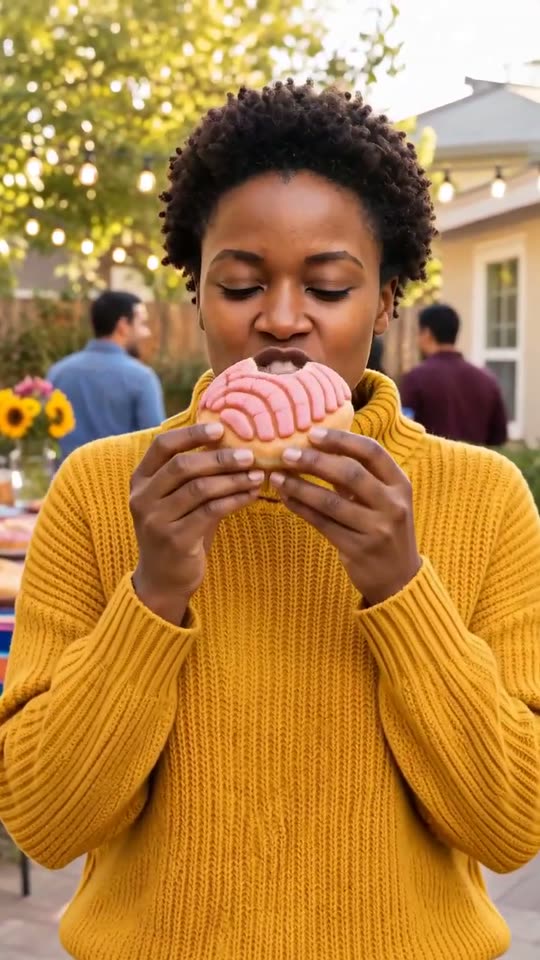
Dime dime baby AI builds a sunny backyard party around one adult photo, then turns the new scene into an 8-second vertical clip. The subject walks toward the camera holding one pink-topped concha, takes a bite without changing expression, looks directly into the lens, then turns and dances toward the distant guests.
A clear, front-facing photo. The template keeps your face, hair and skin tone; outfits and the set come from the template.
No nudity, minors or other people's photos without consent — uploads may be checked by automated tools.
This video: 40 credits
No subscription needed · Credits never expire · Usually ready in 8-12 minutes · Failed renders are refunded
Backyard Bun Dance
Choreography locked · Facial reference enabled
This is our own compact visual interpretation of the online format. It does not include the original recording, artist footage, copied choreography or on-screen lyrics. The background guests are invented and kept soft so the uploaded person remains the only main identity.
- Input: one clear photograph of one adult; pets, children and group photos are not supported.
- Output: one 8-second 9:16 MP4 with a generated backyard, bun, bite and dance-away ending.
- Price: 40 credits for the scene still and full video.
Two dime dime baby AI clips, shown as they came out
Each clip is one render from the settings this page sells, shown as it came out, from a fictional adult and not a real person. We looked at every half second for the face, the outfit, the bun, hard cuts and stray text.
Which moves of the dime dime baby trend does the clip copy, and which does it skip?
The clip keeps the recognisable story beats while avoiding a claim to reproduce a particular performer or full routine.
✓ Included beats
The walk toward camera
The subject approaches while holding one round pink-topped sweet bun at chest height. This establishes the food joke before any dancing starts.
One bite and a deadpan stare
The middle beat is deliberately still: one bite, a short chew and direct eye contact. The contrast makes the later movement easier to read.
A dance away from the lens
The subject turns toward the party with a hip sway and shoulder bounce, glancing back once. It is a simple generated groove, not copied choreography.
✕ Not included
No named performer
The upload supplies the only lead identity. Background guests are generic, distant adults and do not imitate a real artist or creator.
No official song or lyrics
The file carries party ambience rather than a protected recording. Add a licensed sound from the platform where you post.
No full dance reconstruction
The eight-second plan ends after a few readable motions. It does not claim to teach or reproduce every step seen in longer posts.
Who works best in a dime dime baby video?
Because the face must survive a new patio scene and then a turn away from camera, a straightforward adult portrait gives the most useful identity information.
A birthday friend who likes food jokes
The concha gives the clip a specific prop and an easy caption. Use the friend’s photo only with permission and keep the joke affectionate.
A food creator with a clear portrait
The deadpan bite can introduce a recipe or bakery post, but the generated bun is fictional and should not be presented as an exact product.
Yourself in everyday clothes
The still prompt asks to retain the clothes from the photo. A simple outfit with clear edges tends to move more coherently than fine stripes or loose accessories.
Not a child or pet
This scene is written for one adult moving through a party with food. Animal anatomy and uncertain ages are outside the supported setup.
How does it compare with a CapCut template?
| Question | This AI effect | A conventional edit template |
|---|---|---|
| What you provide | One adult photo. | Usually one or more existing video clips. |
| How movement appears | The system creates a new body performance and party scene. | The editor cuts, crops or times footage you already recorded. |
| How consistent is the prop | The bun and fingers can change because they are generated. | A real bun in real footage remains physically consistent. |
| Is timing repeatable | The three planned beats stay, but exact movement varies. | Fixed cuts and keyframes are more repeatable. |
| Best use | A fictional surprise starring someone who did not film the dance. | A polished version of a dance someone actually recorded. |
Choose an editor template when exact choreography, hand detail or product accuracy matters more than the one-photo transformation.
Why is the song not in the file?
A trend sound and a visual format are different assets. This effect generates the walk, bite, stare and dance-away structure, but it does not copy a commercial master recording, lyrics or a performer’s voice. The downloadable video can therefore travel without pretending that CastTake licenses a song for every platform, country and account type.
When you post, select an authorised sound inside the destination app and move its strongest transition to the deadpan stare or the turn into the dance. If the sound is unavailable for a business account, use original narration, a bakery sound effect or silence. The generated party ambience can be muted without changing the visual story. Always follow the posting platform’s current music and disclosure rules.
What we measured on both clips
n = 2 full renders, one per photo, rendered on 13 November 2026. We reviewed each clip every 0.5 seconds, which is 16 steps per clip, and counted what we saw.
| Check | Woman photo | Man photo |
|---|---|---|
| Steps reviewed | 16 | 16 |
| Hard cuts | 0 | 0 |
| Face and hair kept | Yes, all 16 steps | Yes, all 16 steps |
| Outfit kept | Yes | Yes |
| Clear bite on screen | Yes, from 2.5 s | Yes, from 2.5 s |
| Dance-away | A walk and sway | A walk and slight sway |
Two renders is a small sample. It shows what the effect can do, not how often the bun or the hand slips.
How we wrote this, and what we have not tested
How we wrote this: the CastTake team wrote this page on 13 November 2026 from our own two test renders of the same day (n = 2), each reviewed by eye at 0.5-second steps. Both passed with the small notes under each clip. We have not tested pets, children’s photos (refused), people with very different faces or clothes with fine patterns, so those results may differ from the clips here. Check the middle seconds before you share.
Questions about dime dime baby AI
Can the concha bite or hands have artefacts?
Yes. A hand bringing generated food toward a moving mouth is one of the hardest parts of this short scene. Fingers may soften, the bite mark can appear early, the pink topping may shift, or the bun can briefly change thickness. The still-first setup begins with one clearly defined concha at chest height and gives the motion step a better starting geometry, but it cannot turn generated pixels into a physically tracked object. Review the middle seconds at normal speed and frame by frame. If the hand merges with the face or the prop duplicates, do not publish that render.
Can I use a pet photo for dime dime baby AI?
Not yet. The scene is designed around an adult human holding a bun with two hands, taking one bite and performing a hip-and-shoulder dance on two legs. A pet upload would force the system to invent human anatomy or unsafe feeding behaviour, and the still prompt does not provide a supported animal alternative. Choose a pet-friendly effect such as the shaking-head reaction instead. For this page, use one clearly adult person, keep the face and upper body visible, and avoid a photograph that already contains another person or animal near the subject.
How long is the dime dime baby AI clip?
The motion request and delivered file are planned for 8 seconds. Roughly the first two and a half seconds cover the approach, the next two seconds hold the bite and deadpan look, and the remaining time turns into the dance away. Small timing differences can occur because the performance is generated rather than assembled from fixed stock frames. Processing time is separate from output length and can vary with queue conditions. The price is 40 credits for the complete result, including the scene still that establishes the party and bun before animation begins.
Is this an official recording or artist video?
No. The clip is an original generated scene that uses a descriptive name people search for, not footage from a music video, a copied performance, an artist’s face, a voice clone or an official recording. The uploaded adult is the only lead identity. The backyard guests are generic fictional figures kept out of focus, and the motion is a short walk, bite and simple groove written for this template. Do not caption the result as an endorsement or real appearance. If you add a song, obtain it through the posting app’s licensed library and follow that service’s terms.
How should I post the result on TikTok?
Save the MP4, start a new post, add a licensed sound available to your account, and align the musical change with either the direct stare or the turn away. Keep any caption clear that the scene is AI-made, especially when the subject is someone other than you. Watch the draft once with interface overlays visible so a caption does not cover the bun or face. TikTok’s music, synthetic-media and labelling controls can change, so use the options currently shown in the app rather than relying on an old checklist. Obtain the adult subject’s consent before publishing.
Ready to try it?
Add a photo in the tool at the top of this page. Nothing is charged until you press a paid button, and the price is on the button.
Back to the tool