
Shaking head AI with a smug smile and surprise ending
One still photo becomes a quiet reaction clip with a sharp final reveal.
Shaking head AI makes a 6-second vertical reaction video from one photo. The subject closes their eyes, settles into a pleased smile, slowly shakes their head from side to side three times, then stops and opens their eyes wide at the camera. The fixed framing makes the change in expression the whole joke.
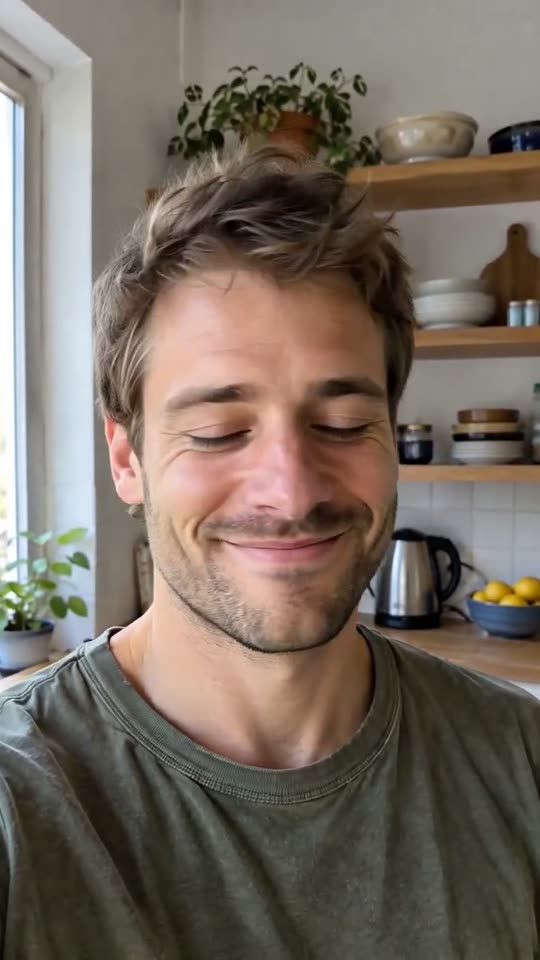
A clear, front-facing photo. The template keeps your face, hair and skin tone; outfits and the set come from the template.
No nudity, minors or other people's photos without consent — uploads may be checked by automated tools.
About 5 seconds of you in this format.
This video: 40 credits
No subscription needed · Credits never expire · Usually ready in 6-9 minutes · Failed renders are refunded
Smug Head Shake
Choreography locked · Facial reference enabled
It works with one adult or one cat or dog. The upload remains the first frame, so the original clothes, room, light and camera angle have a better chance of staying stable than they would in a scene-changing effect. Our three tests took about 45 seconds to render and produced files that played for roughly 6.6 seconds.
- Input: one clear photo of one adult, cat or dog, looking toward the camera.
- Output: a vertical reaction MP4, nominally 6 seconds; our test players reported about 6.6 seconds including the final held frame.
- Price: 40 credits for the complete clip. No subscription is required.
Three shaking head AI results
These are complete runs from two adult portraits and one cat portrait. They are resized for the page, not shortened or assembled from hand-picked frames.
What is the shaking head AI trend?
It is a compact reaction format built around contrast. A subject first looks pleased with themselves, eyes closed and smiling, while a slow repeated no gesture suggests disbelief or mock disapproval. The subject then stops without a camera cut and opens their eyes very wide. Because the opening is calm, the sudden stare reads as the punch line. This version recreates that performance from a still photo; it does not copy another person, a branded clip or a soundtrack.
What happens in each second of the 6-second clip?
The motion follows one continuous shot. Exact fractions vary slightly between renders, but the intended beats stay in this order.
| Time | Face and movement | What makes it work |
|---|---|---|
| 0 to 1.5 seconds | The eyes ease closed and the mouth forms a small, confident smile. | A neutral, visible face gives the expression room to change. |
| 1.5 to 4.5 seconds | The head moves left and right three times while the smile holds. | A fixed camera lets viewers count the rhythm without distraction. |
| 4.5 to 6 seconds | The head stops, both eyes open wide and the subject stares at the lens. | The pause and direct gaze create the reaction payoff. |
Our encoded samples are described as six-second renders, while common players show approximately 6.6 seconds because the final frame is held briefly.
How do you make the shaking head meme from one photo?
The effect has no prompt box because the performance and camera plan are already fixed.
- 01
Choose one readable face
Use a front-facing image where both eyes, the mouth and the outline of the head are unobstructed. A phone portrait is enough; it does not need studio lighting. Crop out other people so the generator has only one subject to animate.
- 02
Check the opening frame
The upload becomes the opening image. Make sure the orientation is upright and the face is not already strongly squinting, because the first movement needs to close the eyes visibly before the smile and shake begin.
- 03
Generate and inspect the final stare
Start the 40-credit render, then watch the whole result once. Check that the identity remains stable, the head does not stretch at either side of the swing, and both eyes open together near the end.
- 04
Add sound only when you post
The downloaded file is intentionally quiet. Add a licensed trend sound in the social app if you want one, lining its last accent up with the moment the eyes open. Keeping sound separate avoids putting an unlicensed recording in the generated file.
Which photos make the eyes-open moment land?
The strongest input is not necessarily the most polished portrait. It is the image whose face can change without important details being hidden.
Straight-on adult portrait
A person looking close to the lens gives both eyes equal weight. Soft, even light keeps the eyelids readable during the close and makes the final white of the eyes more visible.
Cat or dog with both eyes visible
Pets can take the lead, but their version is subtler. Pick a calm animal portrait without a paw, toy or blanket covering the muzzle, and expect a squint rather than a perfectly human expression.
Simple background and steady framing
A plain wall, room or outdoor blur gives the model fewer edges to bend while the head moves. Busy shelves can shimmer slightly at the sides even though the camera is intended to stay fixed.
Avoid profiles and covered faces
Side views, dark sunglasses, heavy fringe, hands against the cheek and extreme close crops conceal the landmarks that define the ending. Group photos are unsuitable because the effect is written for exactly one subject.
Questions about shaking head AI
Does the free preview show the eyes opening?
No. When a free preview is offered, it uses only the first part of the performance: the closed-eye smile and slow head shake. The wide-eyed stop is the final payoff and appears in the complete 40-credit video. A preview is therefore useful for checking whether the face, hair, clothes and background stay stable during movement, but it should not be read as the full story. Some visitors are not offered a preview at all; in that case the price is shown before rendering and no generation begins until they choose the paid result.
Can I use a cat or dog photo for shaking head AI?
Yes. This effect specifically allows one real cat or dog as well as one adult person. Use a photograph with both eyes visible, a clear muzzle and only one animal in the frame. The output will not give every pet a human facial performance: in our cat test, the eye close and head movement were smaller and felt like an animal reaction, which looked more natural. Photos with two pets, a person holding a pet, costumes covering the face or a very dark coat against a dark background can make the identity and eye movement harder to preserve.
Why does a six-second result sometimes show as 6.6 seconds?
The planned action is six seconds, and that is the duration used for generation and pricing. Video encoders and players can report a little extra time when a last frame is held, timestamps are rounded to the nearest frame, or the container stores a slightly longer display timeline. Our three page samples commonly read about 6.6 seconds in a player even though the performance itself finishes on the six-second plan. That small tail is useful because the surprised stare remains visible instead of disappearing immediately. It is not another scene, another paid segment or a hidden extension of the action.
How should I add the trend sound?
Download the result, open it in the app where you plan to post, mute any unwanted room sound and choose a licensed sound from that app’s library. Slide the audio so the strongest beat, stop or spoken reaction lands when the eyes snap open near the end. Using the platform library is safer than embedding a commercial recording in the generated file, and it lets each platform apply its own territory and account rules. The effect itself does not name, copy or include a song, so the same silent visual can also be used with original narration, a sound effect or no audio.
How long does shaking head AI take to render?
Our measured tests completed in about 45 seconds, but that is an observation rather than a guaranteed deadline. Queue traffic, image screening and temporary provider capacity can make a later request faster or slower. Keep the page open until the task is accepted; after that, the generation history can show the result even if you move elsewhere. If the service reports a failure, the normal credit-refund rules apply. A slow task does not mean the head-shake motion is being made longer, because the delivered performance still follows the same six-second shot plan and fixed credit price.
Ready to try it?
Add a photo in the tool at the top of this page. Nothing is charged until you press a paid button, and the price is on the button.
Back to the tool