
Fireworks Video Effect for one photo and a 10-second night sky
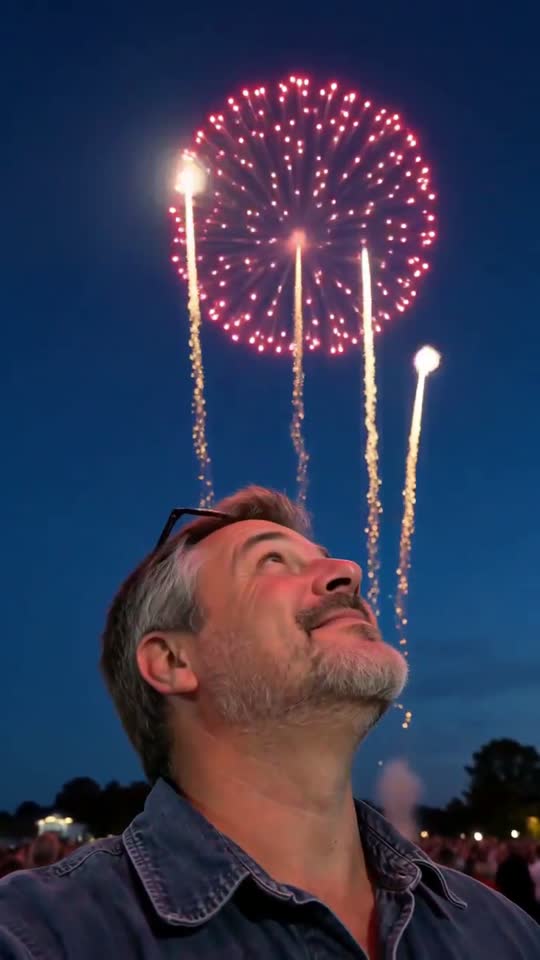
The light drops to dusk, gold trails climb behind you and open into red, gold and blue bursts while you look up and smile.
The fireworks video effect turns one photo into a 10-second vertical clip: your picture holds for a moment, the sky behind you darkens to blue, and gold trails rise into large red, gold, blue and pink bursts that tint your face before the sparks drift down.
A clear, front-facing photo. The template keeps your face, hair and skin tone; outfits and the set come from the template.
No nudity, minors or other people's photos without consent — uploads may be checked by automated tools.
About 5 seconds of you in this format.
This video: 20 credits
No subscription needed · Credits never expire · Usually ready in 10-15 minutes · Failed renders are refunded
Fireworks Night Sky
Choreography locked · Facial reference enabled
It is a short celebration scene for greetings and posts, not a recording of a real display and not a text-to-video fireworks reel with no one in it. The subject stays you, a friend who agreed, or a pet. New Year, Guy Fawkes night, a birthday or a graduation all work as a reason to post it.
- Input: one clear photo of one adult or one pet, face fully visible, with open space above the head.
- Output: one 10-second vertical 9:16 MP4 with the sound of rising and bursting fireworks and distant cheering.
- Price: 20 credits a video; your first credit pack is 50% off. No subscription is required.
Three clips made with the fireworks video effect
Each clip below went through this exact template once, from a different AI-generated portrait. They are shown as they came out, only resized, with what worked and what did not written under each.
What the fireworks video effect is
A fireworks video effect puts a display of aerial bursts into a clip that did not have one. The popular version starts from a photo of a person on a street or a balcony and animates the sky behind them: the light fades, trails shoot up, bursts open, and the face is lit by colour. It is a celebration format, so it travels around New Year, Guy Fawkes night, Independence Day, Diwali, birthdays and graduations, when people already want a greeting with a bit of spectacle.
What you get here is a fixed 10-second scene in three beats. In the first three seconds the photo holds and the sky darkens. In the middle four seconds the bursts open while the person looks up. In the last three seconds the largest burst fades into drifting sparks and the person turns back to the camera with a smile. The sound is the whistle of rising rockets, the dull thump of bursts and a crowd cheering far away, with no music, so you can lay your own track over it in an editor.
It is a visual effect on a real subject, not an animation tool with layers. You cannot choose the colours, change the number of bursts or add a second person. What you control is the photo, and as the three clips above show, the photo decides how much of your own setting survives.
How to make your fireworks video in 3 steps
First, pick one photo and upload it at the top of this page. You can choose the file before you sign in; pressing Generate then asks for an account and shows the price. Second, press Generate and leave the tab. A full clip usually takes about 10 to 15 minutes in the shared queue, and the finished file appears in your dashboard, so you do not have to stay on the page.
Third, watch the whole clip before you post it. Check two things. The first is the face in the last second, which should match the photo you sent. The second is the background, which in our three runs was always replaced by sky and sometimes by a different location, so decide whether that suits your caption. Then download the vertical MP4 and post it as it is, or add a date, a greeting or a music track in your phone editor.
Captions work best in the lower third or in a text bar, because the top half of the frame belongs to the bursts. If you add a countdown or a year, keep it clear of the face so the colour changes on the cheeks stay visible.
Photos that work for a fireworks video and photos that do not
Use one adult, or one pet, looking roughly at the lens, with the whole face visible and some empty space above the head. A head-and-shoulders selfie is the safest. The upload becomes the first frame, so your clothes, hair and glasses are kept and the face is the thing that is held steady. In our runs the glasses, headscarf and sweater all survived, while rooms did not.
Photos that tend to fail are the ones with something above the head: a hat brim, a low ceiling, a hand holding a phone up high, or a tall plant. The sky has to open there, and busy shapes make the opening look cut out. Group photos do not suit it either, because the scene has one lead and the others may blur or merge into the crowd.
Use a photo you own or one where the adult in it agreed. Do not upload a celebrity, a politician or someone else’s child. For a pet, a clear front view of the eyes and ears works better than a side profile. The best result in our tests came from a photo where the background was already plain and indoor, because the change to a night sky then felt like a window opening rather than a teleport.
Price for one fireworks video
| Option | Price | Details |
|---|---|---|
| Full video | 20 credits | A 10-second full render. Your first credit pack is 50% off. Credits do not expire. |
| Free preview where offered | No charge | A separate watermarked 5-second preview of the opening. It is not the full show and is not available to everyone. |
Questions about the fireworks video effect
Is the fireworks video effect free?
A full 10-second clip is paid: 20 credits, and your first credit pack is 50% off. Credits do not expire and no subscription is needed. Some visitors are offered a free watermarked 5-second preview first, which shows the opening of the scene so you can judge the photo before paying. The preview is not the full show and it is not offered to everyone, so treat it as a quick check rather than a free video. If you do not see an offer, the price is shown before anything renders.
Will it use my own photo and keep my face?
Yes. The photo you upload is the first frame and the only subject in the clip. In our three test runs the face, hair, glasses and headscarf stayed the same from the first frame to the last, and the person looked up and then back at the lens. What can change is the setting behind you: the room or street in the photo is replaced by an evening sky, and one clip moved outdoors completely. Check the final frame before posting, because small details such as fabric folds can shift.
Can I put a pet in it?
Yes, one pet works as the lead. Pick a photo where the eyes, ears and muzzle are clear and there is empty space above the head. The template sends the animal into the same three beats: it looks up while the bursts open and turns back at the end. We have not rendered a pet on this page yet, so treat the first result as a trial. A photo of a pet in a harness or a plain collar is safer than one with a hat or costume, which the scene can change.
Which occasions suit a fireworks video?
It fits any greeting where fireworks are the natural symbol: New Year’s Eve, Guy Fawkes night on 5 November, Independence Day, Diwali, Lunar New Year, a wedding announcement, a birthday or a graduation. Because the clip has no text and the sound is only rockets and a distant crowd, you can add the date, a caption or your own music afterwards. If the occasion is sad or tense, this is the wrong effect, since the whole scene is built to feel bright and celebratory.
How long does it take and what format do I get?
You get one vertical 9:16 MP4, 10 seconds long, with sound that you can keep or replace. A full render usually takes about 10 to 15 minutes, though it can be longer when many people are generating at once. You can close the tab and come back to your dashboard to download the file. It is shaped for TikTok, Reels and Shorts, and it also works as the opening or closing shot of a longer greeting that you finish in a video editor, with your own words and a date added on top.
Ready to try it?
Add a photo in the tool at the top of this page. Nothing is charged until you press a paid button, and the price is on the button.
Back to the tool