
AI explode effect: make an explode video from one image
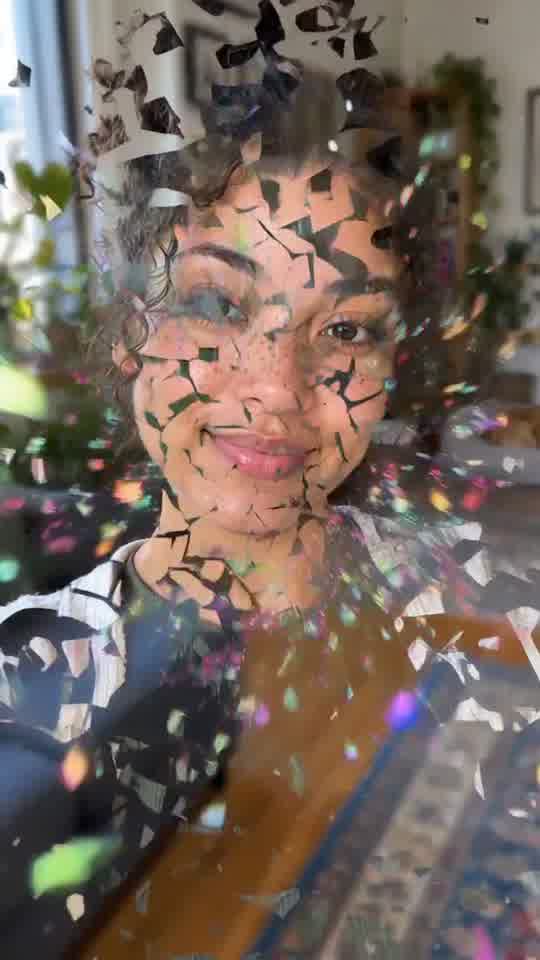
Your photo holds, then cracks and blows apart into bright paper pieces until only the background is left, and the pieces fly back to rebuild you.
Upload one clear photo of one adult or one pet. The picture becomes the opening frame of a 10-second vertical clip, so your original setting and clothes stay visible before the cartoon transformation begins.
A clear, front-facing photo. The template keeps your face, hair and skin tone; outfits and the set come from the template.
No nudity, minors or other people's photos without consent — uploads may be checked by automated tools.
About 5 seconds of you in this format.
This video: 20 credits · about 40 videos a month for $29.90 on Creator, or $288 a year
No subscription needed · Credits never expire · Usually ready in 10-15 minutes · Failed renders are refunded
Photo Burst and Rebuild
Choreography locked · Facial reference enabled
It is a bright, cartoon picture effect made of colored paper pieces and light, not a realistic blast and not a tool for blowing up an object or a logo. The three clips below show what an ordinary run looks like, including what went wrong in each.
- Input: one photo containing one adult person or one pet. Objects, products and logos are not supported.
- Output: one 10-second vertical 9:16 MP4 with a still opening, a bright picture burst and a rebuild ending.
- Price: first full video $2.99 once per account, then 20 credits, about $0.75. No subscription is required.
Clips made with this explode effect
Each clip below came out of the tool at the top of this page from one portrait, in one run, on 23 October 2026, and is shown at full length. The photos that went in are AI portraits we use for tests, not real people. Under each clip is what happened and what went wrong.
Photos that burst well, and photos that do not
The upload supplies the whole first frame, not just a face. A simple, readable picture gives the moving pieces a cleaner shape to leave and rebuild.
✓ Use these
One adult or one pet in clear light
Keep the face sharp and unobstructed. For pets, choose a frame where the eyes and muzzle are easy to see.
A subject separated from the background
A plain wall, open room or simple outdoor background helps the central figure remain readable during the transformation.
A vertical or roomy crop
Leave space around the head and shoulders so the portrait crop does not cut off the parts viewers need to recognize.
✕ Avoid these
Objects, products or logos
The photo check expects a person or animal. A car, shoe, package, wordmark or other object-only image is refused.
Children or people who did not agree
People in this effect must be adults, and you must have permission to use the photo. Pet photos are allowed.
Crowds, collages and tiny faces
The scene is built around one clear subject. Extra faces can merge, vanish or compete for the rebuild ending.
AI explode effect beat sheet for the full 10 seconds
The timing is fixed so the viewer first recognizes the source photo, then sees the visual change clearly, and finally gets a clean ending that can loop back to the start.
| Time | What happens | What to watch |
|---|---|---|
| 0 to 2 seconds | The uploaded picture holds while the camera makes a tiny push toward the subject. A few flecks of confetti may already drift past. | In two of our three clips the confetti started in the first second, so the still opening can be shorter than this. |
| 2 to 3 seconds | A bright center flash appears and a colored light ripple crosses the whole frame. | The flash should stay brief enough that the subject remains readable. |
| 3 to 7 seconds | The face and body crack into pieces that blow toward the lens. Around six seconds the subject is gone and only the background and floating paper are left. | The cracked-face frame can look like broken glass rather than paper. That frame is the explode moment people share. |
| 7 to 10 seconds | The pieces spiral or fly back in, assemble the subject as a mosaic and finish on the original photo, smiling at the lens. | Check clothes in the last frame: one of our three clips ended with a tile pattern left on the T-shirt. |
Four ways to use an explode video
Reveal post
Put a short setup before the clip, then use the center flash as the cut into a new profile photo, announcement or channel look.
Pet clip
Use a clear cat or dog portrait for a playful transformation where the pet disappears into colorful paper pieces and returns at the end.
Before-and-after glow-up
Place the generated clip between two stills. The rebuild gives you a natural point to cut to the after image.
Reaction meme
Add your own caption in the posting app and use the sudden picture change as an exaggerated response to the setup.
An explode image video, not a still filter or a looping GIF
A still filter changes one picture and leaves it as an image. A simple GIF often repeats a layer of particles over the same unmoving photo. This tool creates a timed video: the source picture holds, the whole frame changes into moving paper and light shapes, and the scene is rebuilt for the ending. That gives the clip a beginning, middle and finish instead of one repeated overlay.
The tradeoff is that the final picture is generated again rather than copied pixel for pixel. A face can soften, a pet marking can move, or a hand can return with the wrong shape. The tool does not preserve printed text, logos or small product details, and it is not intended for them. Use it when the recognizable person or pet matters more than exact typography or object geometry.
Make the clip and post it to TikTok or Reels
The effect arrives as a vertical MP4. You can post it as generated or add text and sound in the social app.
- 01
Choose one eligible photo
Use one adult or one pet, facing the camera, with no extra people and no important words in the frame.
- 02
Upload before signing in
Drop the image into the tool at the top of the page. Sign-in is requested when you press Generate, not before you choose the file.
- 03
Review the price and start
The full 10-second clip costs 20 credits after the once-per-account first-video offer. A render that fails for a technical reason gives its credits back.
- 04
Add platform text or sound
Upload the MP4 to TikTok or Reels, place any caption outside the moving face, and choose audio from that platform if you want music.
What one full clip costs
| Option | Credits | What you get |
|---|---|---|
| First full video | $2.99 | A once-per-account 10-second full render. |
| Later full videos | 20 credits | About $0.75 at the $29.90 monthly Creator plan rate. Credits do not expire. |
| Free preview where offered | No charge | A separate watermarked 5-second preview, not the full clip and not available in every location or session. |
How we made these clips: render log, 23 October 2026
Every render made for this page, kept or not. The first wording of the scene was run three times and dropped; the clips above all come from the wording the tool uses now.
| Run | Photo | Result | Used |
|---|---|---|---|
| 1 to 3 | Three test portraits | Finished. Confetti rained over each person, but nobody broke apart, so it did not look like an explode effect. | No, the scene was rewritten |
| 4 | Long dark hair, rust shirt | Finished. Breaks up, empty room, rebuilds. A few pieces left on the shoulder. | Yes, clip 2 |
| 5 | Curly hair, cream cardigan | Finished. Clearest crack and scatter, clean ending. | Yes, clip 1 |
| 6 | Stubble, olive T-shirt | Finished. Empty kitchen, clean face, tile pattern left on the shirt. | Yes, clip 3 |
No render was refused and none failed. Each took about 65 to 80 seconds to come back. All three kept clips are people; no pet photo has been run through this effect yet.
Questions about the picture burst effect
What does the AI explode effect make?
It makes one 10-second vertical video from a single photo of an adult or a pet. The upload holds as the opening frame, a bright flash crosses the image, and then the whole picture, face and body included, cracks into colored paper pieces that blow toward the camera. For a moment only the background is left. The pieces then fly back and rebuild the same subject for the ending. It is a colorful cartoon effect, not a realistic blast, and it does not edit a real video or blow up an object. The result is an MP4 sized for short social posts.
Which photos can I use?
Use one clear image containing one adult person or one pet. The face should be visible, sharp and reasonably front-facing, with enough room around the subject for a vertical crop. Photos of children are not accepted for this template. Object-only pictures, products, cars, buildings, screenshots and logos are not supported because the photo check expects a person or animal. Avoid crowds and collages, since the effect has one lead subject. You also need the right to use the picture and the adult in it must have agreed.
How much does a 10-second clip cost?
The first full video is $2.99 once per account. After that, this effect uses 20 credits for one 10-second render, which is about $0.75 at the monthly Creator plan rate of $29.90. There is no required subscription, and purchased credits do not expire. You see the price before the render starts. A render that fails for a technical reason gives its credits back. The amount covers the generated MP4 described on this page. It does not include editing, added music or paid promotion on TikTok, Instagram or another platform.
Is there a free preview?
Where the preview offer is open, it is a separate watermarked 5-second render that lets you check the direction before paying for a full video. It is not a trimmed copy of the completed 10-second file, and it does not contain every beat. Preview access can depend on location, account history and the current offer, so the tool shows whether it is available to you. The full render still has its own price. Uploading a photo and reaching the Generate step does not charge you; the price is shown before a paid render begins.
What can go wrong in the final rebuild?
The last frame is generated again, so it may not match the upload pixel for pixel. Fine hair can change shape, fingers can look uneven, a pet marking can shift, and a busy background can return softer than it began. Small printed words and logos are especially unreliable, which is one reason object-only and logo uploads are not supported. A clear face against a simple background reduces those problems but cannot remove them. Review the complete clip before posting, especially the final two seconds where the pieces return and the subject is assembled again.
How should I post it to TikTok or Reels?
Download the vertical MP4 and upload it directly to TikTok or Instagram Reels. The first two seconds give viewers time to recognize the photo, so put a short setup caption near the top or bottom without covering the face. If you want music, choose it from the platform library when you post; the generated clip uses effect sounds rather than a known song. For a reveal, cut to a second photo just after the rebuild. For a reaction meme, keep the full ending so the returned smile lands before the clip loops.
Ready to try it?
Add a photo in the tool at the top of this page. Nothing is charged until you press a paid button, and the price is on the button.
Back to the tool