
AI face swap video: star in a ready-made scene with one photo
11 scenes, from a red carpet to a product demo. Your face and hair go in; the outfit, the moves and the camera stay.
A face swap video here starts from a scene we already made, not from a clip you have to find. Pick one, add one clear photo, and you get a 6-second vertical clip in which the person in the scene now has your face and hair, while everything else moves exactly as before.
- One clear photo of one adult, face to the camera.
- A 6-second vertical 9:16 video at 720p, silent, ready for your own music.
- First video $2.99 once per account, then 36 credits a clip (about $1.35). No subscription.
Creators and small shops use it to front a clip without filming: a product demo, a boss walk-in, a dance. Everyone else uses it for a birthday, a joke or a glam moment. Each scene stars one made-up adult, so there is nobody real to replace.
A clear, front-facing photo. The template keeps your face, hair and skin tone; outfits and the set come from the template.
No nudity, minors or other people's photos without consent — uploads may be checked by automated tools.
This video: 36 credits · about 22 videos a month for $29.90 on Creator, or $288 a year
No subscription needed · Credits never expire · Usually ready in about 4 minutes · Failed renders are refunded
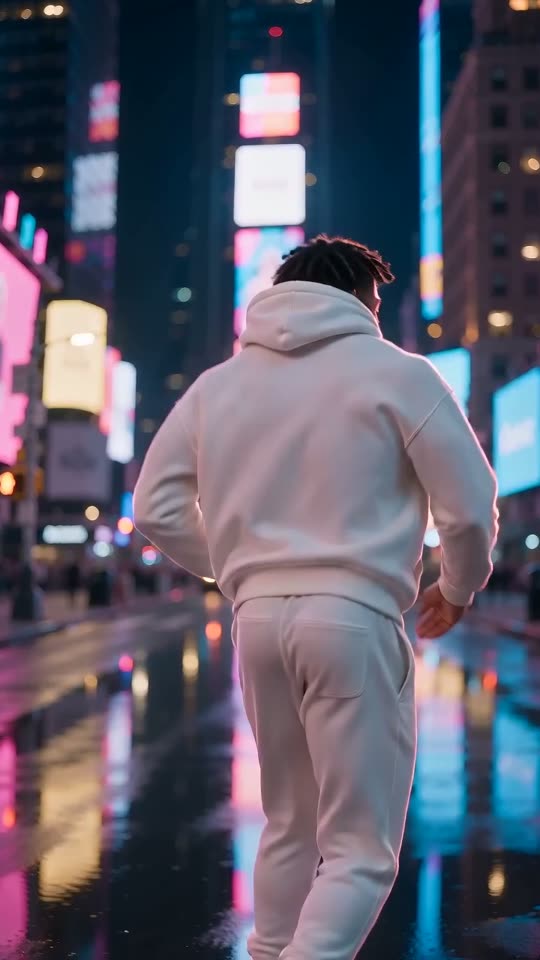
Neon Street Dance
Choreography locked · Facial reference enabled
Before and after: one photo in, one clip out
Each clip below was made from the single portrait beside it, in one run, and is shown at full length. The portraits are AI-generated people, never a real person. Under each one is what came out and anything that went wrong.
 Photo in
Neon Street Dance, with a man in his late twenties
What went in, what came out
In: One AI-generated portrait of a made-up man in his late twenties with short twists, wearing a grey hoodie.
Out: He dances the whole routine on the wet street, spins away from the camera and comes back to it with a wide grin.
A full render of this scene, shown as it came out, only resized for the web. His twists and face held through the spin, the one moment the face leaves the frame. The white hoodie and joggers are the scene, not his photo: his grey hoodie is gone, as it should be.
 Photo in
Red Carpet Walk, with a woman in her mid thirties
What went in, what came out
In: One AI-generated portrait of a made-up woman in her mid thirties with long dark wavy hair in a low ponytail.
Out: She walks the carpet in the red satin gown, waves to the flashes and turns to pose over her shoulder.
A full render of this scene, shown as it came out, only resized for the web. Her ponytail came through as a long braid over one shoulder, which suits the gown. The gown, the carpet and the photographers behind the rope are exactly the scene.
 Photo in
Sunset Beach Walk, with a woman in her mid twenties
What went in, what came out
In: One AI-generated portrait of a made-up woman in her mid twenties with voluminous curls pulled up in a clip.
Out: She walks barefoot through the waves in the white linen dress, laughs and pushes a curl back from her face.
A full render of this scene, shown as it came out, only resized for the web. Her curls stayed piled up as in her photo, and the hair-tuck gesture still lands on them. The light on her face is the sunset in the scene, not the light in her photo.
 Photo in
Boss Walk-In, with a man in his mid fifties
What went in, what came out
In: One AI-generated portrait of a made-up man in his mid fifties with short greying hair and reading glasses pushed up on his head, in a denim shirt.
Out: He pushes through the glass door in the navy suit, checks his cuff and stops at the lens with a half smile.
A full render of this scene, shown as it came out, only resized for the web. The reading glasses on top of his head came with him into the office, because they are part of his hair in the photo. The denim shirt did not: he wears the navy suit and white shirt of the scene.
 Photo in
Gym Flex, with a man in his early thirties
What went in, what came out
In: One AI-generated portrait of a made-up man in his early thirties with messy light-brown hair and stubble, in an olive T-shirt.
Out: He rolls his shoulders, flexes both arms, turns side-on and finishes with a proud grin at the camera.
A full render of this scene, shown as it came out, only resized for the web. Face, stubble and hair are his. The body is the scene's: whatever your build, the clip keeps the arms of the scene, which is half the joke of this one.
 Photo in
Party Toast, with a woman in her early forties
What went in, what came out
In: One AI-generated portrait of a made-up woman in her early forties with dark curly shoulder-length hair and small gold studs.
Out: She raises the champagne glass to the camera, laughs, takes a sip and winks.
A full render of this scene, shown as it came out, only resized for the web. Her curls and earrings held in the close-up, where a swap has nowhere to hide. The sequin dress and the string lights behind her are the scene.
Photo inSkate Park Roll, the man from clip one again
What went in, what came out
In: The same portrait as clip one: a made-up man in his late twenties with short twists.
Out: He carves toward the camera, kicks the board up into his hand and smiles at the lens under the backwards cap.
A full render of this scene, shown as it came out, only resized for the web. Shown to make one point: the same photo in a second scene gives the same face. The cap stays on, so the twists only show around the edges, as they would in real life.
 Photo in
Rainy City Turn, with a woman in her late twenties
What went in, what came out
In: One AI-generated portrait of a made-up woman in her late twenties with shoulder-length straight black hair.
Out: She starts half turned away in the beige trench coat, turns slowly to the camera and holds a long, wet-faced look into the lens.
A full render of this scene, shown as it came out, only resized for the web. The clearest slip in the set: her hair came out a little longer than in her photo, and small hoop earrings appeared that her photo does not have. The face itself held all the way into the close-up.
Photo inGolden Hour Convertible, with a woman in her mid thirties
What went in, what came out
In: The portrait from clip two: a made-up woman in her mid thirties with long dark wavy hair.
Out: She drives along the coast with one hand on the wheel, looks over, smiles and lifts a hand off the wheel to wave.
A full render of this scene, shown as it came out, only resized for the web. The scene was made with a man at the wheel and the swap still works: her face, braid and smile, his white linen shirt and the sunglasses on the head. Who you are matters more than who was in the scene.
Photo inStudio Product Demo, with a woman in her early forties
What went in, what came out
In: The portrait from clip six: a made-up woman in her early forties with dark curly hair.
Out: She holds the plain white bottle up to the lens in a charcoal blazer and smiles through a short, warm product presentation.
A full render of this scene, shown as it came out, only resized for the web. Made for shops and creators who want to front their own product video. The bottle is blank on purpose; your own label is something to add in your editor afterwards.
Photo inWhite Studio Dance, with a woman in her mid twenties
What went in, what came out
In: The portrait from clip three: a made-up woman in her mid twenties with voluminous curls.
Out: She dances the routine full body in the white studio, flips her hair and finishes pointing at the camera.
A full render of this scene, shown as it came out, only resized for the web. Her curls came out loose here instead of clipped up as in her photo. The face is small in a full-body shot, so this is the scene where a sharp photo counts most.
How a face swap video is made, in plain words
There is no editing timeline and nothing to film. Three things happen, and only the first two need you.
- 1
You choose a finished scene
Every scene is a complete six-second clip: the place, the light, the camera move and one person doing something worth posting.
- 2
You add one photo of your face
A selfie works. It is checked first: one adult, a clear face, not a child, not a famous face, nothing explicit. The price is on the button before you press it.
- 3
The person in the scene becomes you
The clip is made again with your face and hair on that person, keeping their outfit and every move. It usually takes about 4 minutes, and the video waits in your dashboard. A render that fails gives its credits back.
Pick your scene
Every scene is one 6-second shot with one made-up person in it, framed vertically for phones. Tap Use this scene and the tool at the top switches to it.
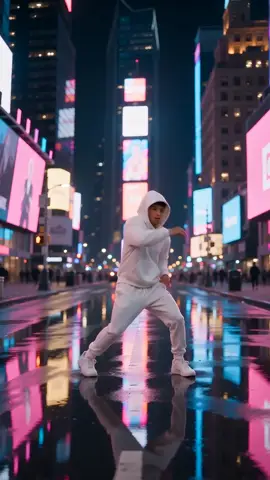
Neon Street Dance
A city street at night, signs reflected in wet asphalt. A short hip-hop routine in an all-white tracksuit, a spin, then a grin.
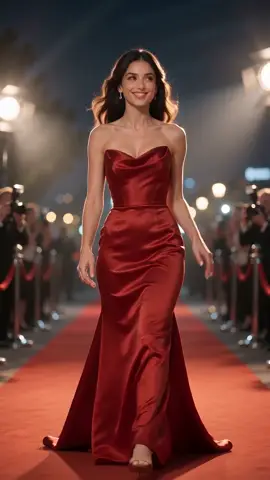
Red Carpet Walk
A premiere at night with flashes from both sides. A walk in a red satin gown, one wave, then a pose over the shoulder.
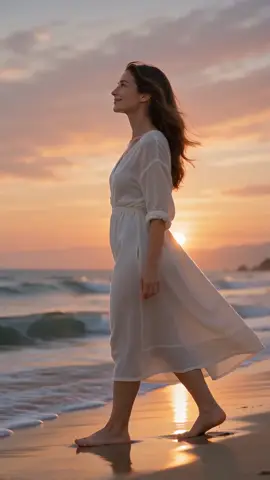
Sunset Beach Walk
Golden hour on the shoreline. A barefoot walk through the waves in a white linen dress, a laugh and a look back.

Boss Walk-In
A bright open-plan office. Through the glass door in a navy suit, a cuff adjust and a calm half smile at the lens.
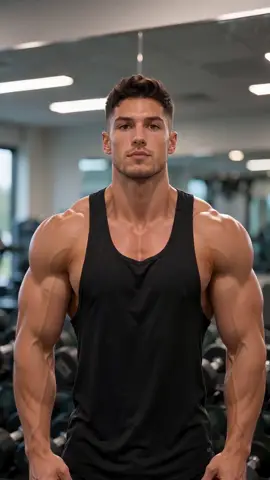
Gym Flex
Dumbbell racks behind, a black tank top. A shoulder roll, a double biceps flex, a turn to the side and a proud nod.

Party Toast
A garden party under string lights, a gold sequin dress. A champagne toast to camera, a sip and a wink.
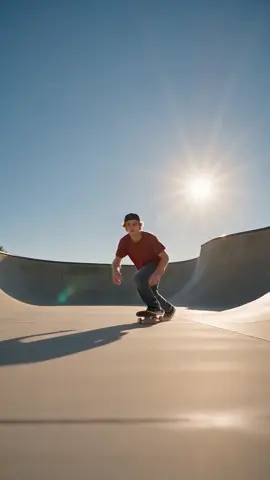
Skate Park Roll
A sunny concrete park. A carve toward the camera, a kick-up into the hand and a smile under a backwards cap.
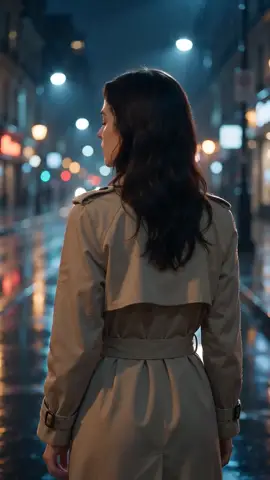
Rainy City Turn
Night rain and blurred shop lights. A slow turn to camera in a beige trench coat, then a long cinematic look.

Golden Hour Convertible
A vintage convertible on a coast road at sunset. One hand on the wheel, a glance over, a smile and a relaxed wave.
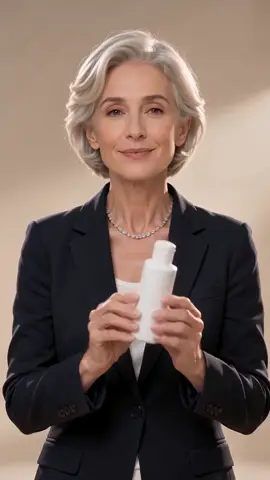
Studio Product Demo
A bright studio and a charcoal blazer. A plain bottle held up to the lens, turned to the camera, presented with a smile.
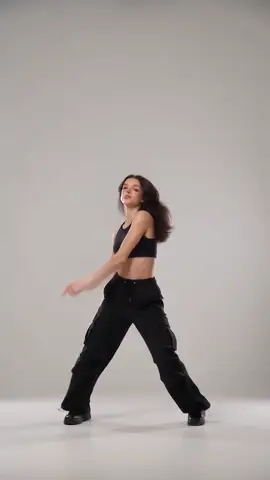
White Studio Dance
An empty white studio, full body in frame. A short upbeat routine, a hair flip and a final point at the camera.
What changes in your clip and what stays
The scene is fixed on purpose: that is why it looks finished. Only the person in it changes, and only from the neck up.
From your photo
- Face
- Yes: your features, skin tone and expression lines.
- Hair
- Yes: colour, length and style, plus anything worn in it, like glasses on your head.
- Clothes
- No. What you wear in the photo does not matter.
- Body and moves
- No.
- Place, light and camera
- No.
From the scene
- Face
- The expressions themselves: the grin, the wink, the laugh.
- Hair
- A hat or cap that is part of the scene stays on.
- Clothes
- The gown, the suit, the blazer and the rest.
- Body and moves
- The dance, the walk, the drive and the turn, beat for beat.
- Place, light and camera
- All of it, including how the light falls on your face.
The middle column is what is asked for, not a promise. In our clips one woman gained earrings she was not wearing, and another one had her clipped-up curls come out loose.
One payment, not a weekly plan
Most face swap apps sell a weekly or monthly plan that renews until you cancel it. This page sells videos.
This page
- To try it: First video $2.99, once
- After that: 36 credits a clip; packs are one payment and never renew
- What you get: A finished vertical clip with your face, to download and post
- If it fails: The credits come back automatically
A typical face swap app
- To try it: A free trial that turns into a subscription
- After that: A weekly or monthly charge
- What you get: Often a face pasted onto a still photo or a short loop
- If it fails: Varies by app
Plans exist for people who make a lot of videos ($29.90 a month on Creator), but nothing here needs one.
For creators and small shops
You do not need a studio day to appear in your own content. The Studio Product Demo scene puts you in a blazer holding a product up to the lens, ready for a product post or an ad test; the Boss Walk-In works for a new-job or launch announcement.
The bottle in the demo is blank on purpose, so add your own label, price or caption in your editor. If you want a full product video from a photo of the product itself, the AI video ad generator on this site is the tool for that.
See the AI video ad generatorWho you can swap, and the photo that works
A face swap is only fun when the person in it is in on the joke, so the rules come before the tips.
Allowed and works
You, or an adult who agreed
You tick a box confirming it before anything renders. The people in our scenes are made up, so you never land on a real stranger.
One face, square to the camera
Both eyes and the whole hairline visible. Head and shoulders is enough: the body comes from the scene.
Soft daylight, hair as you want it
The hair comes from your photo, so that is the haircut you will have on the red carpet.
Refused or drifts
A child, a public figure or nudity
Photos that look like someone under 18, a well-known public figure, or nudity are refused before any credit is spent.
Sunglasses, a hand or a phone over the face
Whatever is hidden is guessed, and the close-up at the end shows the guess.
Two or more people
Each scene has one lead. With two faces in the photo the wrong one may be used, so crop to one first.
Face swap video questions
How do I make a face swap video?
Pick one of the scenes in the tool at the top of this page, add one clear photo of your face, tick the consent box and press Generate. You see the price before anything renders. In about 4 minutes you get a 6-second vertical clip in which the person in the scene has your face and hair, with the outfit, the moves, the place and the camera unchanged. There is no prompt to write and no video to upload or edit, and it all works from a phone.
Can I swap my face into my own video instead?
Not on this page. This one works only with the scenes shown here, which we made so that the swap holds up: one person, a clear face, a known length. For a clip you filmed yourself, use motion transfer, linked at the bottom of the page. It takes your footage and a photo and puts that face or character into it. It costs more per second and takes longer, because every clip is different and has to be read first. Most people start with a ready scene and move on from there.
Will it look like me?
Your face, skin tone and hair come from your photo, so yes, as long as the photo is sharp and shows your whole face. Everything below the neck comes from the scene: the build, the clothes and the moves. That is deliberate, and it is why the clips look finished rather than pasted. In our test clips the faces held through spins, turns and close-ups. The slips we saw were small: a pair of earrings that was not in the photo, and hair a little longer or looser than in the original.
Is the face swap video free?
No, the full clip is paid, and the price is on the button before anything renders. The first 6-second clip on an account costs $2.99, once. After that each clip uses 36 credits, about $1.35 on the Creator plan, whichever scene you pick. Credit packs are single payments that do not renew. If a render fails, its credits come back to your account. Free face swap apps mostly paste a face onto a still photo; this makes a moving clip of you in a full scene.
Can I face swap a friend, a child or a celebrity?
A friend, yes, if they are an adult and they agreed; you confirm that before generating. A child, no: photos that look like someone under 18 are refused on this page. A celebrity or other public figure, no: those photos are refused too, before any credit is spent. A clip of a real person doing something they never did is exactly what platforms label as misleading and remove, and in many places it breaks likeness laws. If someone in a clip asks you to take it down, take it down.
Can I use it for my shop or a product video?
Yes, that is what the Studio Product Demo scene is for: you, in a blazer, holding a plain bottle up to the camera and presenting it. The clip is yours to post, including in ads, as long as the face is yours or belongs to an adult who agreed. The bottle is blank, so put your own label or price on top in any editor. If you need the actual product in the shot, start from a photo of the product with the AI video ad generator instead.
Does it work on iPhone and Android?
Yes. The page is built for phones first: you pick a scene with your thumb, take a selfie or choose a photo from your camera roll, and pay with the card or wallet your phone already has. You can lock the screen while it renders; the video waits in your dashboard and we email you when it is ready. The finished file is a vertical MP4 that saves to your camera roll and posts straight to TikTok, Reels or Shorts without cropping or converting anything first.
What happens to my photo?
Your photo is checked for the rules above before anything renders: a photo that looks like a child, a public figure or nudity is refused at that point and no credit is spent. A photo that passes is used only to make your video: it is processed by our video-generation partner for that one render and is never shown publicly or to other members, as our privacy policy describes. The finished clip is yours to download and post. If a photo of you was uploaded by someone else without your permission, the takedown form at the bottom of every page reaches us directly, and we remove the clip and its media.
How the sample clips were made
The record behind the before and after clips on this page. They are sample renders made on launch day; clips made today follow the same recipe, tuned since to keep your own hairstyle more firmly.
| Item | Detail |
|---|---|
| Rendered | 16 October 2026 |
| Scenes | 11 clips we generated for this page, each with one made-up adult, six seconds, vertical |
| Inputs | Seven AI-generated portraits, some used in two scenes, never a real person |
| Runs | One run per clip. Nothing here was rendered twice to pick a better take |
| Editing | Resized and compressed for the web, nothing else |
| Reviewed | Frames sampled across every clip, start to end, for face drift, a second person, and whether the outfit and moves of the scene held |
| Since then | The recipe now asks more firmly for your own hairstyle, length and colour, so your clip can match your photo more closely than these samples do |
Because each clip was rendered once, its faults are left in and named in its note, like the earrings in the rainy city clip.