
Flashlight AI Photo Generator
Add one portrait, pick a scene, press Generate. The flashlight AI photo costs 3 credits at 1K, and the price shows on the button first.
A flashlight AI photo from one portrait
This is what the form above made on 14 October 2026 from one reference portrait: a man lighting a tiny anime version of himself on his palm. The prompt is the one the form opens with, so you can reproduce it.
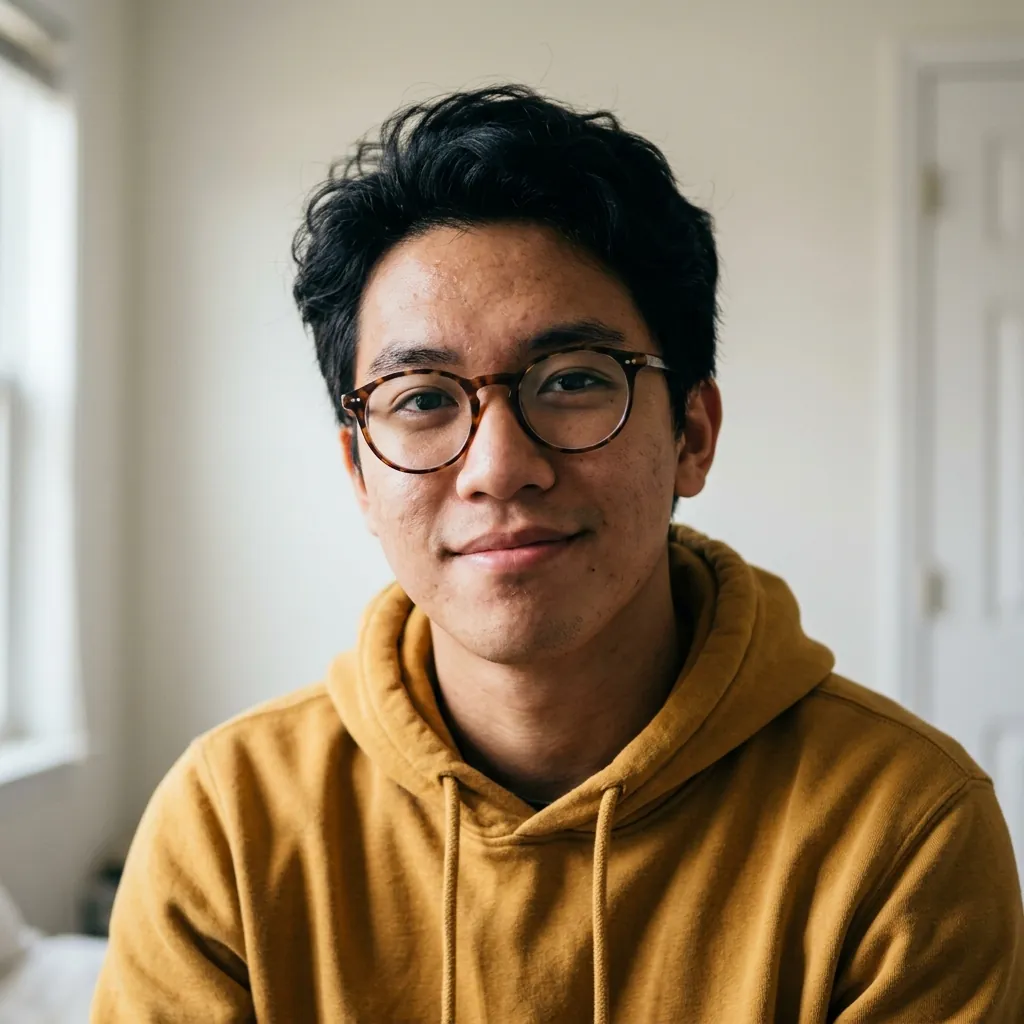 Reference photo
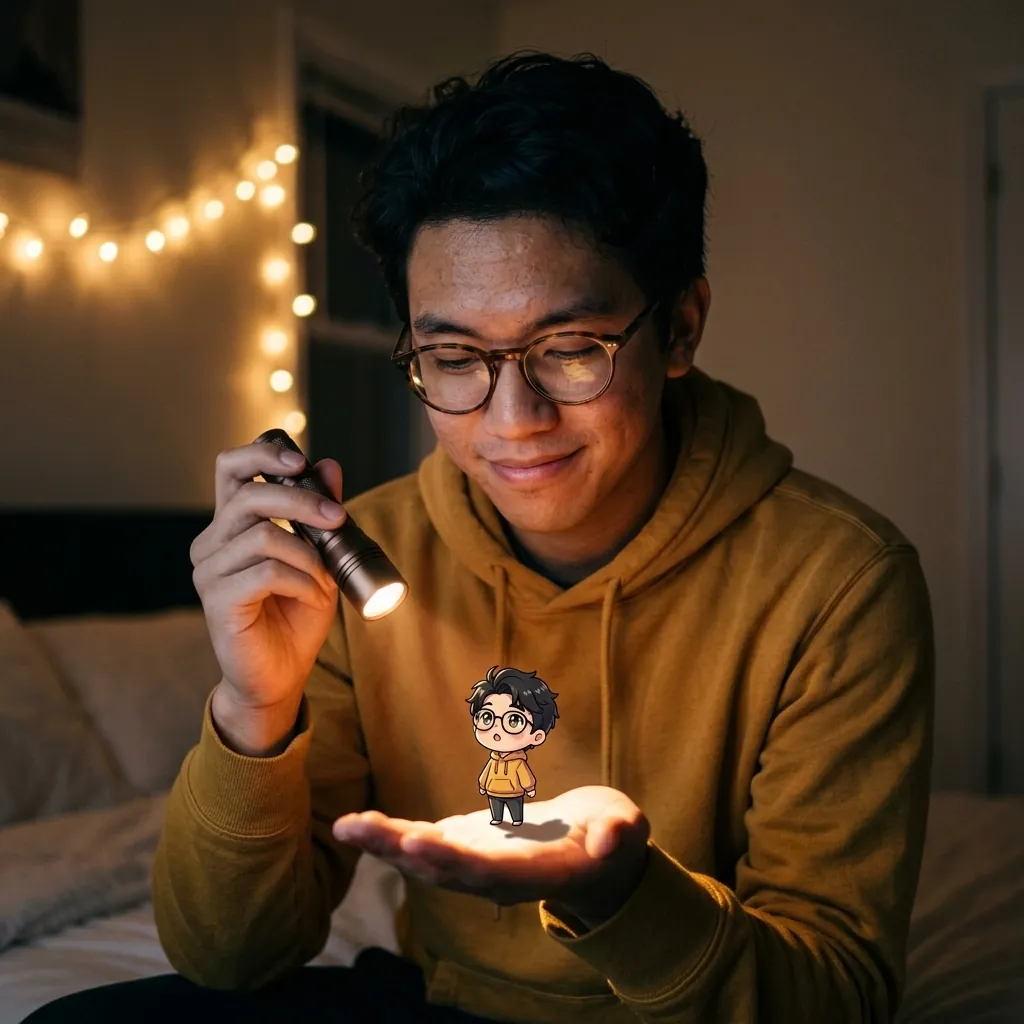 Flashlight AI photo
Next: Want it to move? One-photo video effects run on a single upload. Browse the effects.
Four scenes from the same face
Same face, four rooms, first tries made before the beam fix. Use this scene loads the fixed wording for that room, so a new run will not match the picture shown. The prompts use neutral wording; our renders used he and his.
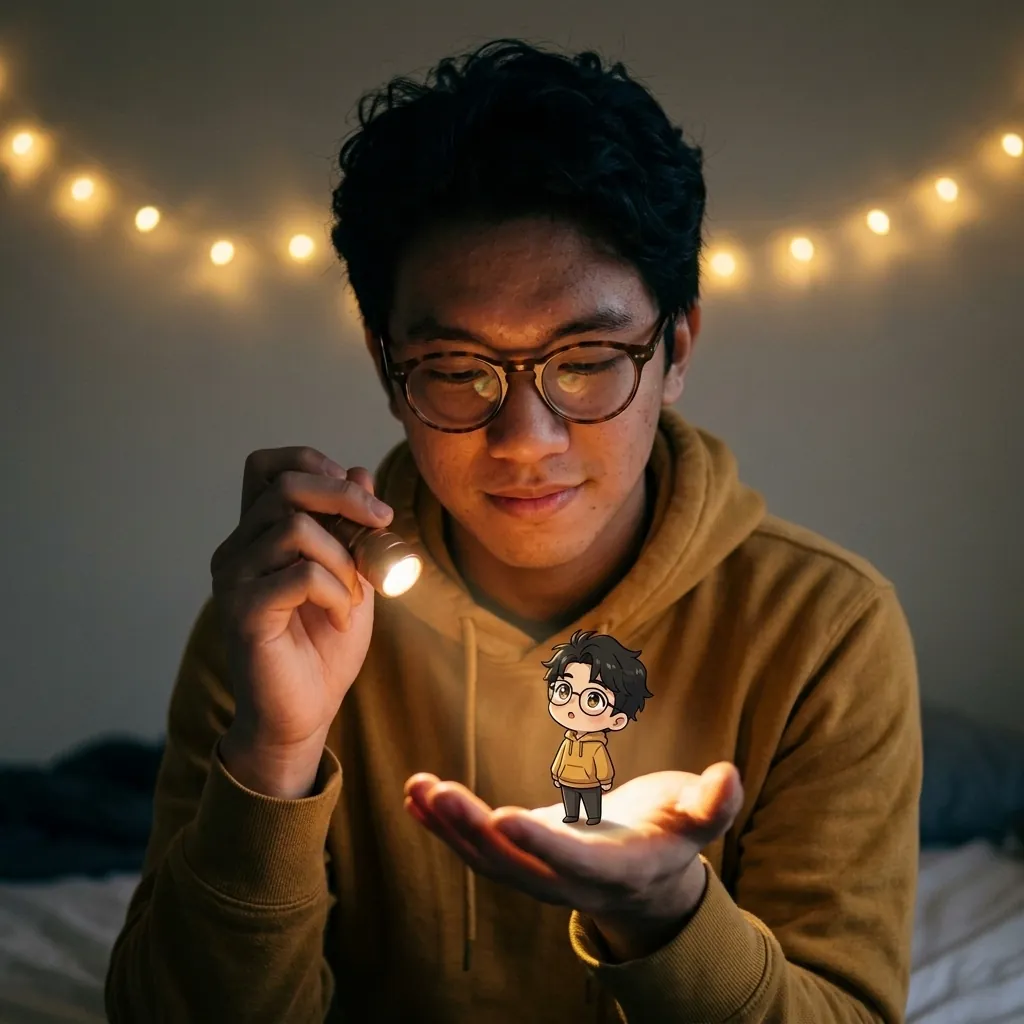
Bedroom at night, first try
1:1, 1K, 70 s
Fairy lights and glasses held. The flashlight points sideways, the palm is barely lit, and the tiny figure looks stuck on.
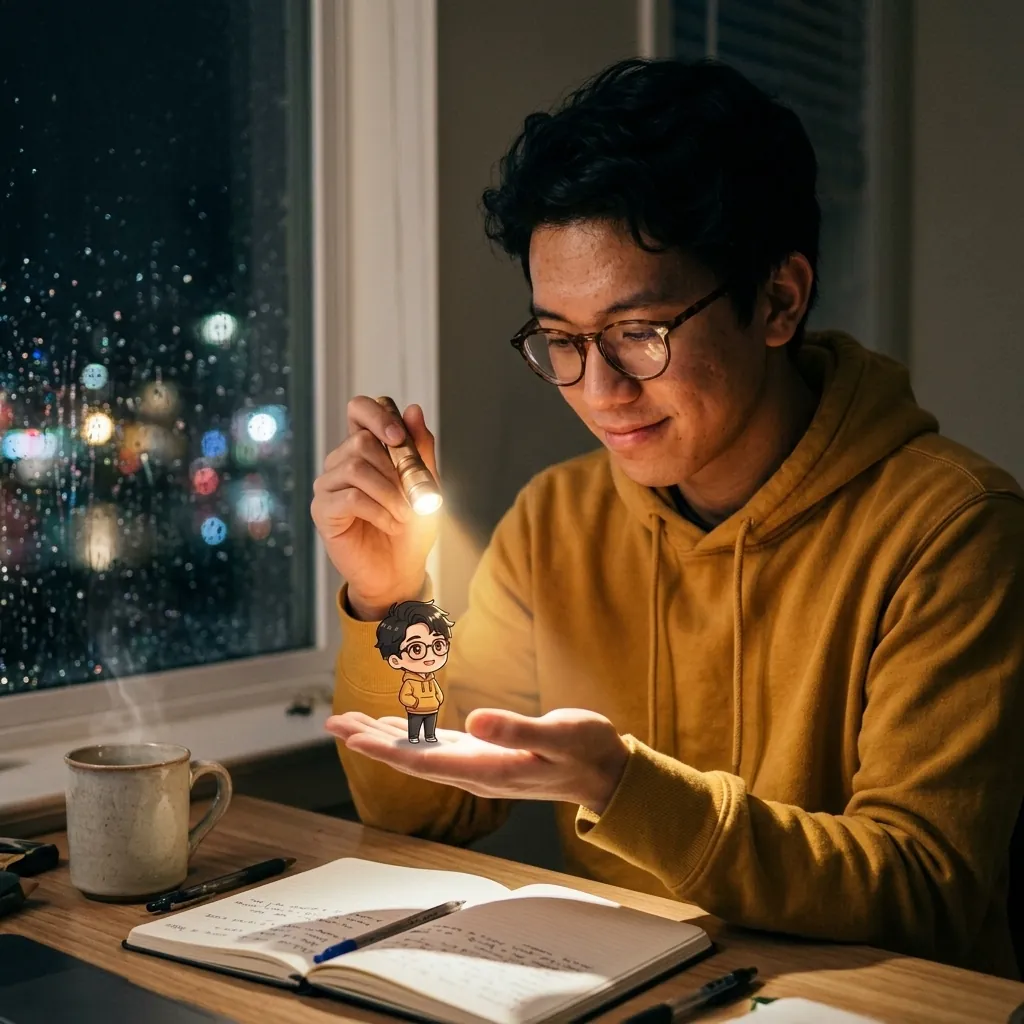
Rainy desk
1:1, 1K, 57 s
The best of the four first tries: the palm and the tiny figure take the light, and the window rain reads clearly.
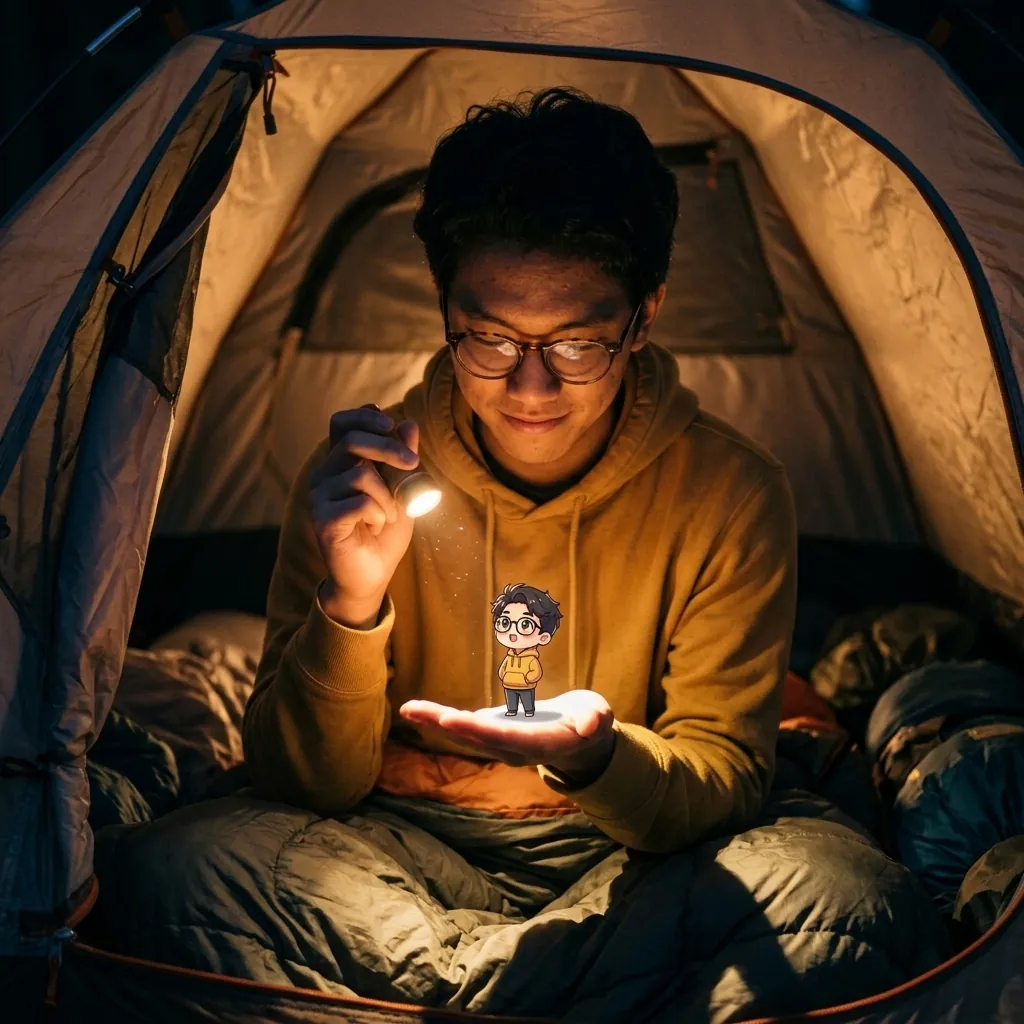
Camping tent
1:1, 1K, 51 s
The tent fabric glows warm and the figure stands on the palm with a faint shadow. The flashlight faces his own chest.
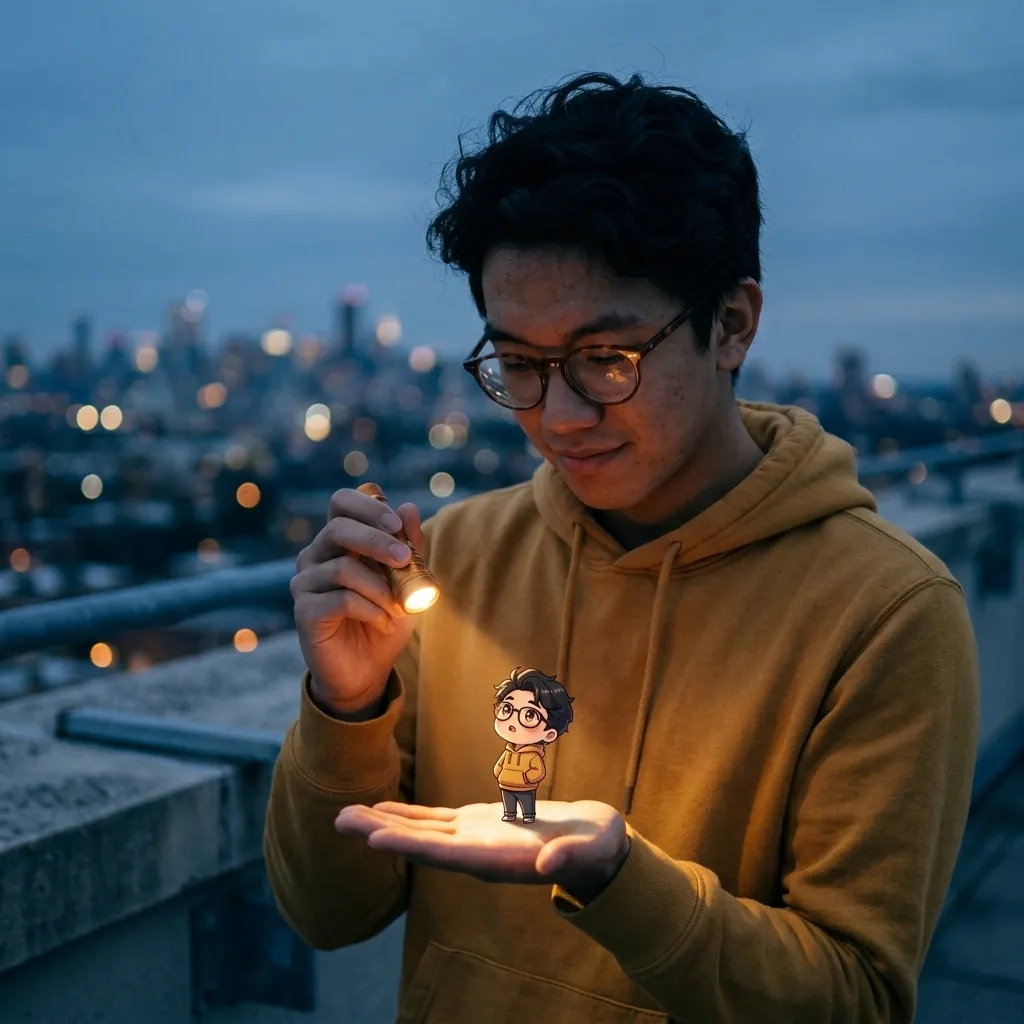
Rooftop at dusk
1:1, 1K, 44 s
The city and the blue sky look right. The beam points away from the palm, so the figure reads as a sticker.
The flashlight AI photo prompt, slot by slot
The prompt has five slots. Each row shows the words we used and what the slot is for. Slot 2 matters most.
| Slot | Words we used | What it does | Skip it if |
|---|---|---|---|
| 1. Keep the person | Keep the same person from the reference photo: same face, hair and glasses. | Names the features that must not move, so the edit does not hand you a stranger. | Skip only when you want a new character and no photo. |
| 2. Where the beam goes | angled downward so the warm beam lands on the open palm of the other hand | Our first prompt said the beam "shines on the open palm" and in three of four first tries (bedroom, tent, rooftop) the flashlight did not aim at the palm. Naming the angle is the fix we tested, on the bedroom only. | Never skip. This is the slot that decides whether the photo works. |
| 3. The tiny double | a tiny anime-style chibi version of the same person, about the size of a finger, wearing the same glasses and clothes | Gives the second figure a size, a style and the same clothes, so it reads as you. | Skip the clothes if you want the double to dress differently. |
| 4. Light on the figure | lit by the beam and casting a small shadow on the palm | A shadow on the palm is what separates a figure standing in the light from a sticker laid on top. | Skip it and expect a flat double, as in our rooftop render. |
| 5. Scene and look | Setting: a dim bedroom at night, string fairy lights glowing on the wall behind them. | Dark rooms make the beam the brightest thing in the frame. One scene sentence is enough. | A bright daylight scene makes the flashlight hard to see. |
What went wrong once, and the fix
Three of our four first tries did not aim the beam at the palm (bedroom, tent, rooftop). We re-ran the bedroom with two phrases added and nothing else changed; we did not re-run the other two.
| Attempt | Prompt change | What came back | Seconds |
|---|---|---|---|
| Bedroom, first try | The beam sentence said it "shines on the open palm". No angle, no shadow. | Flashlight pointed sideways, palm barely lit, tiny figure flat and stuck on. | 70 |
| Bedroom, retry | Added "angled downward" and "casting a small shadow on his palm". Nothing else changed. This run used he and his; the wording in the form is neutral. | Beam lands on the palm, the figure throws a shadow and the lens glows in his hand. | 38 |
Which portrait to add
You add one portrait. This is what ours looked like, and why each trait is worth copying.
| Photo trait | What our reference had | Why it matters |
|---|---|---|
| A clear, front-facing face | Head and shoulders, looking at the camera, soft window light. | The second figure is drawn from the same face, so a clear face gives both of them something to copy. |
| One person only | One face in the frame. | Our guess: with two faces, "the same person" has no single meaning. We did not test it. |
| No hands or props needed | No flashlight and no raised hand in the photo. | The model drew the hands and the flashlight from the prompt, so you do not need to stage them. |
| A plain background | A pale bedroom wall. | The scene sentence replaced the wall in all five renders, so the background of the photo is not what you get. |
| Only people who agreed | An AI-made portrait, not a real person. | Photos of you or people who agreed to appear only. No celebrities, politicians or public figures. |
Three ways to get the tiny-double look
A portrait plus a prompt is not the only route. Here is how it compares with the other two.
| Way | What you get | Best for | Not for |
|---|---|---|---|
| Portrait plus this prompt | Your face twice: once photographic, once as the anime double. | A profile picture or a post that should look like you. | Group photos, or a pet standing in for you. |
| Prompt only, no photo | A made-up person holding the flashlight. Nobody you know. | A character, a story illustration or a cover image. | Anything that has to look like a specific person. |
| Editing it by hand | Full control: you place the glow, the figure and the shadow. | People who already own an anime avatar of themselves. | Anyone who wants a result in a minute without editing skills. |
Questions before you try it
What is a flashlight AI photo?
A flashlight AI photo is a portrait of you holding a small flashlight and aiming it at your open palm, where a tiny anime version of you stands in the beam. The real person looks photographic and the little double is drawn in clean anime style, so the contrast is the whole joke. You do not need a flashlight or a staged hand: you add one ordinary portrait and describe the scene, and the picture is made for you. It works best in a dim room, where the beam is the brightest thing in the frame and the tiny figure has something to stand in.
How do I make a flashlight AI photo?
Add one portrait in the reference area, pick one of the four scenes above the form, and press Generate. The form opens with a prompt that already names the person, the beam, the tiny double and the room, so you can run it as it is. The price shows on the button before you press it: 3 credits at 1K and 4 at 2K. You can add up to 3 reference photos, but one clear portrait is enough. The five scene renders on this page took between 38 and 70 seconds each, and finished pictures appear beside the form.
What prompt works for a flashlight AI photo?
Use five parts in this order: keep the person, where the beam goes, the tiny double, the light on the figure, and the scene. The part people leave out is the second one. Our first prompt only said the beam shines on the palm, and in three of four first tries the flashlight did not aim at it. Adding "angled downward so the warm beam lands on the open palm" and "casting a small shadow on his palm" fixed the bedroom picture on the next try. The full wording is in the recipe table on this page, and the form opens with it already filled in.
Will the flashlight AI photo keep my face?
In our five renders from one portrait the mustard hoodie came back every time, and the tiny double wore glasses and a hoodie too. The glasses were the weak spot: they stayed glasses, but the frames changed between renders, and in the tent picture they turned thin and dark. That is one person and one run per scene, so treat it as a hint and not a promise. Open the images and check the details that matter to you. If something drifts, name that feature in the first sentence of the prompt and run it again.
Why is the light not hitting the tiny figure?
Usually the prompt says the flashlight shines on the palm but never says which way it points. In our first bedroom, tent and rooftop renders the flashlight faced sideways, at his chest or away, and the figure looked pasted on. Name the direction ("angled downward"), say what the beam lands on ("the open palm of his other hand") and ask for a shadow ("casting a small shadow on his palm"). Change only those words and keep the rest. One retry fixed our bedroom picture, but it was a single test, so expect to try twice now and then.
How much does a flashlight AI photo cost?
One picture costs 3 credits at 1K and 4 credits at 2K. If you ask for several pictures in one go, the form multiplies the price and shows the total on the Generate button before you press it. Adding a reference photo does not change the price. Credits come from a plan or a top-up pack, listed on the pricing page. Because a retry costs the same as the first try, it helps to make the first prompt specific: name the beam angle and the shadow, so you spend credits on keepers and not on rerolls.
Can I use a photo of a friend or a celebrity?
Use photos of yourself or of people who agreed to appear. We do not use photos of celebrities, politicians or public figures, and the payment window says so before you pay. A friend is fine as long as they know and are happy with the result. Group photos are a poor fit anyway: the prompt asks for "the same person", and with several faces in the frame that phrase stops pointing at anyone. Crop to a single face before you upload, and keep the result to the people who agreed to it.
More from CastTake
- 1980s AI photo promptEight 80s looks tested on one face, with the rejects left in.
- AI image generatorThe same form with every image model we offer.
- Image model guideOne image model, tested on posters and photo edits.
- Prompt libraryCopy prompts for AI video and images.
- AI video effectsOne-photo effects that run on a single upload.
- Credit pricingPlans and top-up packs for the credits each picture uses.