
Elf dance video generator: turn yourself into an elf in 8 seconds
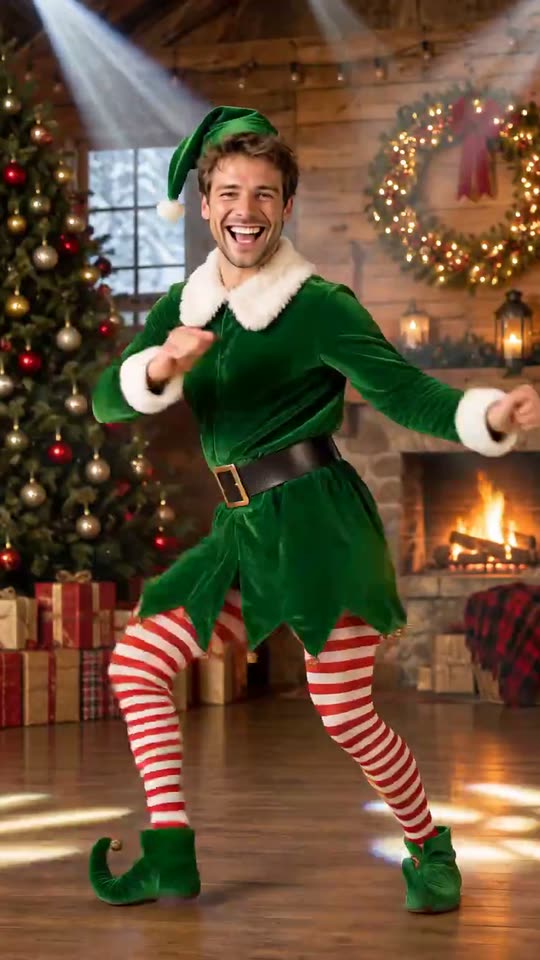
This elf dance video generator turns one clear photo of one adult into a dancing elf. We draw a new scene around you first: a long-sleeved green velvet elf tunic with a white collar, full-length striped tights, curly shoes and a hat, on a wooden stage in a Christmas cabin with trees, a fireplace and presents. Then that scene moves for 8 seconds: a bounce, a jump and kick, a side-to-side shimmy, a spin and a big goofy pose at the camera.
A clear, front-facing photo. The template keeps your face, hair and skin tone; outfits and the set come from the template.
No nudity, minors or other people's photos without consent — uploads may be checked by automated tools.
This video: 40 credits
No subscription needed · Credits never expire · Usually ready in 8-12 minutes · Failed renders are refunded
Elf Stage Dance
Choreography locked · Facial reference enabled
Your face is the only thing taken from the photo. The outfit, the cabin and the dance are made for each run, so your own clothes and room do not carry over. It is a plain elf dance video, the kind people look for as elf yourself, made from your own picture. Use your own photo, or an adult friend who said yes. The two clips below show what an ordinary run looks like, faults included.
- Input: one clear photo of one adult, face fully visible. Pets, children and group photos are not supported.
- Output: one 8-second vertical 9:16 MP4 (720 x 1280) of you as a dancing elf, fully clothed in a tunic and tights, ready for TikTok, Reels or Shorts.
- Price: 40 credits for the scene and the full clip. There is no free full clip for this effect.
Two clips from the elf dance video generator, shown as they came out
Each clip came out of the tool at the top of this page from one portrait, in one run, on 25 November 2026. The photos that went in are fictional adults we use for tests, not real people. Under each clip is what happened and what went wrong.
What we measured on both clips
n = 2 full renders, one per photo, made on 25 November 2026. We looked at each clip every half second, which is 16 steps per clip, and ran an automatic scene-cut check across the whole clip.
| Check | Man photo | Woman photo |
|---|---|---|
| Steps looked at | 16 | 16 |
| Hard cuts found | 0 | 0 |
| Face and hair read as the same person | Yes, all 16 steps | Yes, all 16 steps |
| Outfit | Long-sleeved tunic, hip to mid-thigh | Short flared dress with long sleeves |
| Legs covered by full-length tights | Yes, all 16 steps | Yes, all 16 steps |
| Spin on screen | Yes, at about 5.5 s | Yes, at about 5.5 s |
| Ends on a pose at the lens | Yes, from 7 s | Yes, from 7 s |
| Fault we noted | Hem flares in the spin, hat slides | Skirt swings wide in the spin |
Two renders is a small sample. It shows what an ordinary run can look like, not how often the face or the outfit slips.
How we wrote this, and how we tested it
How we wrote this: the CastTake team wrote this page on 25 November 2026 from our own two test renders of the same day (n = 2), each looked at every half second and checked for scene cuts. Both passed, with the faults noted under each clip. We have not tested very different face shapes, glasses, beards in other colours or hats and scarves in the upload, so those results may differ from the clips here.
Common problems with an elf dance video, and how to fix them
Look at the clip once with the sound off before you post it. These are the things we found in our own two renders, and what to do about each.
✓ Fine to post
A hem that flares in the spin
The tunic or skirt swings out for about a second at the turn and the legs stay covered by the tights. That is how this effect moves.
A hat that slides a little
It can drift to one side during the kick and settle again. Leave it unless it covers the face.
A goofy last pose
The wide grin and the tongue out are written into the last two seconds. Time your caption or sound change to it.
✕ Run it again with another photo
The face stops looking like you
If the face drifts when the head turns fast, try a sharper, straighter photo in even light.
The outfit is not what you expect
We saw a tunic in one clip and a short flared dress over full-length tights in the other. If anything looks wrong, do not post it, and run it again.
Hands or feet melt in a quick turn
They are usually fine but can blur. Pick the run where they stay clear.
How do you turn yourself into an elf in four steps?
There is nothing to download and no template to edit. The only choice you make is the photo.
- 01
Pick one photo of one adult
Use a sharp, front-facing photo of yourself, or of an adult friend who agreed. Keep the whole face in view and in even light.
- 02
Upload it
The photo is checked first. A picture with a child, several people or no clear face is normally refused before anything is charged.
- 03
We draw the elf scene, then it dances
The new still comes first, then the 8-second dance is made from it. Waiting usually takes about 8 to 12 minutes.
- 04
Check it, then post
Save the MP4 and add a licensed sound in the app you post to. There is no song in the file. Say in the caption that the video is AI-made, especially when the person in it is not you.
Which photos work for an elf dance video, and which do not?
The outfit and the cabin are made for you, so the photo only has to carry one thing: who you are.
✓ Use these
One adult, face straight to the camera
A phone selfie in daylight is enough. Eyes open, nothing covering the forehead or the cheeks.
Hair that is easy to read
Both test clips kept their hair across the dance. A plain outline helps the hat sit on top of it.
Upper body in view
The scene is drawn full length, but a head-and-shoulders photo gives the face the most pixels to work from.
✕ Avoid these
Children, pets or groups
This effect is for one adult only. A photo with a child or with several faces is normally refused.
Sunglasses, masks or heavy filters
If the face is hidden or reshaped, the elf will be a different person.
Someone who did not agree
Only use your own photo, or an adult who said yes. Do not use photos of public figures or other people.
Questions about the elf dance video generator
Can I turn myself into an elf with just one photo?
Yes. One clear photo of one adult is the whole input. You do not film anything, pick a dance or cut a face out. The tool first draws a new picture of you in the elf outfit on a cabin stage, using your face from the photo, and then turns that picture into the moving clip. Your own clothes and background are not kept, because the outfit and the room are made for the effect. A sharp, front-facing photo in even light gives the best likeness. If the face is covered, tilted away or very small, the elf may not look like you.
Is the elf dance video generator free?
Not for the full clip. This effect has no free full video: the scene and the 8-second dance cost 40 credits, and the price is shown on the button before you press it. You are not charged if the photo is refused, for example because it shows a child, a group or no clear face. We would rather say so plainly than call a paid clip free. If you only want to look first, the two clips on this page are real, unedited renders, with their faults written under each one.
Can I use a photo of my child or a friend?
A child, no. This effect is for adults only, and a photo that looks like a child is normally refused before anything is made or charged. A friend, yes, if the friend is an adult and has agreed to be in the video. Only upload a photo you have the right to use, and do not use photos of public figures or of people who have not said yes. Because the clip can look very real, tell people it is AI-made when you share it, and take it down if the person in it asks you to. Pets are not supported here either.
What does the elf dance video generator make?
It is a 8-second vertical video. You wear a long-sleeved green velvet elf tunic with a hat, full-length striped tights and curly shoes, on a wooden stage in a cosy Christmas cabin with lit trees, wreaths, a fireplace and wrapped presents. You bounce, kick, shimmy from side to side, spin once, and finish on a big goofy pose at the camera. The outfit can come out as a tunic or a short flared dress, and no two runs move exactly alike. The file has no song, so you add your own sound where you post.
Can I run it again if I do not like the result?
Yes, but every run is a new render and uses credits again, at the price shown on the button, so look at the photo before you press it. A sharper, straighter photo in even light helps most, because the face is the only thing the effect takes from you. The outfit, the cabin and the moves are made fresh each time, so two runs from the same photo will not match exactly. If one clip has a good spin and a bad pose, you cannot splice them inside the tool, but you can pick the better run. Do not post a clip where the outfit, hands or face look wrong.
Ready to try it?
Add a photo in the tool at the top of this page. Nothing is charged until you press a paid button, and the price is on the button.
Back to the tool